

If you run a marketing agency, work as a Virtual Assistant (VA), or manage content for multiple clients, you know the struggle well. It’s a constant battle against friction. The traditional method is not sustainable or profitable for growth. The time spent troubleshooting missed posts, requesting approvals via endless email chains, or trying to correlate social engagement with actual sales pipeline movement is time lost on high-level strategy.
Introducing The Social Hub
Let’s introduce a feature known as The Social Hub. This is a fully integrated content management system that lives inside the same platform as your CRM, pipelines, and marketing automation. Its singular goal is to centralize content planning, scheduling, and community management for multiple clients in one location.
Check out this quick video walkthrough of GHL's Social Planner.
Core Features: The Mechanics of the GHL Social Planner
There are four core features intended to make multi-client management scalable:
1. Unified Content Calendar and Multi-Client View
The GHL Social Planner eliminates the need to jump between client sub-accounts or external calendars:
- It provides a centralized, clean, drag-and-drop calendar view that immediately displays all scheduled posts across all connected client accounts simultaneously. You can see Instagram posts for Client A, Facebook posts for Client B, and LinkedIn posts for your own agency on one screen.
- This powerful view uses intuitive filtering. You can easily filter by platform (Instagram, Facebook, LinkedIn, Google Business Profile) or by client sub-account.
2. Multi-Platform Native Publishing
Make a post once, not four times. GHL supports simultaneous publishing across all major platforms:
- You can create a single post and schedule it across multiple platforms, but GHL is smart enough to allow platform-specific customization.
- It supports native posting methods, scheduling carousel posts, reels, and video content without needing manual intervention or intermediate apps.
3. Integrated Client Feedback & Approval Workflow
The most significant time drain for agencies is the client approval loop, sending drafts via email, managing feedback in spreadsheets, and chasing approvals:
- GHL provides a built-in system allowing content drafts to be shared with the client for review and approval directly within the platform.
- Clients receive a unique, clean, branded link to view the draft content. They can approve the post instantly or reject it with comments, creating a clear, timestamped audit trail accessible only by you.
4. Consolidated Communications (The Unified Inbox)
Social media is not just broadcasting; it's communicating. Missing a comment or a direct message (DM) is a missed sales opportunity:
- All comments, DMs, and messages across connected social platforms (Facebook, Instagram, etc.) automatically get funneled to a single Conversations tab.
- This centralization enables rapid response times and prevents missed client interactions.
Strategic Benefits: Why Integration Is Essential for Scale
The advantages of the Social Hub are about more than simple convenience. Here are other benefits:
1. Unlocking Exponential Time Savings
The largest ROI from GHL comes from eliminating context switching. Every time you close one tool and open another, your brain has to reboot, costing several minutes of productivity.
By having all drafting, scheduling, monitoring, and even client conversation happening in one browser tab, you eliminate the mental load and friction.
2. Solving Data Silos and Improving Reporting
One of the most expensive hidden costs of using external schedulers is the inability to prove which social activity led to revenue:
- GHL Advantage: Because the Social Planner is natively integrated with the CRM, every click, comment, and lead is tracked. You can run reports that easily attribute social traffic and engagement to new leads, booked appointments, and even closed sales (Attribution).
- Reporting: This dramatically simplifies the monthly client report creation. Instead of manually stitching together social engagement stats with pipeline data from your CRM, all the metrics live in one platform.
3. Immediate Cost Consolidation
From a financial standpoint, the Social Planner immediately makes a case for GHL adoption:
- Financial Benefit: You eliminate monthly subscription costs for external schedulers (Buffer, Hootsuite, Sprout Social, Later, etc.).
- Time Savings: There is also an incredible time savings for training new staff members.
4. Enhanced Client Trust and Oversight
Managing risk and maintaining professionalism is paramount when handling a client's brand presence:
- Professionalism: The automated approval system acts as an indispensable safety net, ensuring content is always on-brand and preventing costly mistakes.
- Client Experience: Clients greatly appreciate the simple, modern, and branded approval experience provided by GHL compared to messy email attachments or cluttered shared spreadsheets, positioning your agency as highly organized and professional.
Step-by-Step Implementation: Activating The Social Hub
To get started, all you have to do is follow these five steps to launch your consolidated content hub:
Step 1: Connecting Client Accounts to the Planner
You must first link the client’s social media properties to their respective GHL sub-account:
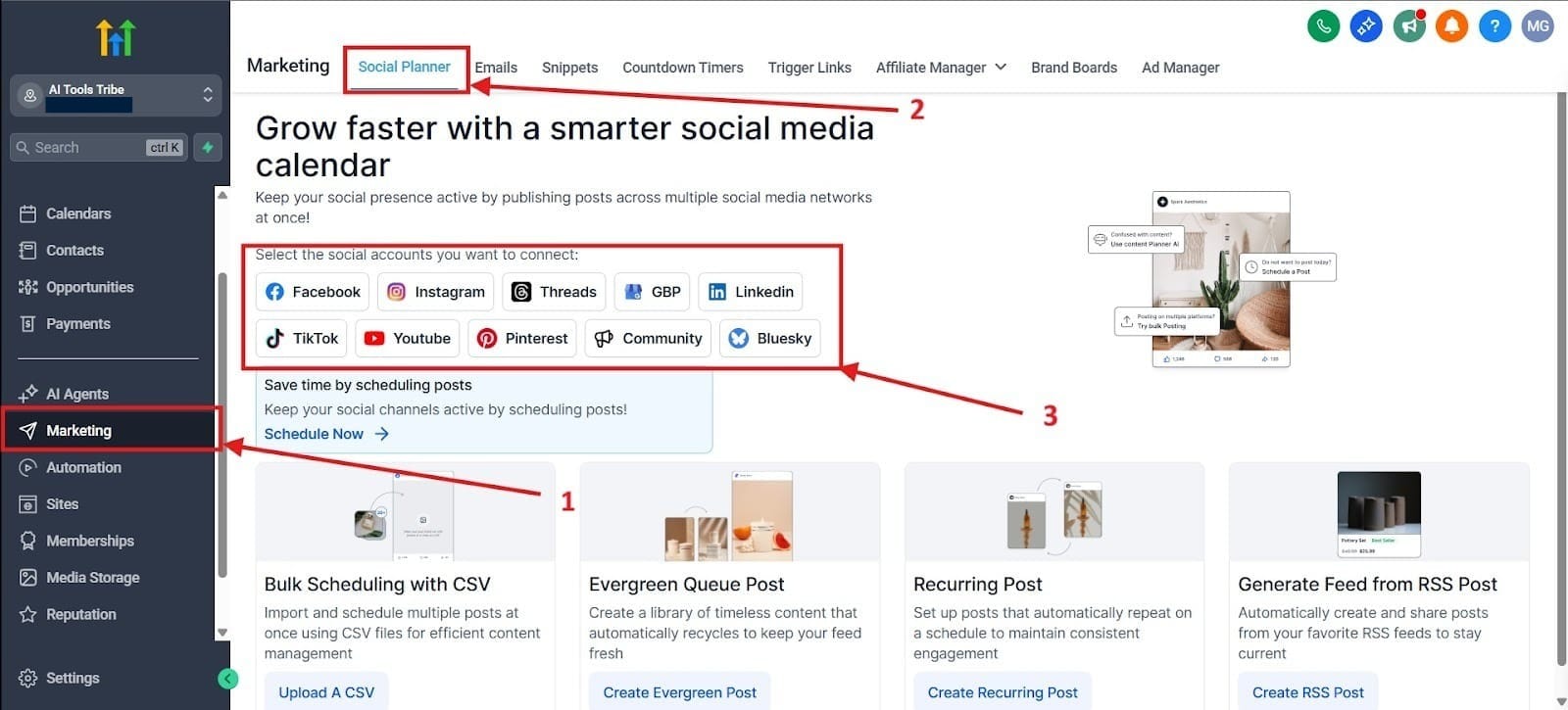
- Action: Navigate to the Marketing tab in the left-hand menu. Make sure you are in the correct client sub-account. Click to connect the necessary platforms (Facebook, Instagram, LinkedIn, and Google Business Profile).
- Expert Tip: Emphasize the requirement for the user to be an admin on the client’s Facebook Business Manager or the owner of the Google Business Profile to ensure successful, non-revocable connection.
First, go to the tab on the left hand side that says Marketing, highlighted in red as number 1.
When you click on this, it should take you right into the section that says Social Planner, but if it doesn’t, I highlighted where to find this as number 2.
For red box number 3, you would connect your social media accounts like Facebook, Instagram, LinkedIn, etc.
Step 2: Utilizing the Calendar for Content Visualization
Once connected, your calendar view becomes the single source of truth for all content.
- Action: Review the main calendar dashboard, which can be viewed in month, week, or list format.
- Expert Tip: Use the Draft status extensively. Before formal scheduling, use the draft function to lay out the monthly content plan visually. This allows you to drag, drop, and rearrange posts on the calendar before committing them to the client approval process.
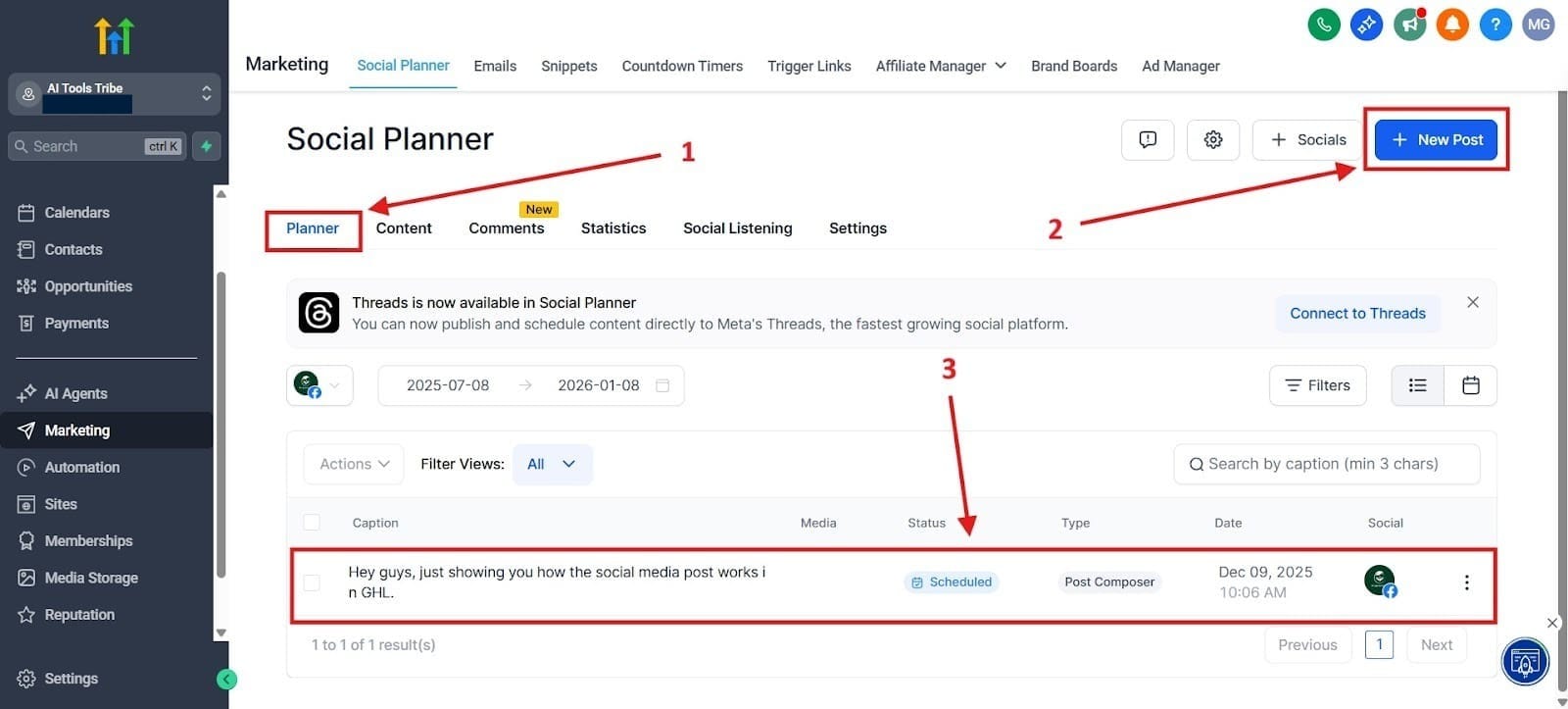
After you integrate your social media platforms, you would head over to the Planner. I highlighted that as number 1.
Second, you would create a New Post, which I highlighted in red as number 2.
When you have set it up, you’ll see it scheduled, which I highlighted in red as number 3.
Step 3: Setting Up the Client Approval Workflow
This step automates the most tedious part of agency management—getting content signed off.
- Action: When creating a post, select the option to Request Approval. A modal will prompt you to input the client's email address and any specific notes.
- Process: The client receives an email notification with a branded header. When they click the link, they see a clean, professional preview of the post. They can then instantly click Approve or Reject.
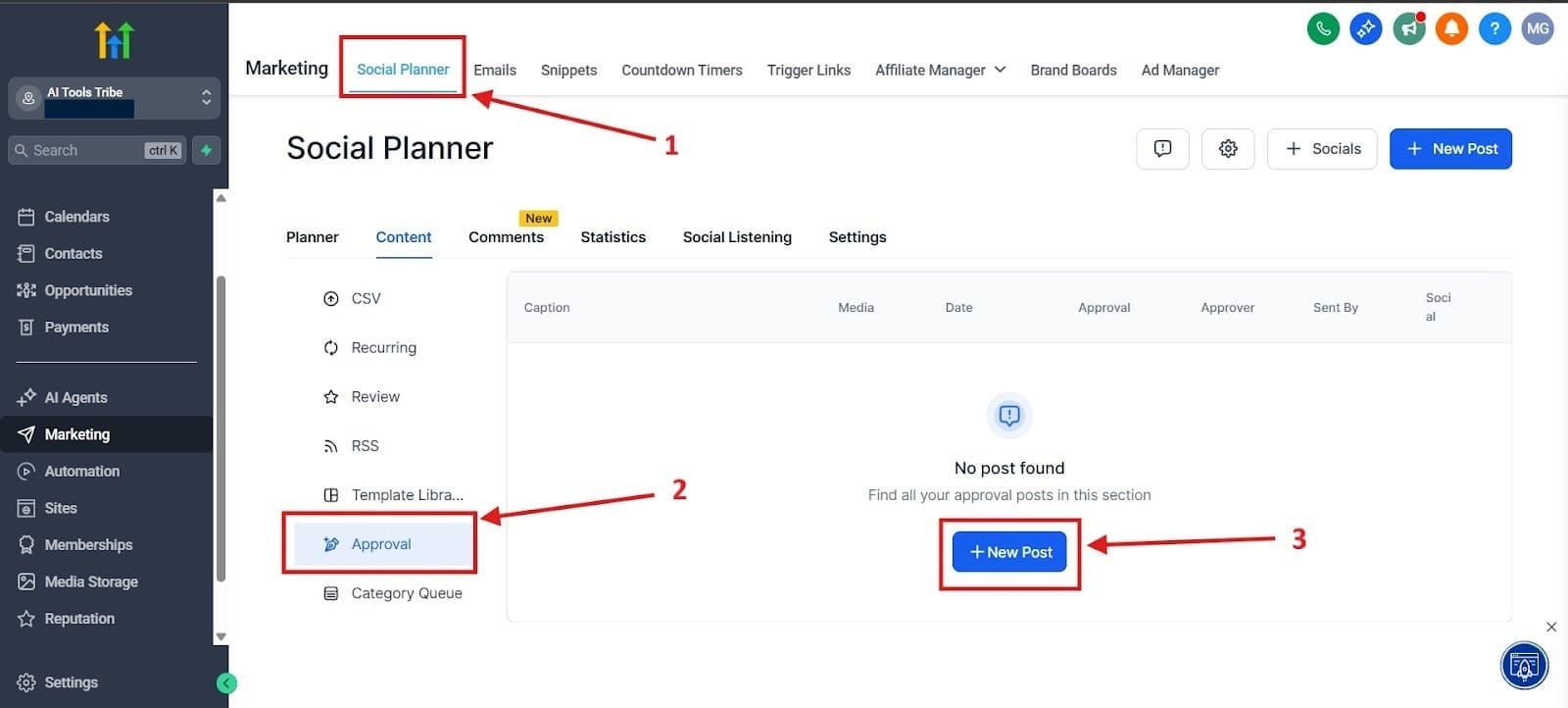
In the image below, you see how to get to the Approval section.
Red box number 1 highlights for you to go to your Social Planner.
Red box number 2 highlights for you to click on the tab that says Approval.
Red box number 3 is where you would create the new post for approval.
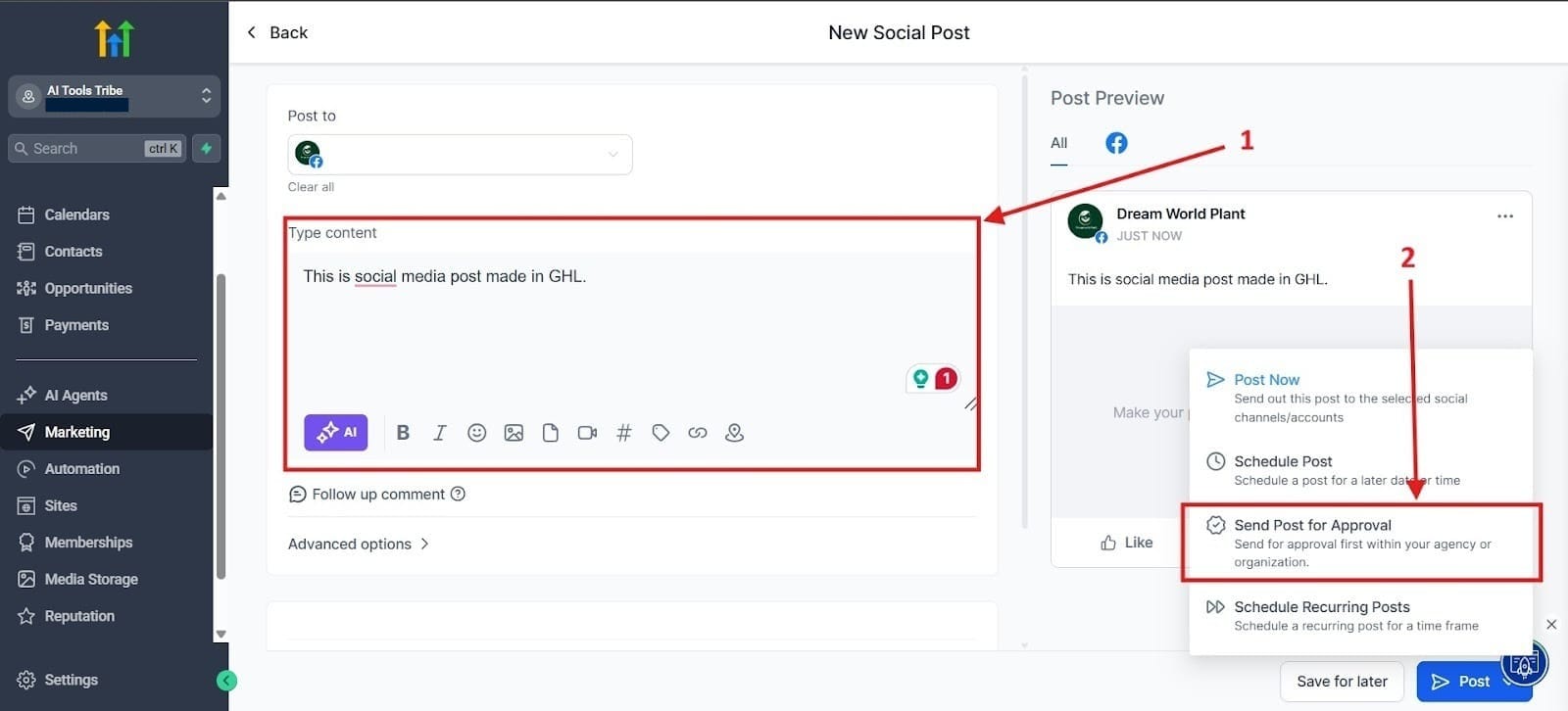
After you go to the approval tab and create a post, you will see the post highlighted as number 1, where you would create the context.
For number two, you would click the little blue button at the bottom and hit the section that says Send Post for Approval.
Step 4: Bulk Scheduling with CSV Import
For agencies dealing with high-volume, repeatable content (like property listings or daily quotes), the bulk import saves you a lot of time:
- Action: Find the CSV import option within the planner. You will need to map your spreadsheet columns (Date, Time, Caption, Media URL) to the corresponding GHL fields.
- Efficiency Focus: Use this function for rapid batch scheduling (e.g., scheduling 30 days of evergreen content in 5 minutes).
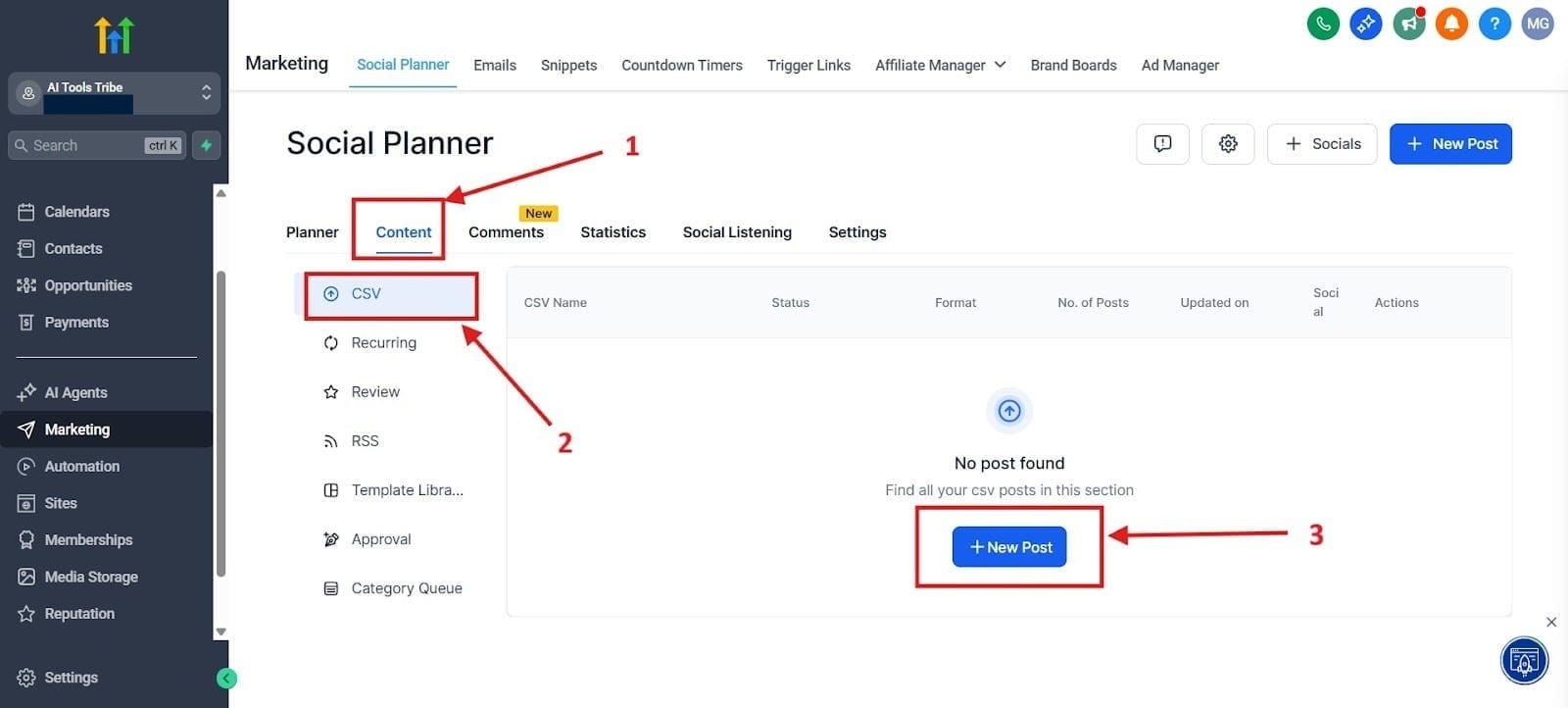
To get to the section where you can do a CSV import, go to Content, highlighted as number 1.
Next, go to the tab that says CSV, highlighted as number 2.
Finally, go to New Post, which I highlighted in red as number 3.
Step 5: Managing Engagement through the Unified Inbox
The Social Hub helps you close the loop on social engagement, linking it to your sales process:
- Action: Navigate to the Conversations, and filter the view to Social to see all incoming comments and direct messages.
- Service Recovery: Highlight how staff can reply directly to Instagram DMs and Facebook comments from this single screen, linking the conversation to the customer’s profile in the CRM for follow-up.
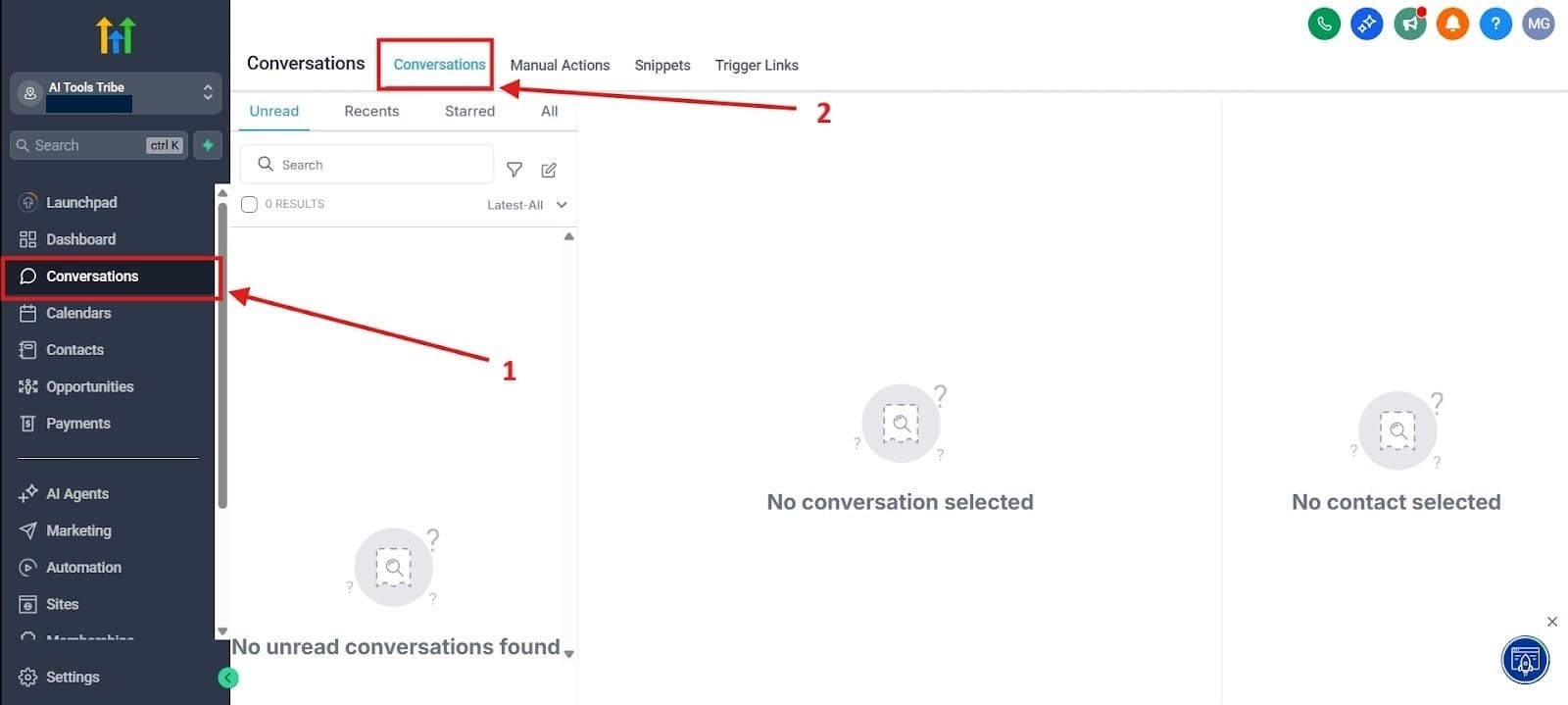
To get to your social media conversation, go to the Conversations tab found on the left hand menu, highlighted as number 1.
After you do that, click on the Conversation tab if necessary, which I highlighted in red as number 2.
Final Thoughts
The GHL Social Planner moves content strategy from a decentralized, time-draining headache to a centralized, scalable, and profitable workflow. It is far more than just a scheduling tool; it’s an operational hub that connects your outreach directly to your lead data, your client communication, and your sales pipeline. This integration is what creates the true efficiency multiplier.
