

Today, an overwhelming number of consumers (upwards of 90%, according to recent surveys) check online reviews before they even consider stepping foot in your store or booking a service. For local business owners, this is a constant, high-stakes challenge: you know you need a fresh, positive reputation flowing in continually to compete, but doing this manually is impossible.
GoHighLevel (GHL) is built to automate every boring, yet essential, growth task. At the heart of its value proposition is the Reputation Management feature, a system designed with one goal in mind: to turn every satisfied customer into a five-star review. Let’s take a look at how this automation protects your brand and secures your sales.
Here is a video overview for this article:
Feature: The 5-Star Engine: Automated Review Generation & Reputation Management
The GoHighLevel (GHL) platform natively solves the high-stakes reputation challenge by providing an automated, set-it-and-forget-it system designed to continuously convert satisfied customers into positive online reviews.
- Automated Review Request: Triggers an immediate review request (via SMS or email) automatically after a job is marked as complete in a GHL workflow.
- Review Gating & Filtering: Directs happy customers (4 or 5 stars) straight to public sites (Google, Yelp, Facebook) while directing dissatisfied customers to a private feedback form, protecting your public reputation.
Benefits:
- Establish Instant Trust: Solves the core problem that upwards of 90% of consumers check online reviews before making a purchase decision.
- Dominate Local Search (SEO): Increases your volume and velocity of reviews, which are critical ranking factors that push your business higher in Google's local search results ("Map Pack").
- Permanent Brand Protection: The filtering mechanism captures negative feedback internally, allowing you to resolve the issue privately and prevent a 1-star public review.
Practical Outcome:
By implementing this practical, automated feature, you will transform customer service into an engine for brand growth, guaranteeing a continuous flow of 5-star reviews that establishes instant trust and maintains a dominant, competitive online presence 24/7.
The Mechanics of the GHL 5-Star Engine
The brilliance of GHL’s reputation system lies in its automation and sophisticated routing logic. It is a set of integrated tools that work silently in the background, ensuring your reputation is always growing and protected.
1. Automated Review Request Campaigns
GHL allows businesses to set up automated review request campaigns that get triggered the moment your customer completes a purchase or buys your service. Some of the specifics include:
- Requests are automatically sent via SMS and email, maximizing your reach and ensuring the customer receives the prompt through their preferred channel.
- The behind it depends on integration with GHL's pipelines and CRM. When a lead is moved to the "Closed/Won" stage or a specific "Service Complete" tag is applied, the automated sequence kicks off.
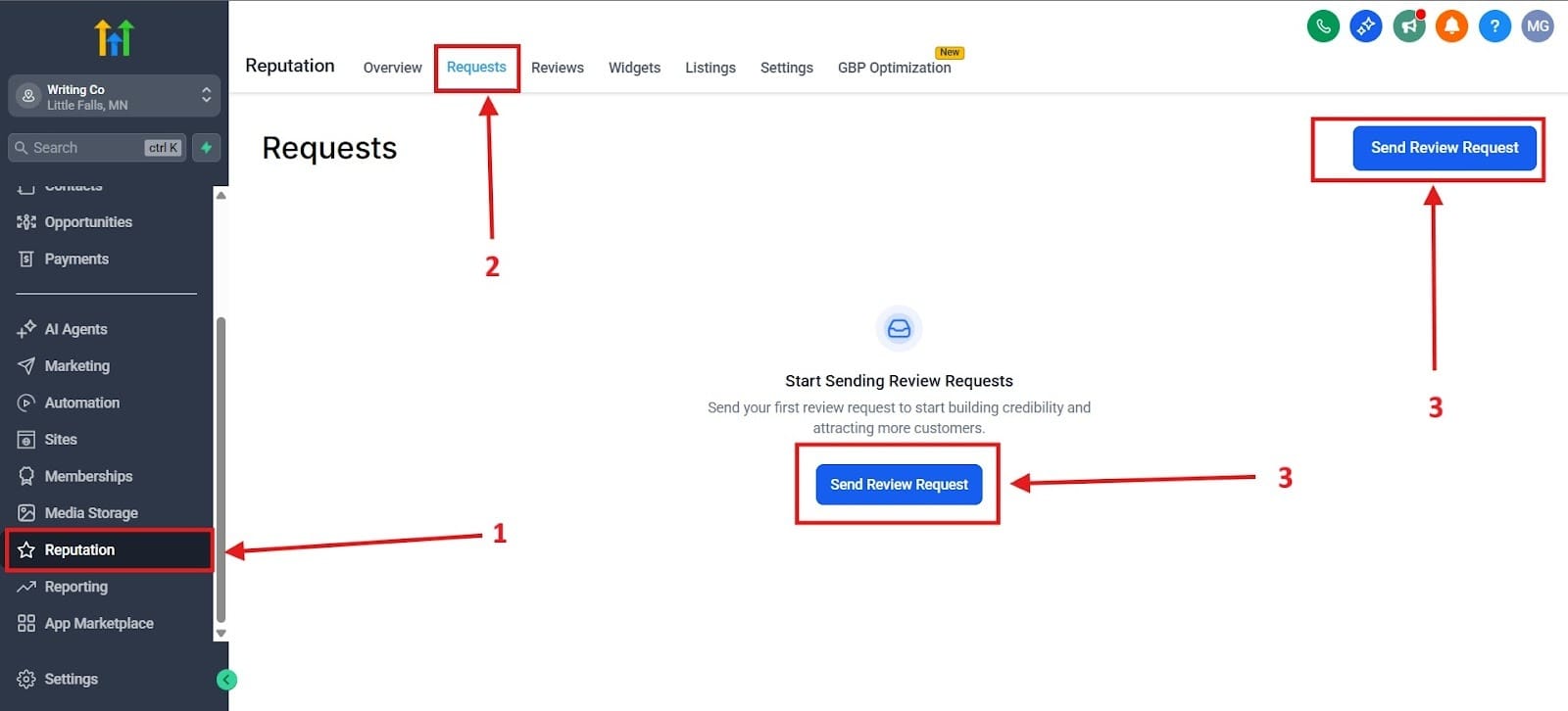
Below I highlighted how to get to this feature by going to Reputation, highlighted in the red box as number 1. Next you would go to the Requests area highlighted at the top as number 2. Finally, you would click on either “Send Review Request” highlighted as number 3s.
2. Smart Filtering (The "Gating" Mechanism)
This is the reputation engine’s defensive shield and its most valuable feature. Instead of immediately sending all customers to Google or Yelp, GHL first directs them to a proprietary landing page to capture how they feel about your service:
- The most essential step where GHL asks the customer to rate their experience privately. This private rating is the gatekeeper.
- High Rating (4 or 5 stars): The customer is automatically and seamlessly redirected to your public review sites (Google My Business, Facebook, Yelp) to post their glowing feedback.
- Low Rating (1, 2, or 3 stars): The customer is directed to an internal form where they can collect their feedback privately. This is a critical element for protecting your reputation and avoiding public complaints.
3. Centralized Reputation Dashboard
Managing multiple platforms like Google, Facebook, Yelp, and others can be chaotic. GHL solves this with a single pane of glass:
- A clean interface within GHL pulls in reviews from all linked public platforms.
- This allows users to see every new review, track star ratings over time, and analyze review volume trends in one place.
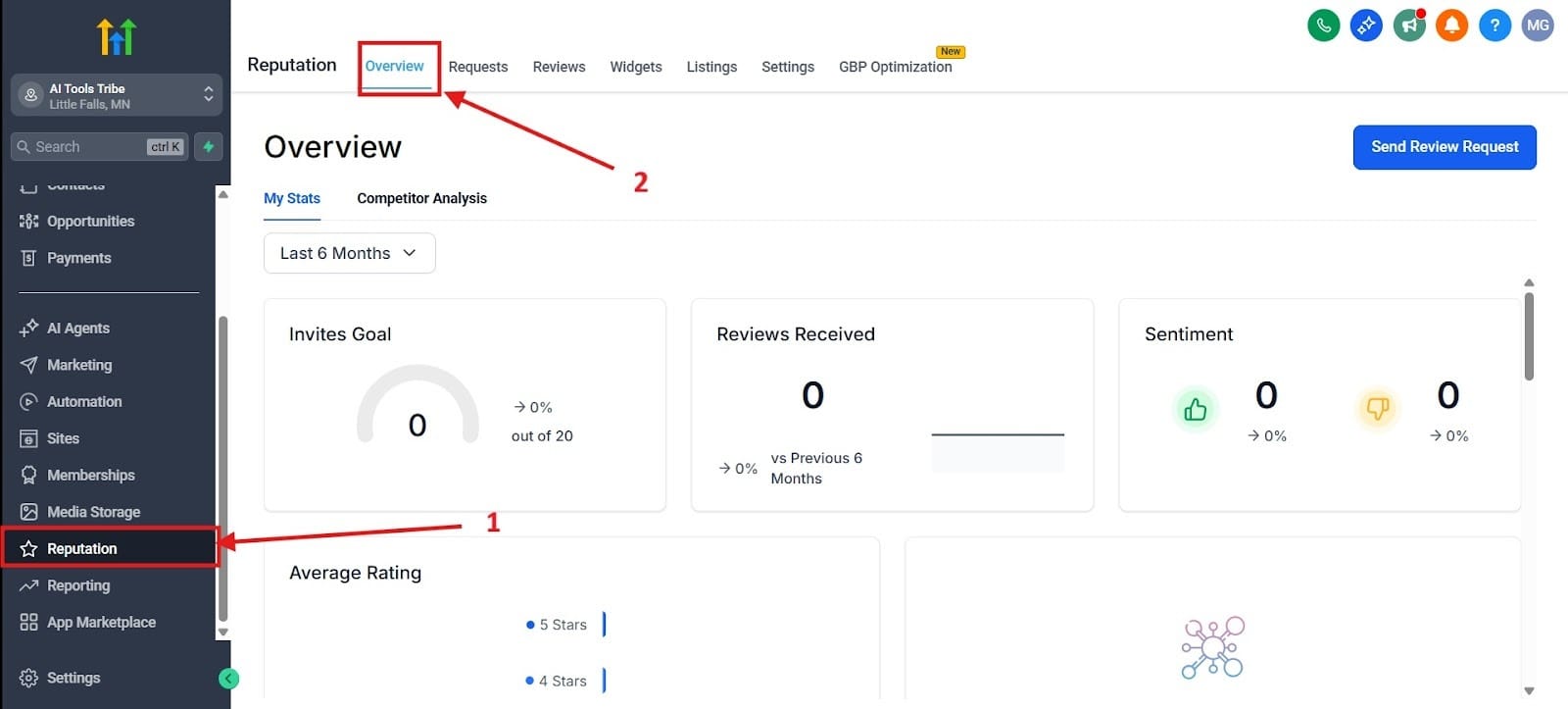
First, go to the red box highlighted as number 1. After you get there, click on the red box highlighted as number 2.
Strategic Benefits: Why Automation Is Necessary
Let’s take a look at why GHL’s system is a game-changer for business outcomes and the strategic benefits you get from automation:
1. Increase in Review Volume and Average Star Rating
Automation provides a level of consistency and scalability that no human worker could easily maintain. By hitting customers exactly at the peak of their satisfaction and removing the manual friction of asking, the system ensures a steady, reliable flow of new reviews.
More importantly, the Smart Filtering Effect naturally pushes the average star rating higher. By systematically diverting negative experiences into private customer service channels, the published reviews are overwhelmingly positive, actively strengthening your business's online score.
2. Boosting Local SEO and Search Visibility
For local businesses, reviews are a direct line to ranking higher on Google. The Google Algorithm heavily weighs three factors related to reviews: Quantity, Quality, and Recency.
By constantly generating new, high-quality reviews, the engine acts as an ongoing SEO boost. Consistent reviews signal to Google that your business is active, relevant, and trustworthy.
3. Maximizing Customer Trust and Conversion Rates
Even if a customer finds your business, they won't convert if they don't trust you. Recent studies show that businesses rated as 4.0 stars overall see a much higher conversion rate:
- Trust Signal: Consumers are inherently more likely to trust businesses that have numerous, recent, and highly-rated reviews. A strong star rating acts as instant social proof.
- Higher Conversion Rate: This better reputation leads directly to higher click-through rates (CTR) from Google search results, and higher lead-to-customer conversion rates on your website. Think about the reputation engine as your most effective, silent sales team member.
Building the Engine
To implement GHL’s reputation engine, you need to follow a few core setup steps. I’ll walk you through exactly how to activate and launch your own 5-Star Engine.
Step 1: Connect the Review Platforms
The first step is granting GHL permission to communicate with the sites where you want your reviews to land:
- Inside your GHL account, navigate to the Reputation tab in the main sidebar menu.
- You must use an administrator account for both platforms to ensure GHL has the permissions to read existing reviews and manage the redirection process
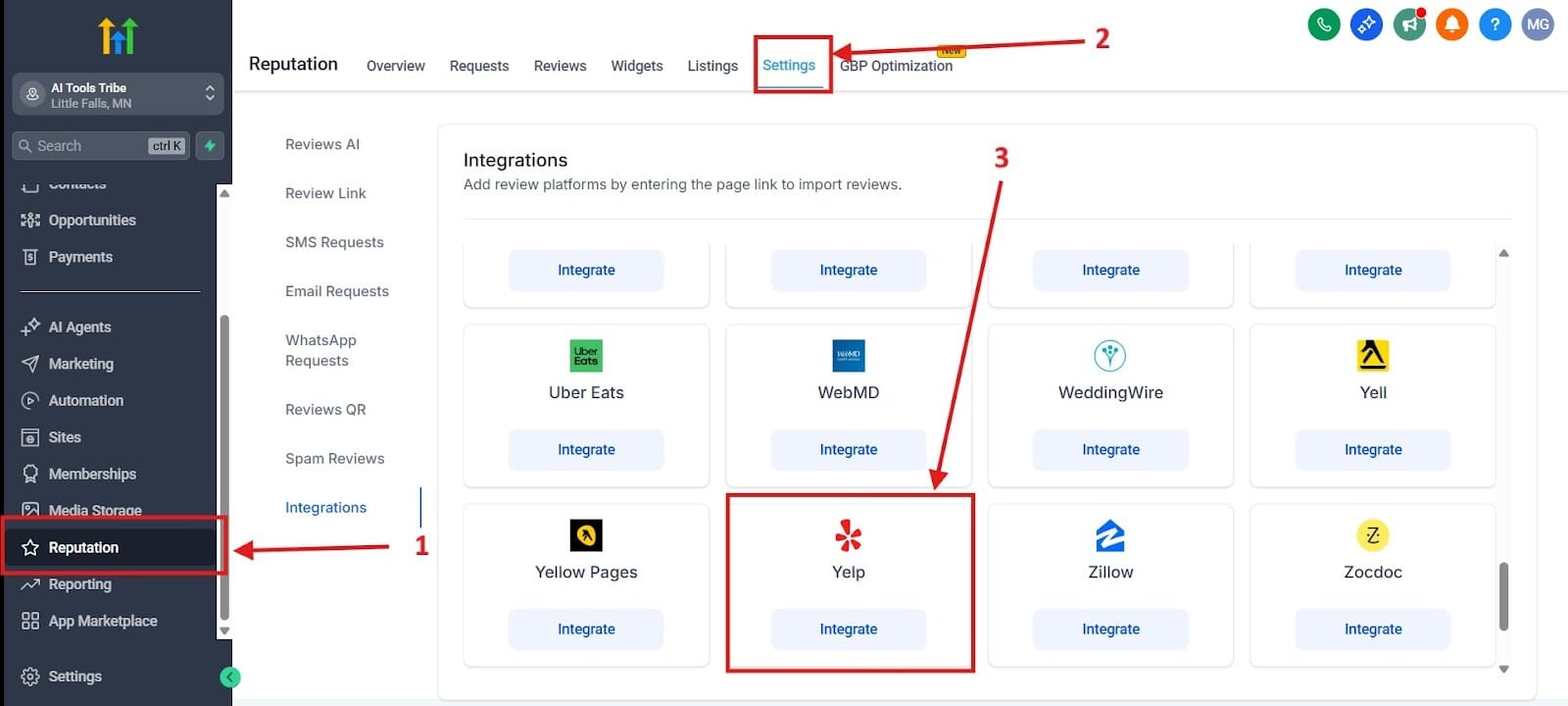
To get there, first you need to head over to the Reputations tab. I highlighted this as red box number 1. Second, go to your settings highlighted as the red box number 2. From there, you go to the integrations you want. Yelp, for example, is found closer to the bottom.
Step 2: Customizing the Review Funnel Link
Before automation starts, you need the single link that the system will send to your customers:
- Locate the main Review Link/Widget within the Reputation settings.
- Advise on customizing the look and feel of the landing page to match the brand.
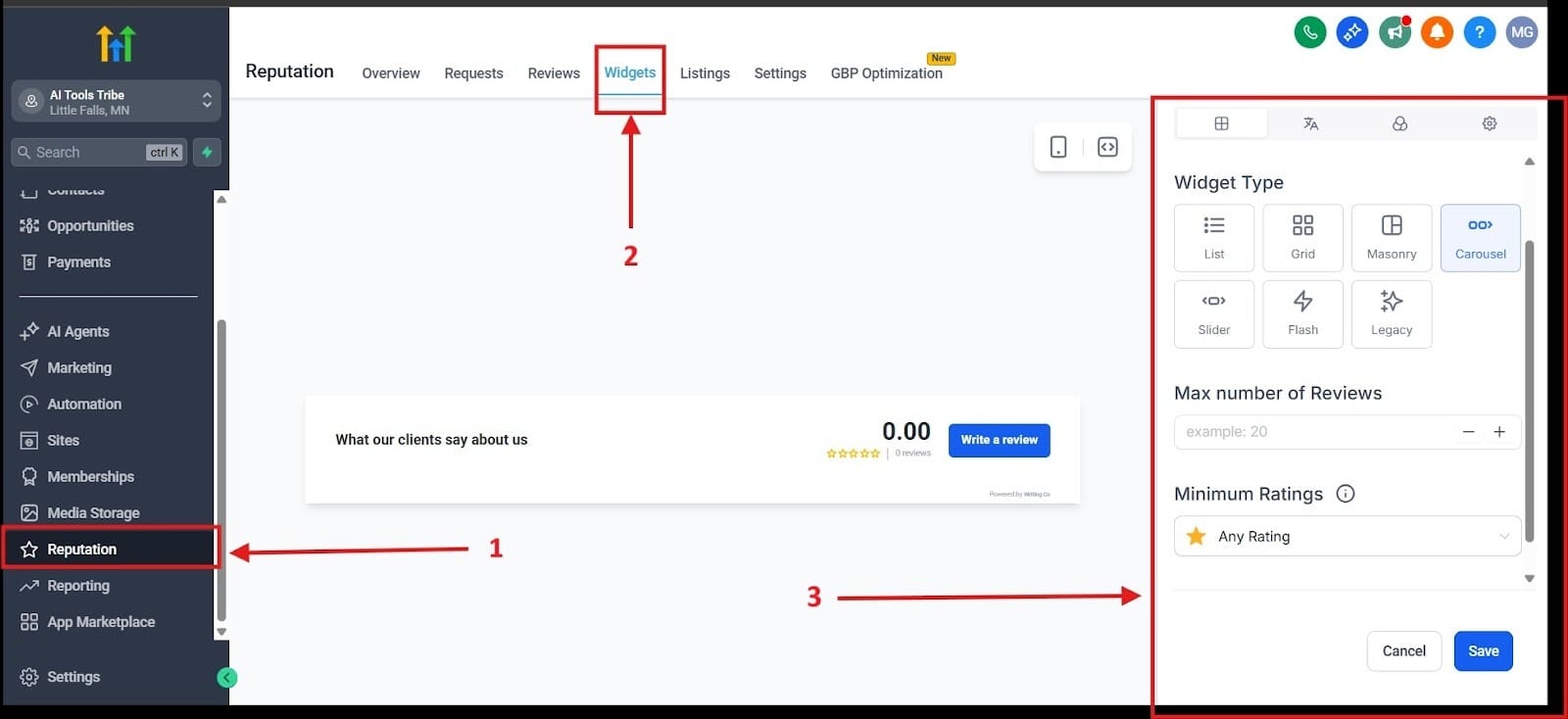
First, go to the Reputation tab highlighted as number 1. Second, go to Widgets. From there, you will see an area that says “Create New.” Click on that, and it will take you to a new area. Click on the red box highlighted in red as number three and start customizing your review funnel.
Step 3: Setting up the Workflow Automation
The power of the engine comes from the automated workflow that pushes the link out precisely when it needs to be sent:
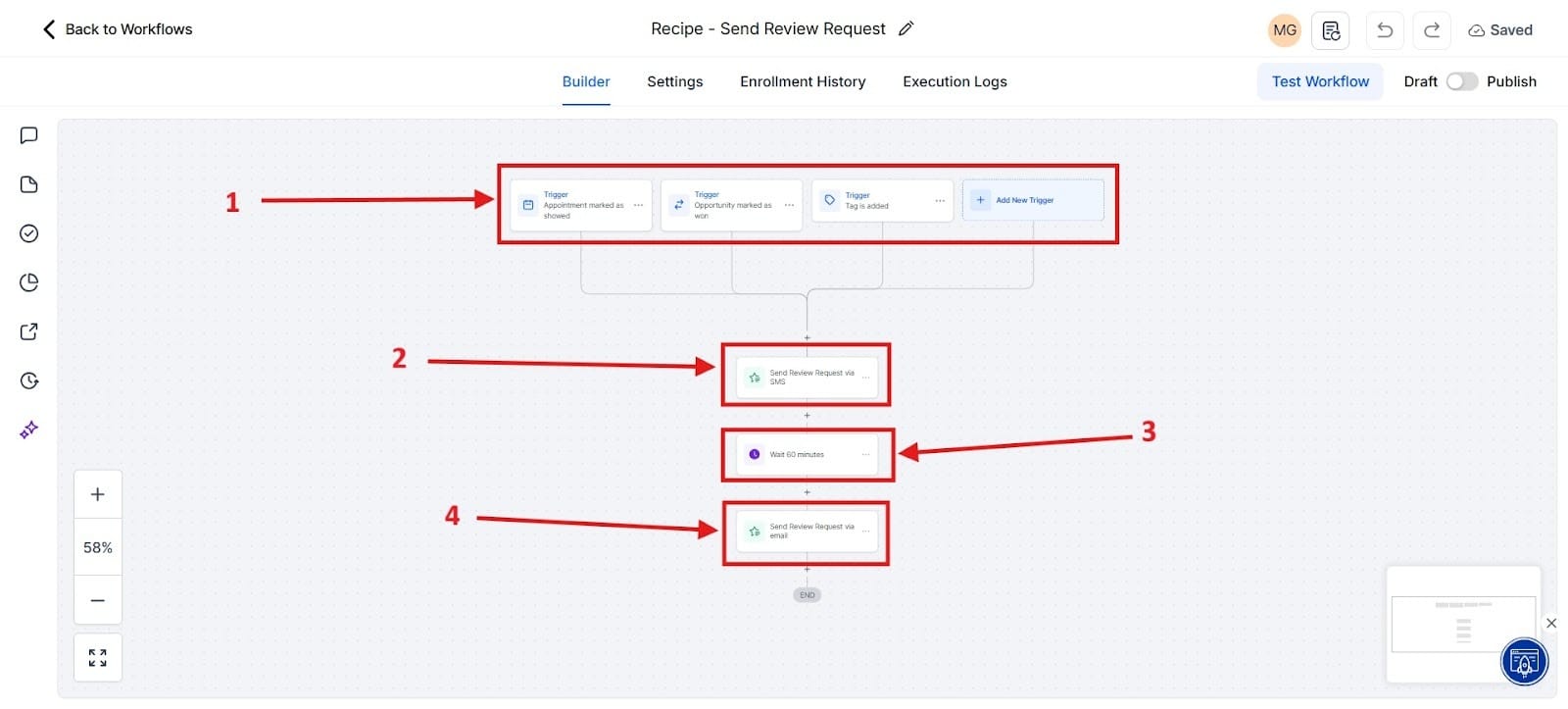
- Go to the Automation tab -> Workflows and create a new workflow dedicated to Review Requests. You can find this in the template area.
- Trigger Definition: The trigger is vital. Use an event that signals a successful job or sale completion, such as: Pipeline Stage Changed to: Closed/Won or Tag Added: Service Complete.
- Timing: Implement a small 60-minute delay.
The first box you see highlighted in red as number 1 is the trigger area. If you selected the template, this area would automatically come up, and I would do it that way. Highlighted in red as number 2 is the Send Review Request via SMS. The third red box is where you would wait 1 hour before the Send Review Request via Email. The fourth red box is sending a Review Request via Email.
Step 4: Crafting the Request Message
The message itself is the final touchpoint and must feel personal to avoid being ignored:
- Tone: The message must sound human, not automated. Use the contact’s name via GHL’s custom values.
- SMS Example (High Impact): "Hi {{contact.first_name}}, thank you for choosing us! Could you take 10 seconds to let us know how we did? [Review Link]"
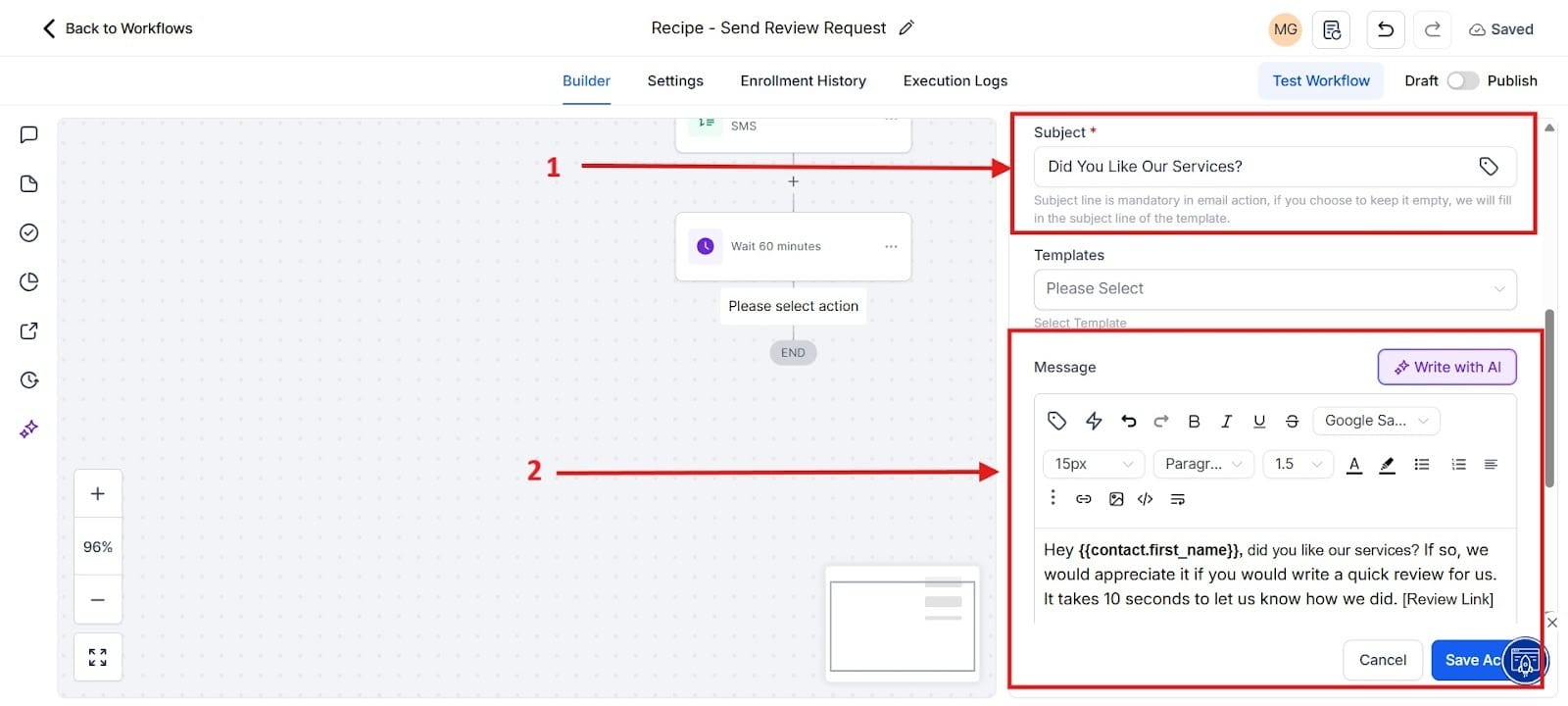
- Email Template: Design a simple, mobile-friendly email with a clear call-to-action button (e.g., "Leave Your Feedback") that links directly to your customized Review Funnel Link.
To get to this point, you need to go to the action that says, Send Email. Once you reach that point, you should see it pop up as it shows. Highlighted in red box number 1 is the subject. In red box number 2 is the message.
Step 5: Monitoring and Service Recovery Protocol
Automation generates the reviews, but human intelligence handles the service recovery:
- Monitoring: Commit to reviewing the GHL Reputation Dashboard daily to track trends and quickly spot new feedback.
- Service Recovery: When a low rating is received, the negative feedback must trigger an immediate internal task or notification for a manager to call the client and resolve the issue.
Final Thoughts
The GHL 5-Star Engine offers a complete transformation in how businesses approach online feedback. It shifts reputation management from a reactive, time-consuming chore into a proactive, scalable, and self-sustaining asset.
The true strategic recommendation for any growing local business is not just to use these tools, but to embrace the consolidation that GHL offers. Take advantage of it and see how it helps.
Check Out The Other GoHighlevel (GHL) Articles:
What is GoHighLevel?
Stop Losing Leads: How to Build Your First High-Converting Lead Magnet Funnel in GHL
End the Email Back-and-Forth: Master GHL Calendars for Zero-Friction Appointment Booking & Reminders
The Solopreneur's Quickstart Guide to GHL CRM: Pipeline Setup & Smart List Organization That Converts
