

Most influencers treat Instagram like a gambling habit: they snap a photo, improvise a caption, and hope the algorithm picks them. That isn’t a business. It’s a cycle of disconnected tasks with no real strategy.
If you want to turn ideas into consistent income with minimal friction, you don’t need fifty different apps. You need five tools that work together like an AI employee team. This guide walks through the complete “Idea-to-Income” workflow using a practical, step-by-step system.
Stage 1: The Blueprint (Strategy & Scripts)
Tool: ChatGPT
Analytical Creativity & Reverse-Engineering Virality
Most influencers fail because they produce "generic" content. They see a trend and replicate it without understanding the underlying mechanics. To succeed, you must move from replication to reverse-engineering.
Why Generic Content Fails
- Zero Differentiation: Recycled trends and "aesthetic" templates turn you into a commodity. Without a unique perspective, there is no reason for an audience to choose you over 10,000 identical creators.
- The Fix: Inject a "Contrarian Take." If everyone is saying "Wake up at 5 AM," your hook should be "Why waking up at 5 AM ruined my productivity."
- High Predictability: If a viewer anticipates the payoff within five seconds, they swipe. This signals the algorithm that your content is low-value, killing your reach.
- The Fix: Use "Open Loops." Start a story or a tip in the first 3 seconds but don't resolve it until the final frame.
- The Trust Gap: Over-templated content feels performative and "salesy." This prevents the parasocial connection required to convert a casual viewer into a loyal follower.
- The Fix: Show the "Messy Middle." Replace perfectly curated shots with raw, behind-the-scenes footage that proves the "Reward" you are promising is real.
The Psychology of the "Hook, Retain, Reward" Framework
Every viral Reel follows a psychological sequence:
1. The Hook (0–3 Seconds)
Purpose: A visual or auditory pattern interrupt to stop the "infinite scroll" and create a curiosity gap.
- Generic (Fail): "Hey guys, I've been getting so many questions about my morning routine..."
- Why it fails: Low stakes, overused, and assumes the audience already cares about you.
- The Strategic Shift: "I stopped waking up at 5 AM, and my productivity actually doubled. Here’s why."
- Why it works: It presents a counter-intuitive statement (pattern interrupt) and a clear benefit.
2. The Retention (3–20 Seconds)
Purpose: Managing cognitive load by delivering on the hook’s promise through pacing and "open loops."
- Generic (Fail): A slow, single-shot video of someone talking into a camera with no text overlays or scene changes.
- Why it fails: The brain predicts the outcome and loses interest. There is no visual or narrative momentum.
- The Upgrade: Use "B-roll" footage, rapid cuts, or on-screen text that reveals information in stages (e.g., "Step 1 was easy, but Step 2 is where most people quit").
- Why it works: It forces the viewer to stay to "close the loop" created by the tension.
3. The Reward (The End)
Purpose: Providing a dopamine spike or utility that justifies the time spent watching.
- Generic (Fail): A vague "Follow for more!" or a punchline the viewer saw coming 10 seconds ago.
- Why it fails: Low ROI (Return on Investment) for the viewer's attention.
- The Upgrade: A "Save this for later" checklist, a surprising plot twist, or a specific, high-value resource link.
- Why it works: It triggers Variable Reinforcement—the viewer feels they gained something tangible, making them more likely to engage with your next post.
Step-by-Step Guide: The Competitor Screenshot
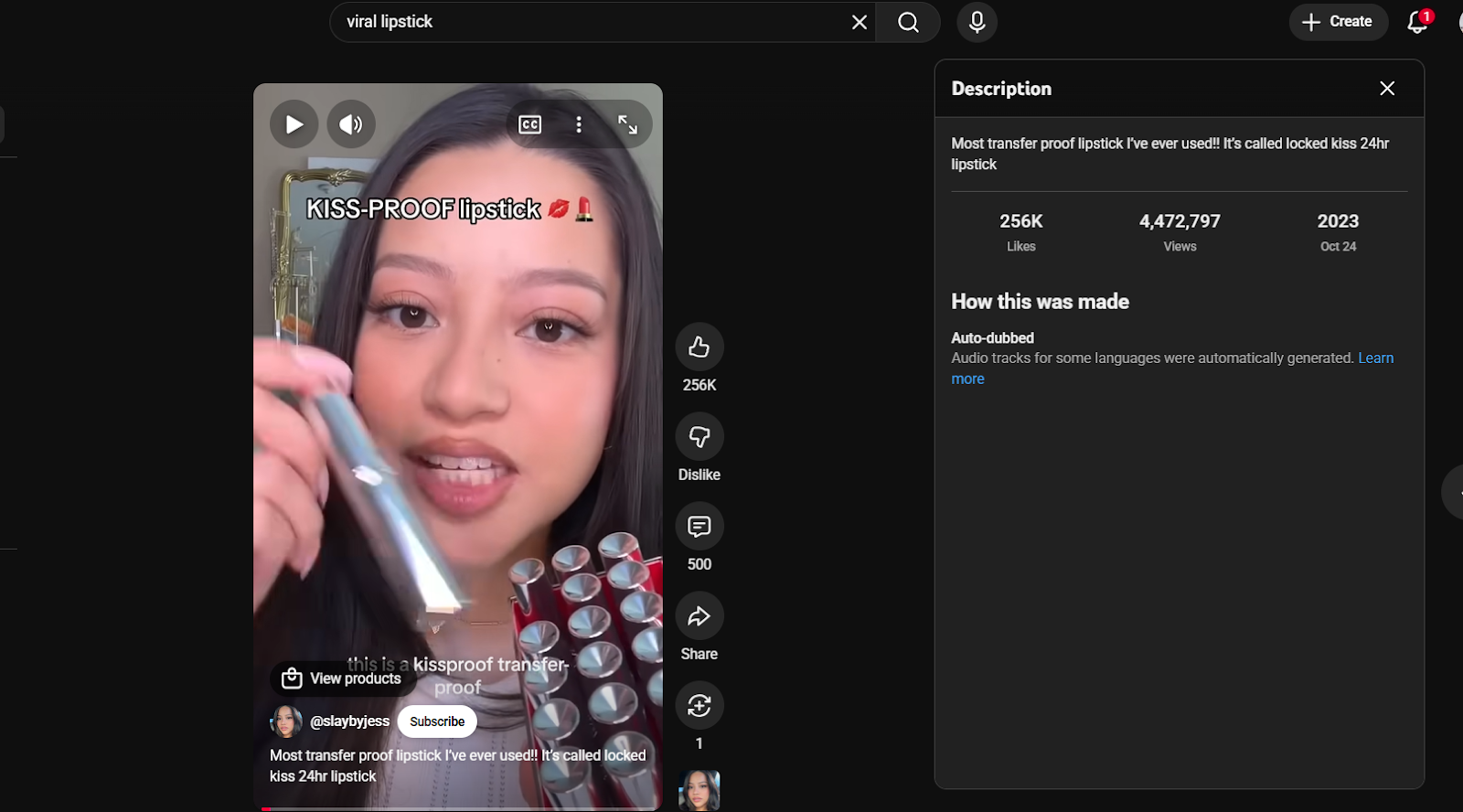
Instead of just reading text, use ChatGPT’s vision capabilities (via the mobile/computer app) to analyze "outliers" videos in your niche that have 10x the creator’s average views.
- Capture: Screenshot the first frame (the hook) and the caption of a viral competitor video.
- Upload: Feed this into ChatGPT.
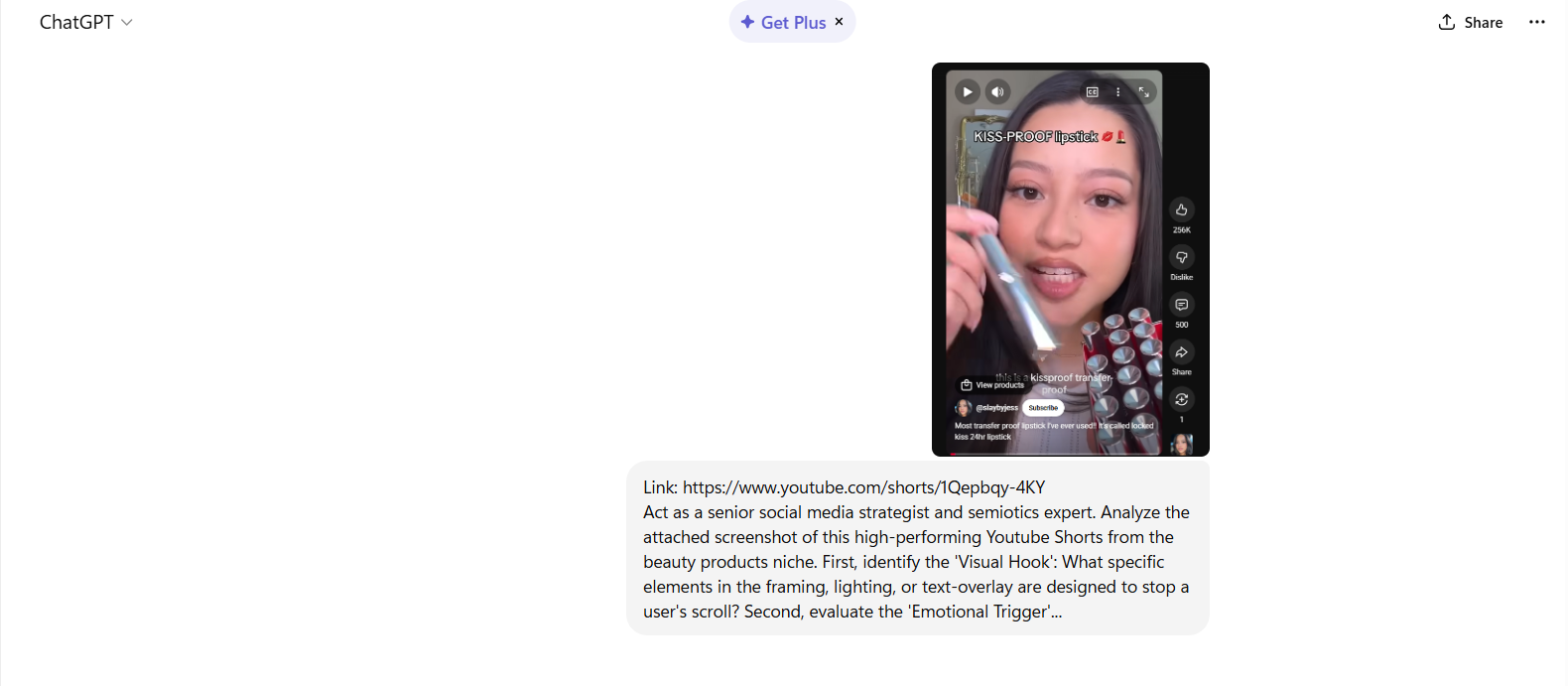
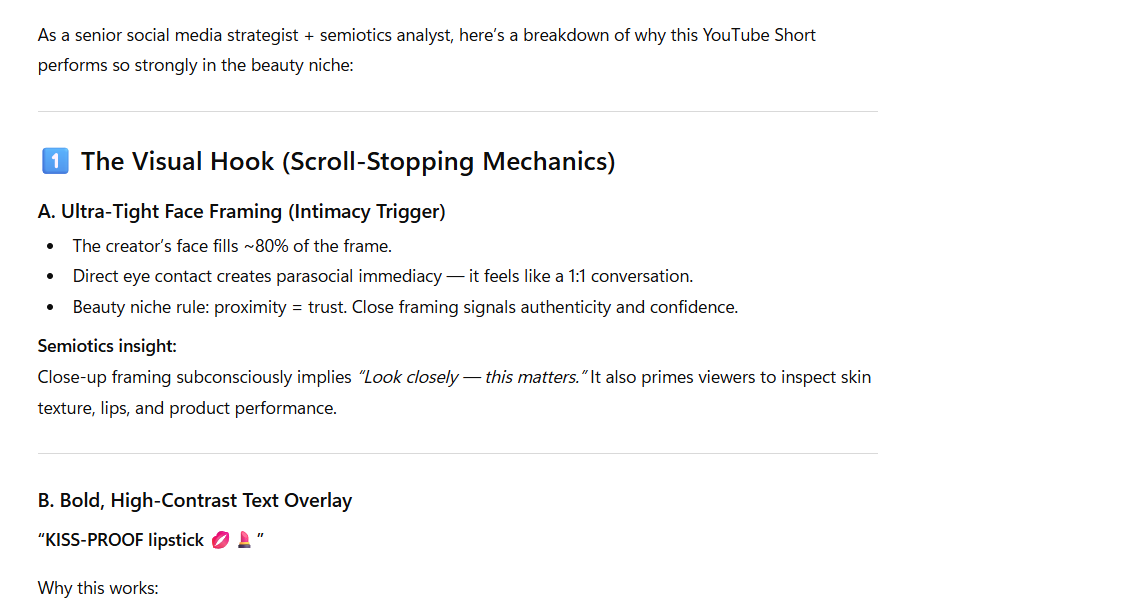
- Analyze: Use the "Master Prompt" below to deconstruct why it worked.
The "Vision" Master Prompt
"Act as a senior social media strategist and semiotics expert. Analyze the attached screenshot of this high-performing Instagram Reel from the [Your Niche] niche. First, identify the 'Visual Hook': What specific elements in the framing, lighting, or text-overlay are designed to stop a user's scroll? Second, evaluate the 'Emotional Trigger'..."
Stage 2: The Asset Lab (Visuals & B-Roll)
Tool: Canva
Aesthetic Authority & High-End Production Value
The "Messy Room" syndrome is a real barrier. Many creators delay filming because their environment isn't "aesthetic" or they lack B-roll.
Canva’s AI suite allows you to manufacture professional environments.
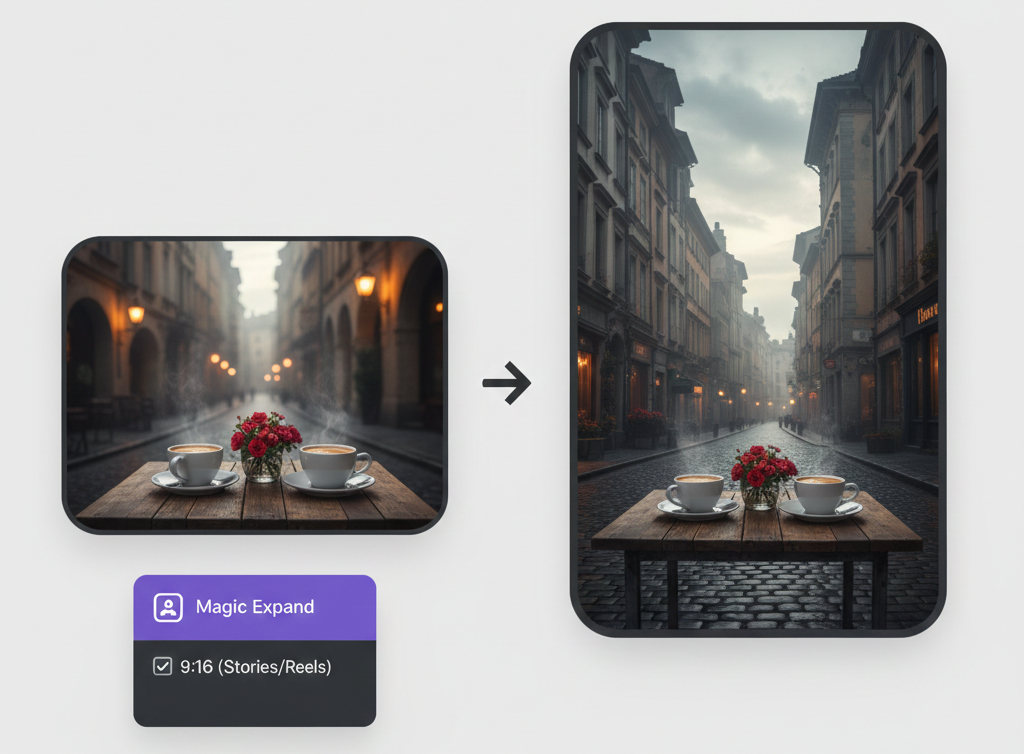
Core Feature: Magic Media (Text-to-Video)
When your script requires a specific as "a steaming cup of coffee in a rainy London cafe," use Magic Media.
- How-to: In the Canva sidebar, select 'Magic Media.' Describe your scene with sensory details: "Cinematic close-up, 4k, moody lighting, steam rising from coffee."
- Result: You now have high-quality B-roll to layer into your project without leaving your house.
Maintaining the "Grid" with Brand Kits
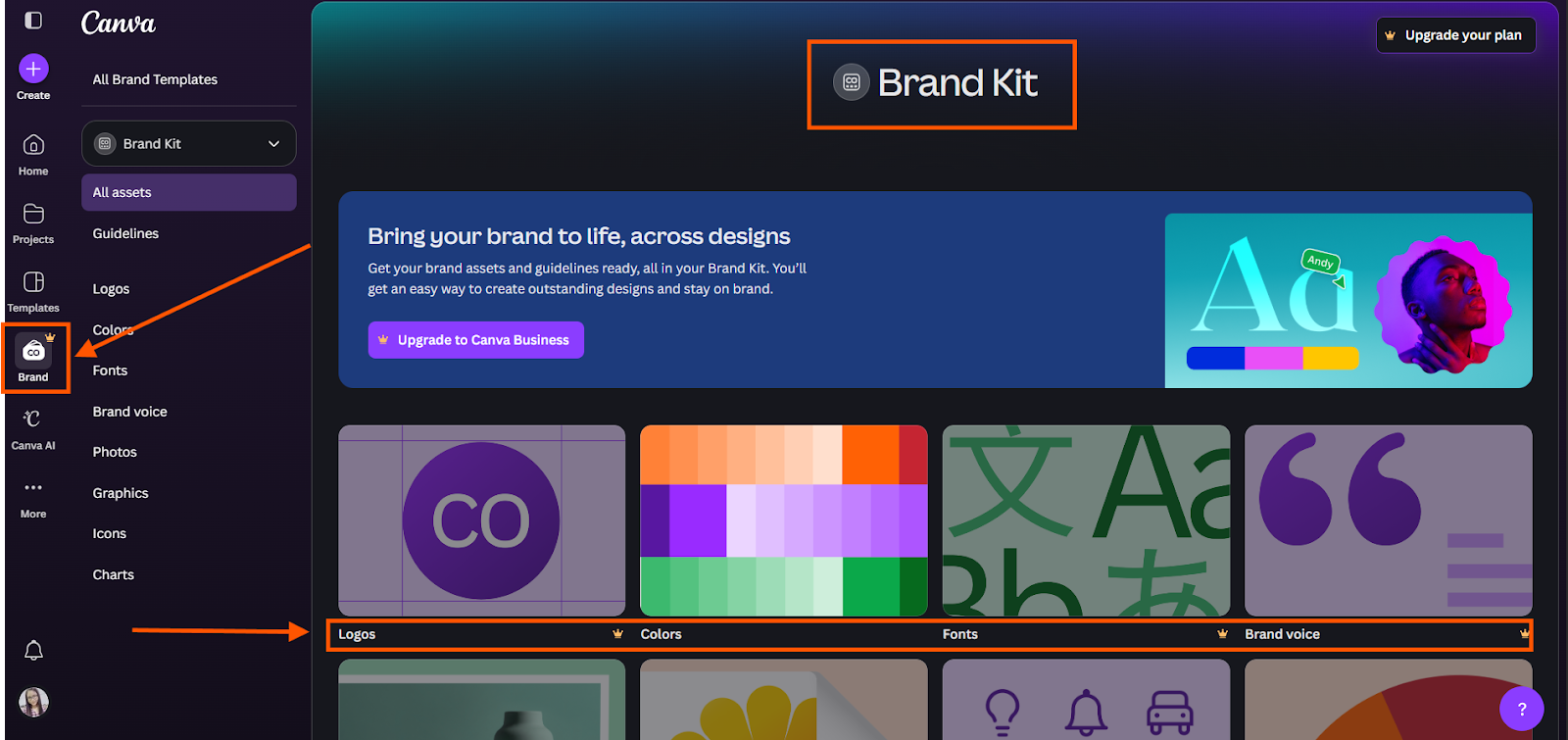
A professional influencer account is recognizable without seeing the username. Use Canva’s Brand Kit to lock in your "Tech Minimalist" or "Clean Girl" palette.
This ensures that every AI-generated background or text-overlay uses the exact hex codes.
Stage 3: The Assembly Line (Video Editing)
Tool: CapCut
Retention Editing & The "Scroll-Stop" Factor
Editing is where content is won or lost. Statistics show that roughly 85% of social media users watch videos with the sound off.
If your video doesn't communicate its value visually, it is invisible.
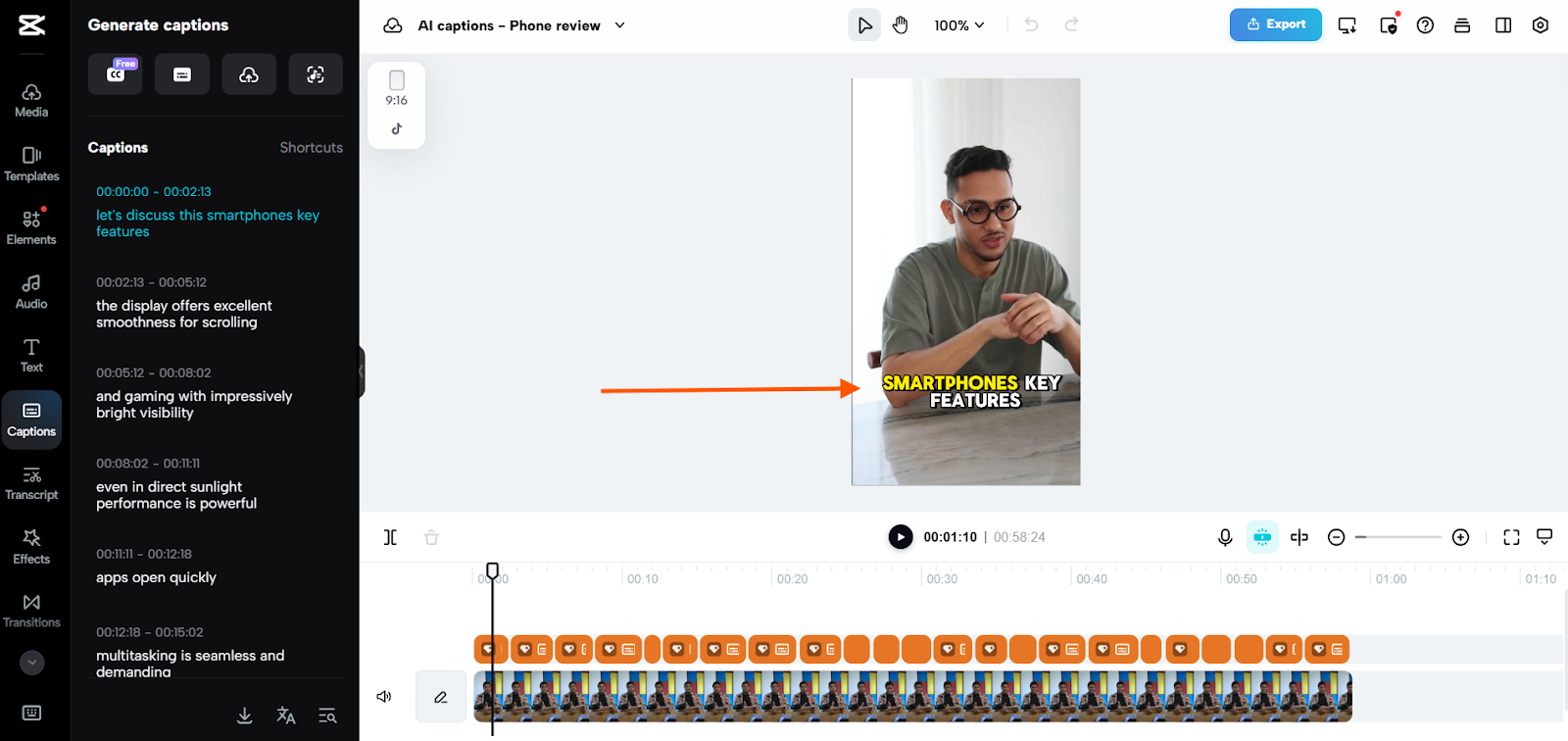
Auto-Captions: The Viral Style
Viral captions are dynamic.
- Workflow: Use 'Auto-captions' and select a 'Template' that highlights the active word in a different color. This keeps the viewer's eye anchored to the center of the screen.
AI Beat Sync
Stop wasting time manually squinting at waveforms to find the drop. Let the AI do the heavy lifting so your edits stay perfectly in rhythm.
The 3-Step Workflow
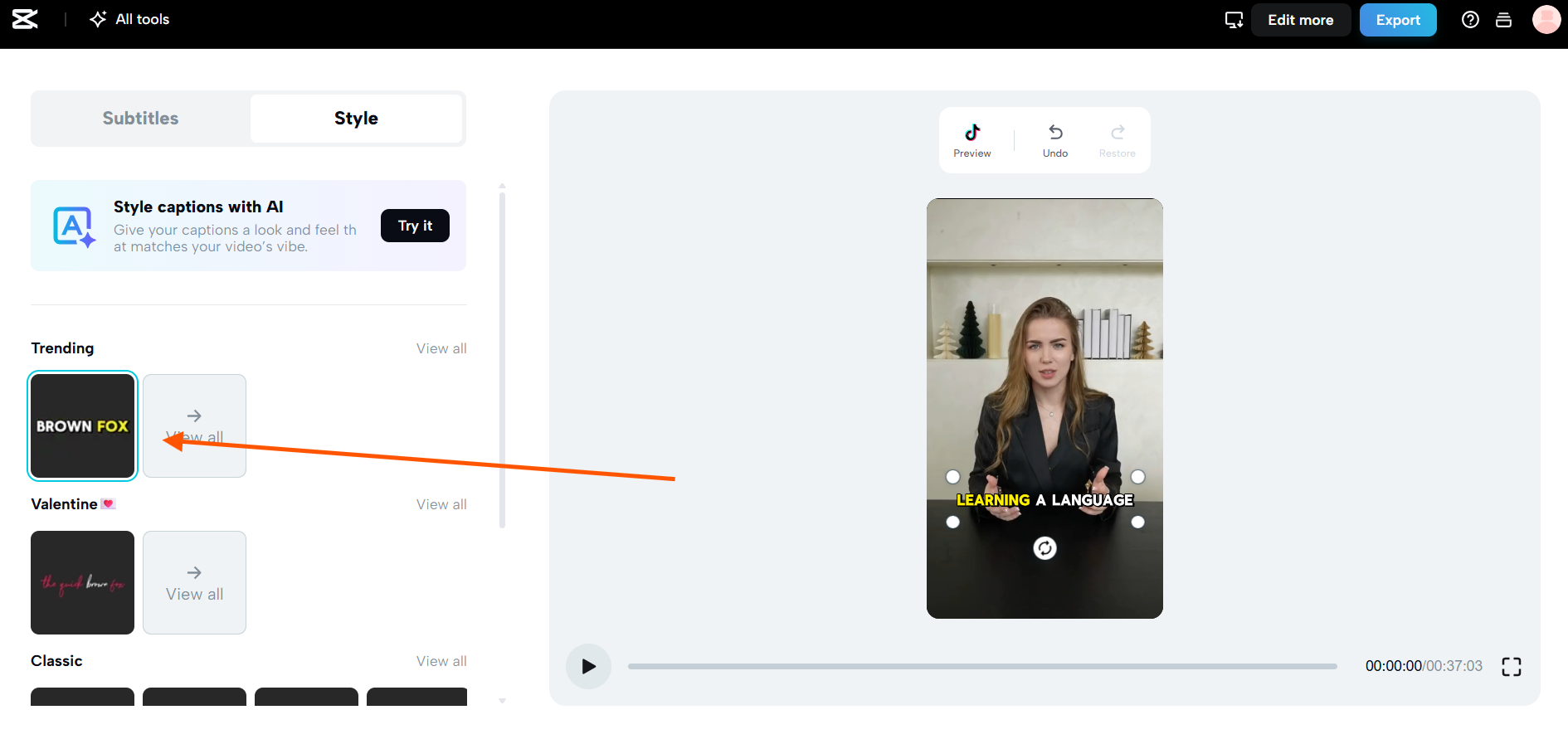
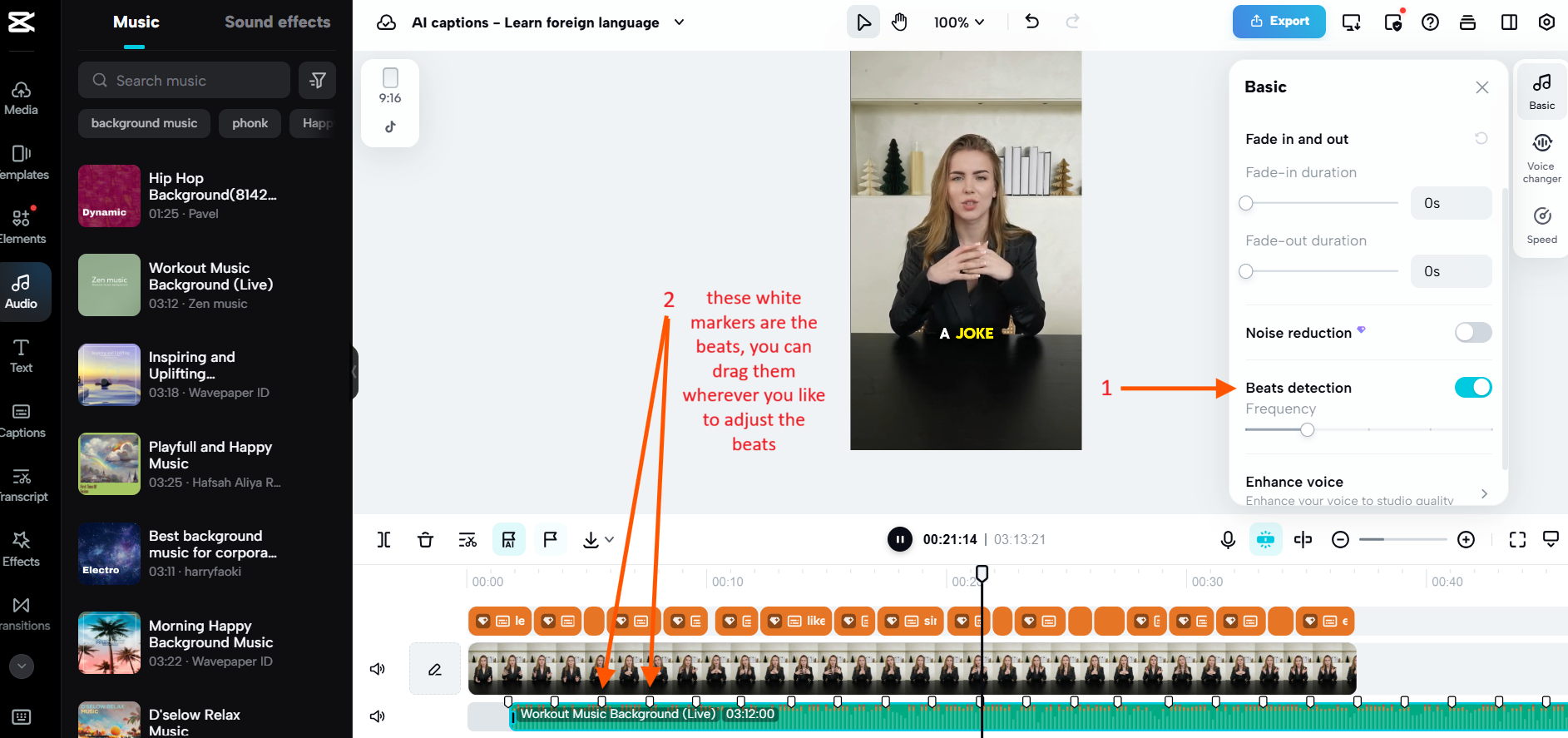
- Import & Activate AI Detection Add your music to the timeline. With the audio track selected, go to the Basic tab in the right-hand panel and toggle on Beats detection (indicated by arrow #1).
- Generate Your Markers The AI will automatically analyze the track and place white markers (indicated by arrow #2) along the bottom of the audio clip. These represent the primary beats and rhythmic shifts.
- Snap to the Rhythm Simply drag the edges of your video clips. They will magnetically "snap" to these white markers, ensuring every transition hits exactly when the beat does for a high-energy, professional flow.
Pro Tip: Customizing the Vibe
If the AI-generated markers don't quite fit your vision, you can manually drag the white markers to any position on the timeline to create a custom rhythmic pattern that fits your specific footage. Please refer to the image below:
Stage 4: The Force Multiplier (Repurposing)
Tool: OpusClip
Efficiency & Content Omnipresence
The most successful influencers operate as a "Network," not just a "Creator." If you spend three hours filming one "Master Reel," it is a waste of resources to only post it once.
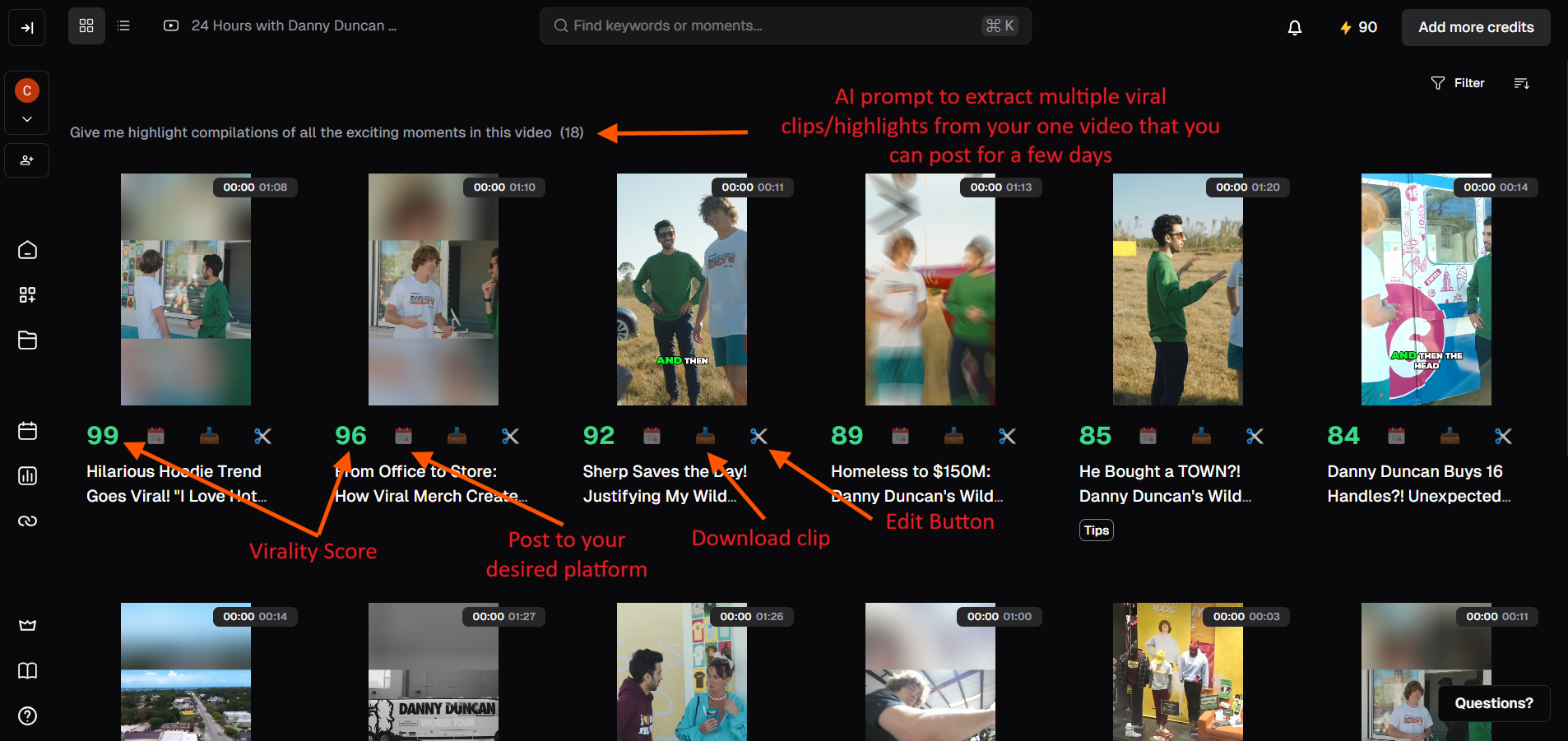
Actionable Tips for Higher Engagement
- The "70+ Rule" with a Twist: Focus primarily on clips with a 70+ score to save time, but don't ignore the "Diamonds in the Rough." If a clip has a 60 score but covers a trending niche topic or a deeply emotional moment, it may actually outperform a high-scoring generic clip.
- Optimize the First 3 Seconds: The AI identifies the hook, but you should refine it. Ensure the very first frame has a clear, bold caption hook (e.g., "The secret to...") and that any "filler" words (like "um" or "so") at the start are trimmed for an instant, high-energy opening.
- Use AI B-Roll to Fix "Talking Heads": If a high-scoring clip feels visually stagnant, use the AI B-roll tool to overlay contextually relevant footage. This keeps the viewer's eyes moving and significantly boosts retention rates.
- A/B Test Your Hooks: If you have a video with a score of 85, try exporting two versions with different Brand Templates or caption styles. Small visual changes can lead to massive differences in how the TikTok or Shorts algorithm "seeds" your content.
- Check for "Context Cuts": AI sometimes cuts mid-thought. Always manually check that your clip tells a complete micro-story. If the ending feels abrupt, use the "Edit Clip" tool to extend the boundary by 2–3 seconds to provide a satisfying conclusion.
Active Speaker Tracking
If your original video was filmed in widescreen (16:9) and you move around the frame, OpusClip’s AI Speaker Tracking acts like a virtual cameraman.
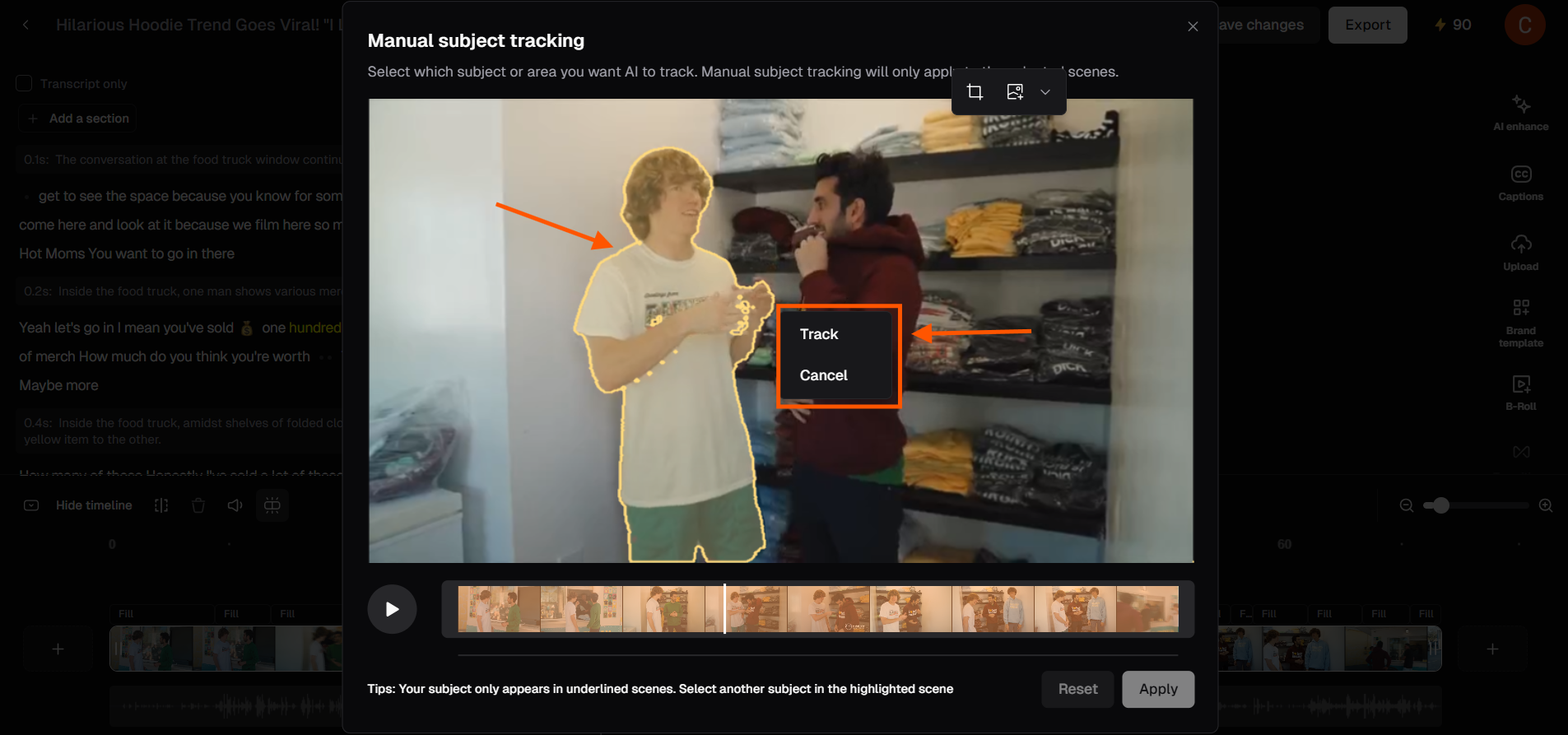
It automatically pans and crops the footage to keep your face centered, making your content look like it was natively shot for vertical platforms.
Maximize Your Professional Look
- Center of Attention: No more "cutting off" your head or shoulders when you move. The AI tracks your motion in real-time to maintain a perfect 9:16 vertical crop.
- The "Screen-Space" Rule: Ensure you aren't too far from the lens in the original shot. The AI can crop in, but if you're a tiny speck in a wide shot, the vertical version might look grainy.
- Dynamic Two-Person Tracking: If you have a guest, use the Split-Screen or Focus Switch settings. This tells the AI to jump between speakers or stack them, preventing the "awkward empty space" between two people.
- Check Your "Safe Zones": When the AI pans, make sure your captions don't overlap with the speaker's face. Use the Auto-Caption placement tool to keep text in the lower or upper third.
Stage 5: The Payday (Conversion & Monetization)
Tool: ManyChat + Stan Store
Transforming Attention into Revenue
Traffic is a vanity metric; conversion is a business metric. Asking a user to click your profile and find a link is too many steps.
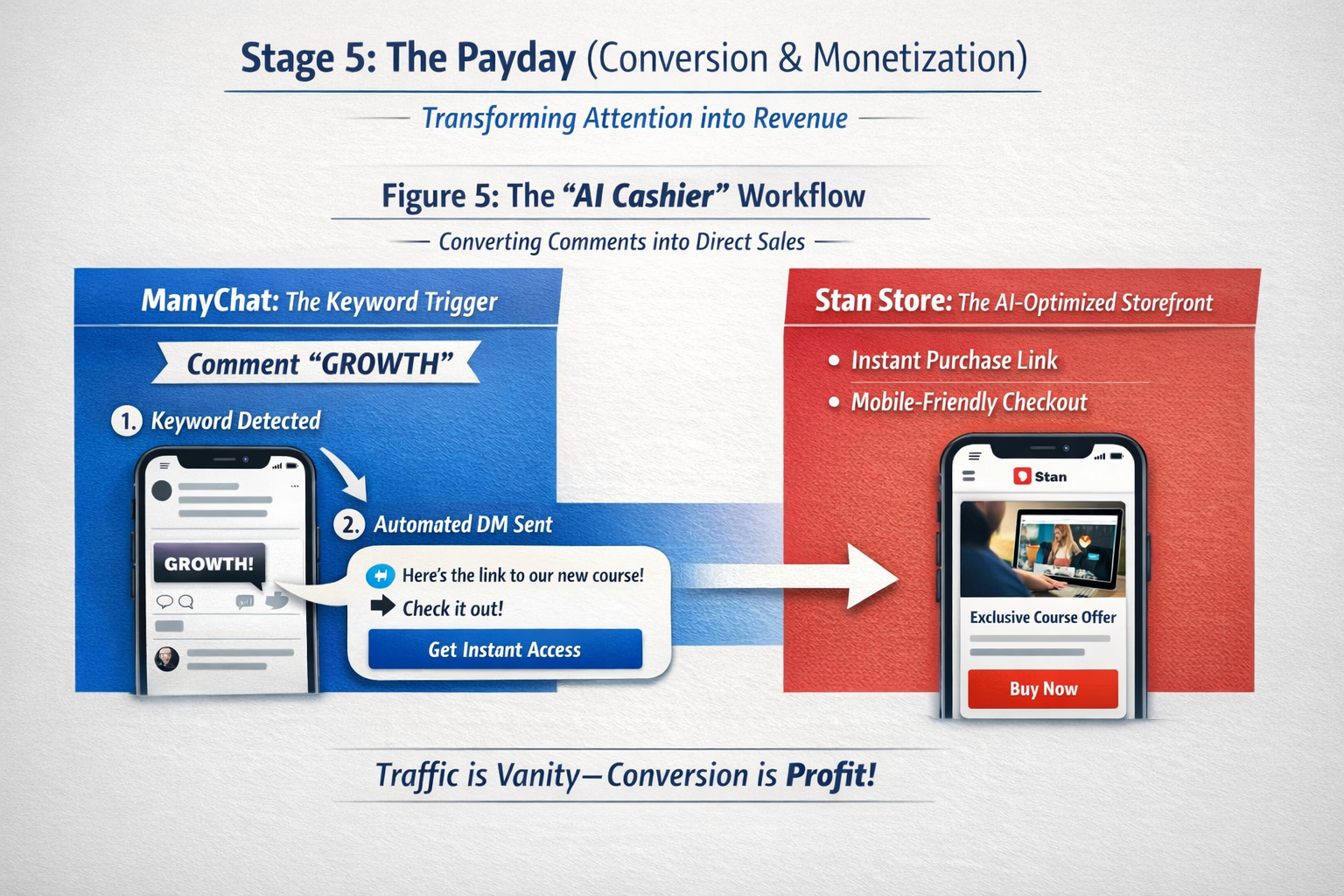
ManyChat: The Keyword Trigger
The "Link in Bio" is a conversion killer. It requires too many clicks. Instead, use the "Comment Keyword" strategy to turn passive viewers into instant leads.
- Trigger: Set ManyChat to monitor comments for a specific keyword.
- Automation: The second someone comments, the AI sends a DM with the direct link to your product.
Actionable Tips for High-Converting Automation
- Choose "Frictionless" Keywords: Use short, easy-to-spell words like "GO," "DEAL," or "MAP." Avoid complex words that autocorrect might ruin, as the trigger won't fire if the spelling is off.
- The "Double-Tap" Engagement Boost: Set your ManyChat automation to automatically "Like" the user's comment before sending the DM. This sends a second notification to the user, doubling your brand's real-time presence on their lock screen.
- Vary Your Public Replies: Don't let your bot reply with the same "Sent you a DM!" every time. Use ManyChat’s "Randomize" feature for public comments to avoid looking like a spam bot to the Instagram/TikTok algorithms.
- The 24-Hour Follow-Up: Set a "Smart Delay" in ManyChat. If the user clicks the link in your DM but doesn't buy within 24 hours, have the AI send a friendly, automated nudge or a limited-time discount code.
Stan Store: The AI-Optimized Storefront
While ManyChat handles the delivery, Stan Store is the high-speed cashier. It is engineered specifically for mobile "impulse" buys, stripping away the clutter of traditional e-commerce sites.
Strategies to Maximize Your Revenue
- The "1-Tap" Checkout: Unlike Shopify or Etsy, Stan Store allows users to check out without leaving the social app’s built-in browser. This 3-second checkout window is critical for capturing heat-of-the-moment sales.
- Leverage Order Bumps: When someone buys your main $27 guide, use an AI-suggested "Order Bump" at the checkout (for example: a $9 checklist). Because the credit card info is already entered, the "Add to Order" button has a massive conversion rate.
- Reverse-Engineer Your Success: Don't just look at total sales. Check your "Referrer" data in the Stan dashboard. If "Video A" resulted in 50 sales while "Video B" only got 2, you now have a data-backed blueprint for what content to film next.
- Lead Magnets as Data Nets: Even if you aren't selling a product yet, use a Freebie/Lead Magnet on Stan. This captures the email address immediately, allowing you to move the conversation from a volatile social algorithm to a permanent email list.
The Success Loop: Feeding the Data Back
The final stage is the "Success Loop." Look at your sales data. Which "Keyword" had the highest conversion? Which script variation led to more clicks?
Take that data and feed it back into Stage 1. Ask ChatGPT: "My educational script got 5k views but 10 sales. Analyze why and write 5 more scripts in that style." By using these five tools, you aren't just making content; you are building an automated media company.
