

Alitu was designed as an AI tool to simplify the process of creating, editing, and publishing podcasts. Instead of using complicated audio software or manually editing every recording, you can record your episodes, clean up your audio files, edit your visual content, and publish directly from a single dashboard.
Colin Gray, the founder and creator of Alitu, says that this AI tool was designed to eliminate the overly technical barriers that often discourage people from starting a podcast. The software automates several production tasks including noise reduction, volume balancing, transcription, and audio enhancement.
For those who want an easier workflow, Alitu offers features like text-based editing, magic filters, and automated audio cleanup to ease your workflow. Rather than learning professional audio engineering software, you can focus more on content creation while the platform handles much of the technical editing process behind the scenes. Through this guide, you’ll learn if Alitu would work for your situation or not.
What Problems Does Alitu Solve?
Alitu solves one of the biggest problems in podcasting: the complexity and time commitments surrounding audio production. Traditional podcast editing often requires separate recording software, manual audio cleanup, exporting, editing timelines, and publishing tools.
When you start to use Alitu, you streamline much of the process. You can record episodes, edit visual mistakes, improve audio quality automatically, and prepare episodes for publishing much faster.
The platform also helps creators who feel overwhelmed by technical software like traditional digital audio workstations. Instead of requiring professional editing knowledge, Alitu simplifies podcast production into a beginner-friendly workflow.
For busy creators, this can greatly reduce the time spent editing episodes while helping maintain more consistent audio quality.
Who Should Use Alitu?
Alitu appeals the most to creators who want professional podcast production without learning advanced audio editing.
Here are the people who may benefit most from Alitu:
- Podcasters: Great for beginner and intermediate podcasters who want simpler production workflows.
- Coaches: Useful for coaches creating educational or client-focused audio content.
- Educators: Helpful for teachers and course creators producing lessons or audio series.
- Content creators: Good for creators repurposing content into podcast formats.
- Small businesses: Useful for businesses launching branded podcasts.
- Marketers: Helpful for marketers creating long-form audio content for audiences.
- Solo creators: Excellent for creators handling recording, editing, and publishing themselves.
- Agencies: Useful for teams managing podcast production for clients.
What Can Alitu Be Used For?
You can use Alitu for more than simple audio editing. The platform supports several stages of the podcast production workflow.
Recording Podcast Episodes
One of the biggest uses of Alitu is recording podcast episodes from within the platform. You can record solo episodes or invite remote guests without needing separate recording tools.
The platform focuses heavily on simplicity, making it easier for creators to start recording quickly.
After recording, users can immediately move into editing and publishing without exporting files to external software.
How to Record Podcasts with Alitu
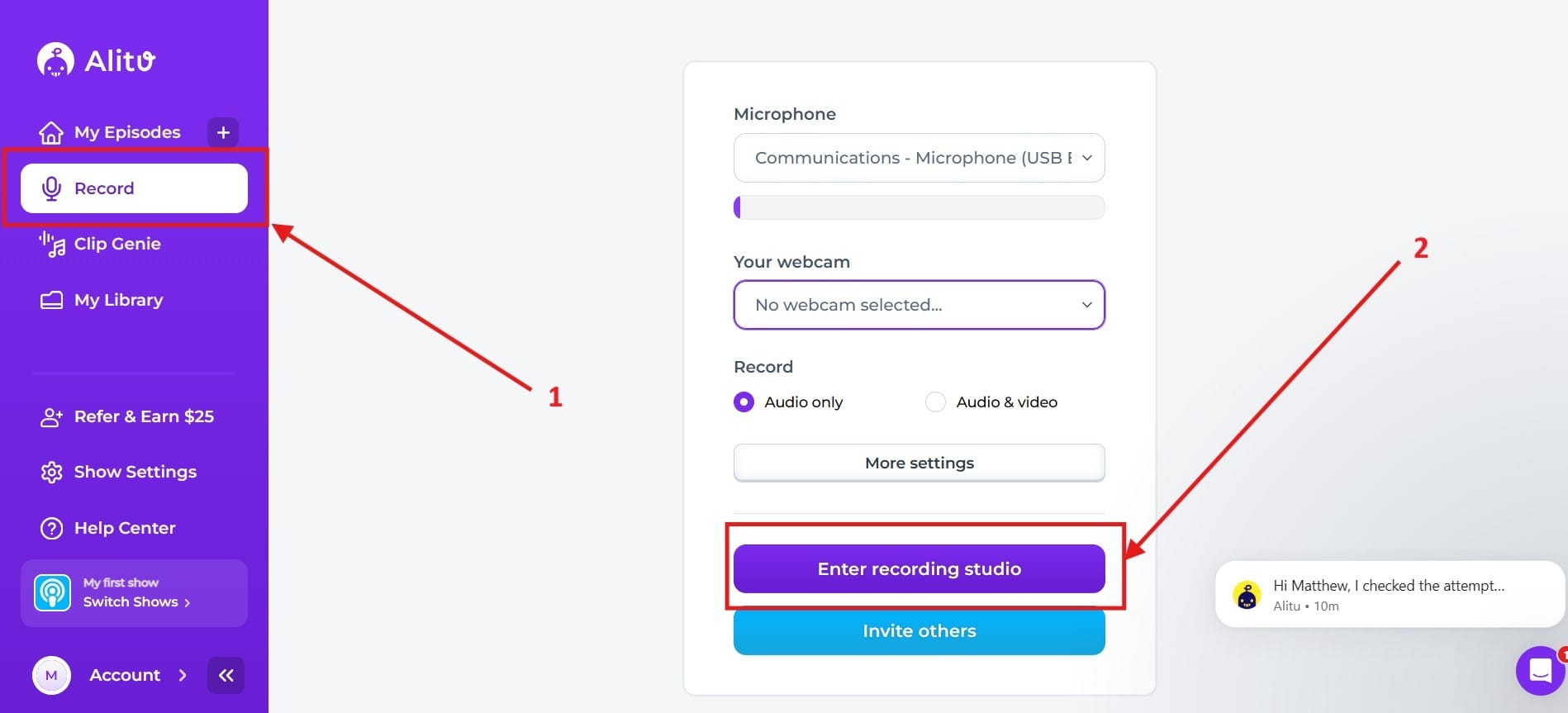
- First, go to the tab that says Record. I highlighted it as Red Box 1. After you go to that tab, you will want to tap the button that says Enter Recording Studio. I highlighted this as Red Box 2.
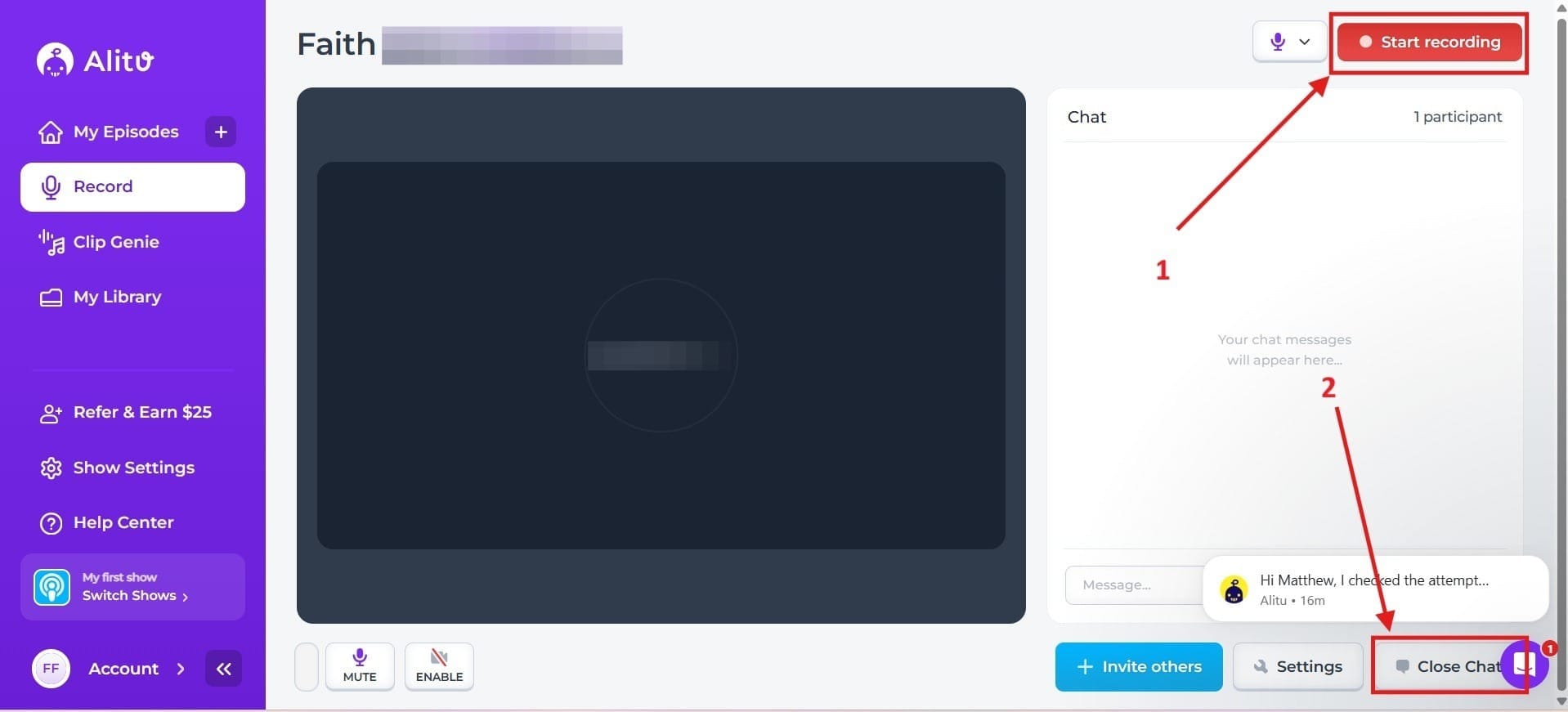
- Once inside, you can tap the red button that says Start Recording, and this will begin recording your podcast. I highlighted this as Red Box 1. In Red Box 2, I highlighted this as the button where you can choose to close your chat if you would prefer to record without chat.
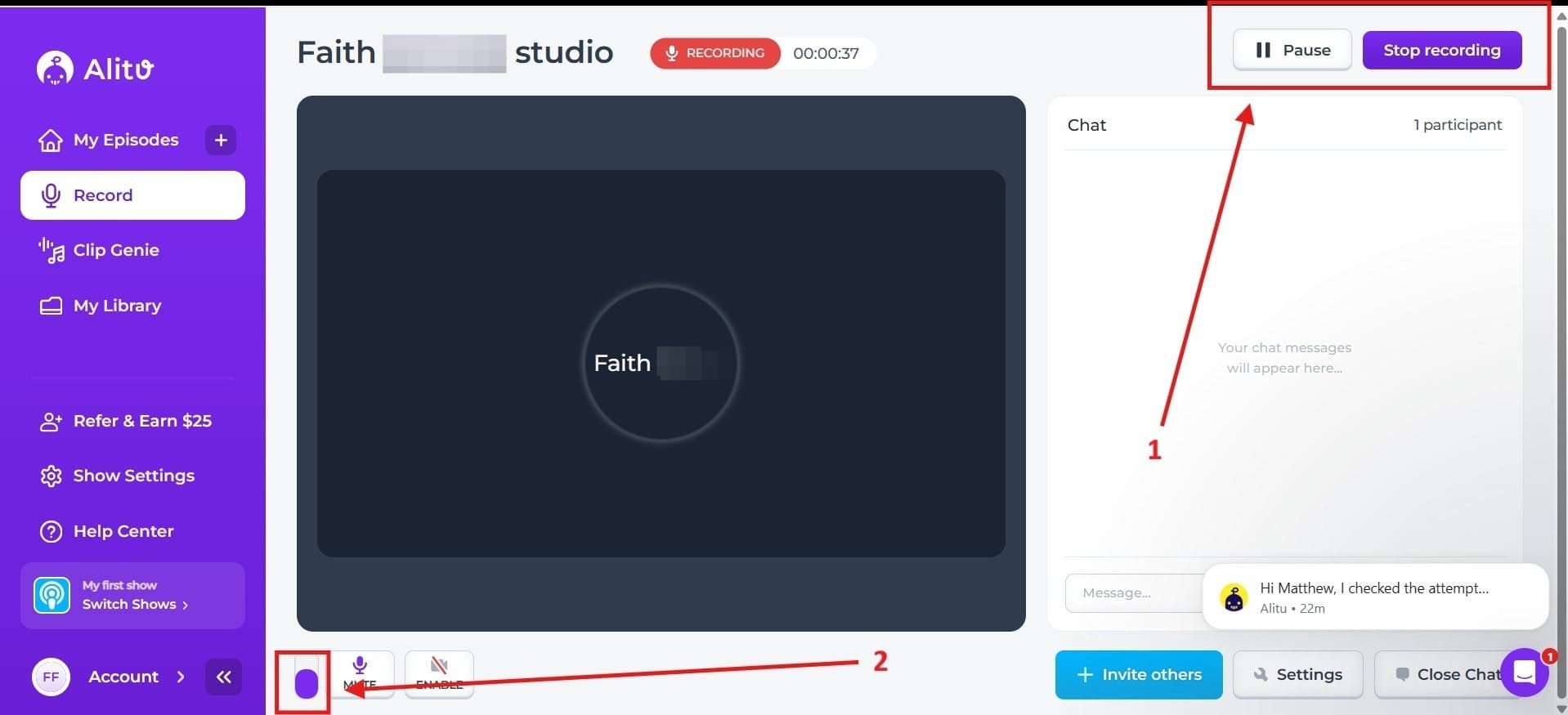
- This is what you’ll see once you hit the record button. I highlighted in Red Box 1 where you can choose to either Pause or Stop Recording. Doing this will take you to a pop-up screen where it will add the recording over to your library. Red Box 2 is your volume and shows that you have sound. If you don’t see any purple in this bar, it means you have no sound.
AI-Assisted Audio Cleanup
Alitu is heavily known for its automatic audio enhancement tools. The platform can reduce background noise, normalize audio levels, and improve sound quality automatically.
This helps creators achieve cleaner podcast audio without manually adjusting complicated audio settings.
The platform is designed to reduce technical editing work so creators can focus more on content and conversations.
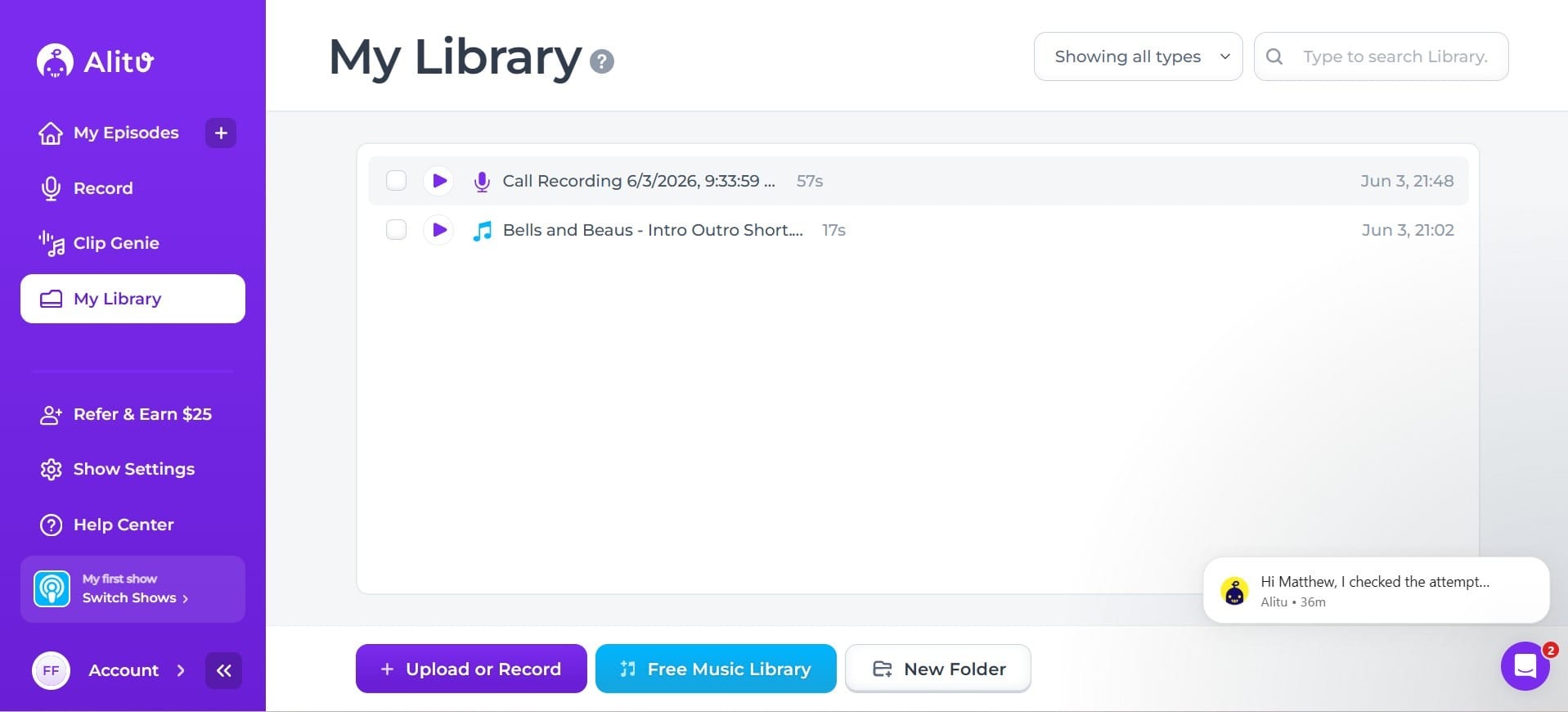
I won’t show this process because it happens automatically when you finish recording your podcast. The AI tool will automatically clean it up and then you can download it in your library.
Editing Podcasts Visually
Alitu includes visual editing tools that allow users to edit podcasts through text and waveform-based controls instead of advanced editing timelines.
This makes the editing process more approachable for beginners who may feel intimidated by traditional audio production software.
Creating Podcast Transcripts
The platform supports automatic podcast transcription, allowing creators to generate written versions of episodes.
This can help you improve accessibility, SEO, repurposing workflows, and content distribution across blogs and social media.
How to Get the Transcript
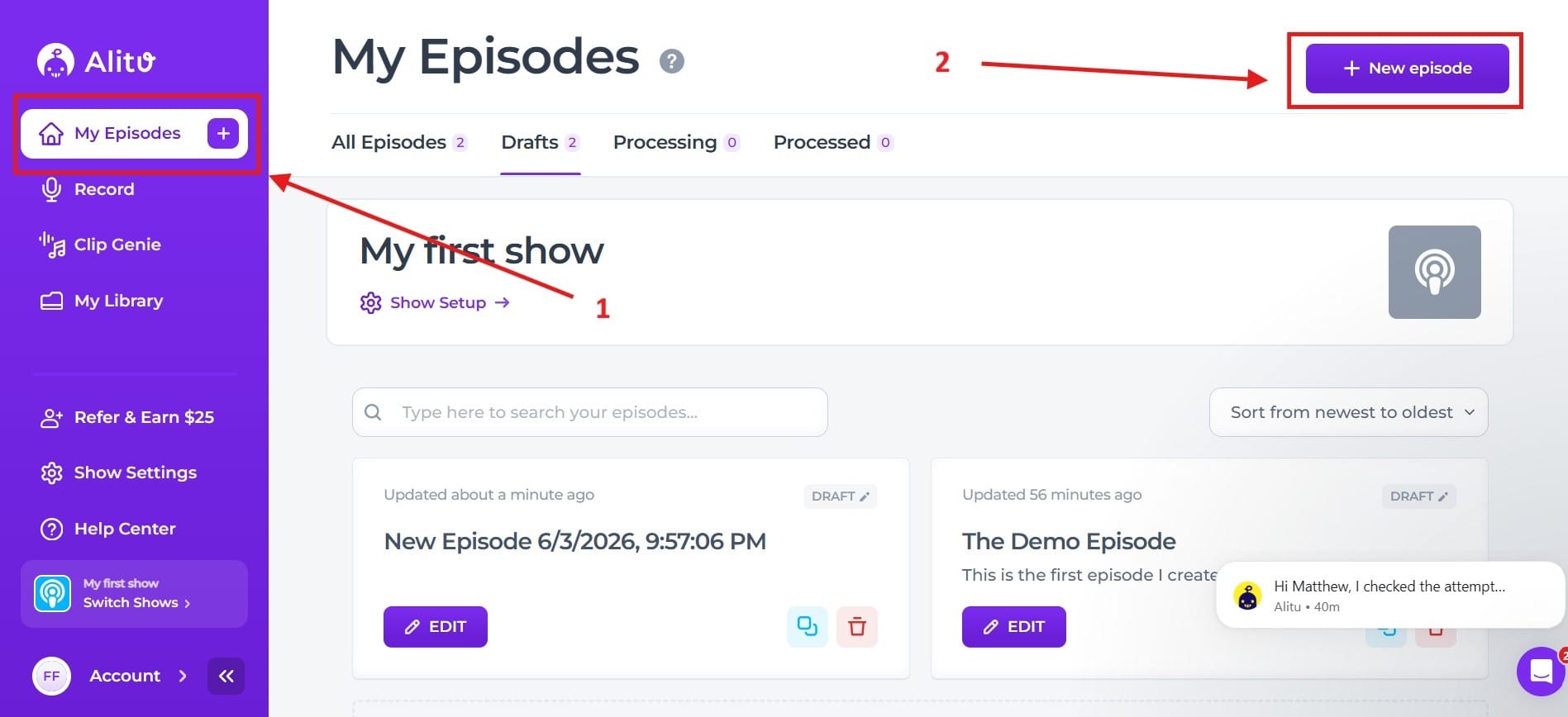
- To get the transcript, first you need to go to the tab My Episodes, which I highlighted as Red Box 1. Next, you need to go to New Episode, which I highlighted as Red Box 2.
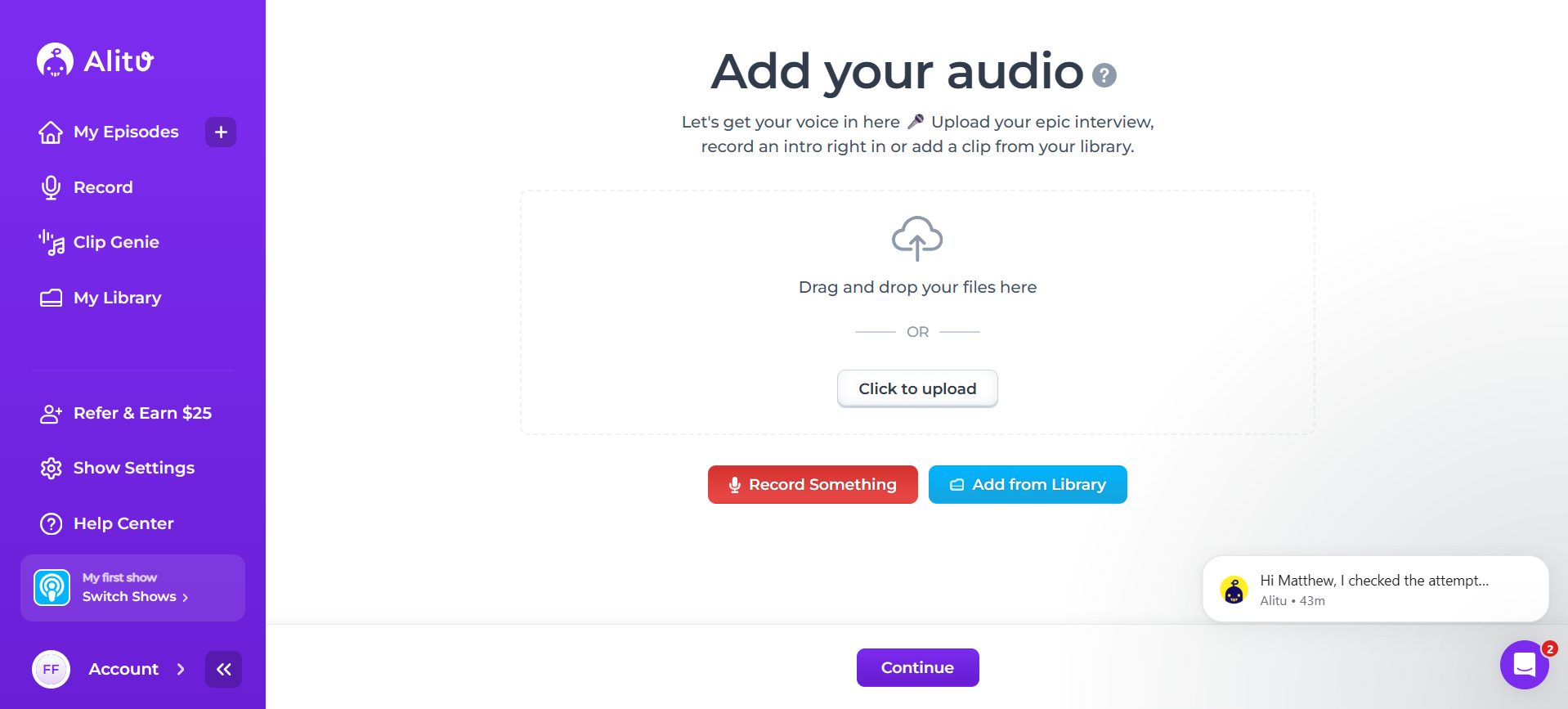
- After you do that, you’ll be taken to a new screen where you upload your audio, shown in the screenshot below. Once you have the audio file there, hit continue.
- Once inside, you can go up to the Episode Details tab, and this will let you choose your episode title, your season number, and your episode number. When you scroll down the page, you’ll also see a box where you can check if it uses explicit content, and you can give an episode description.
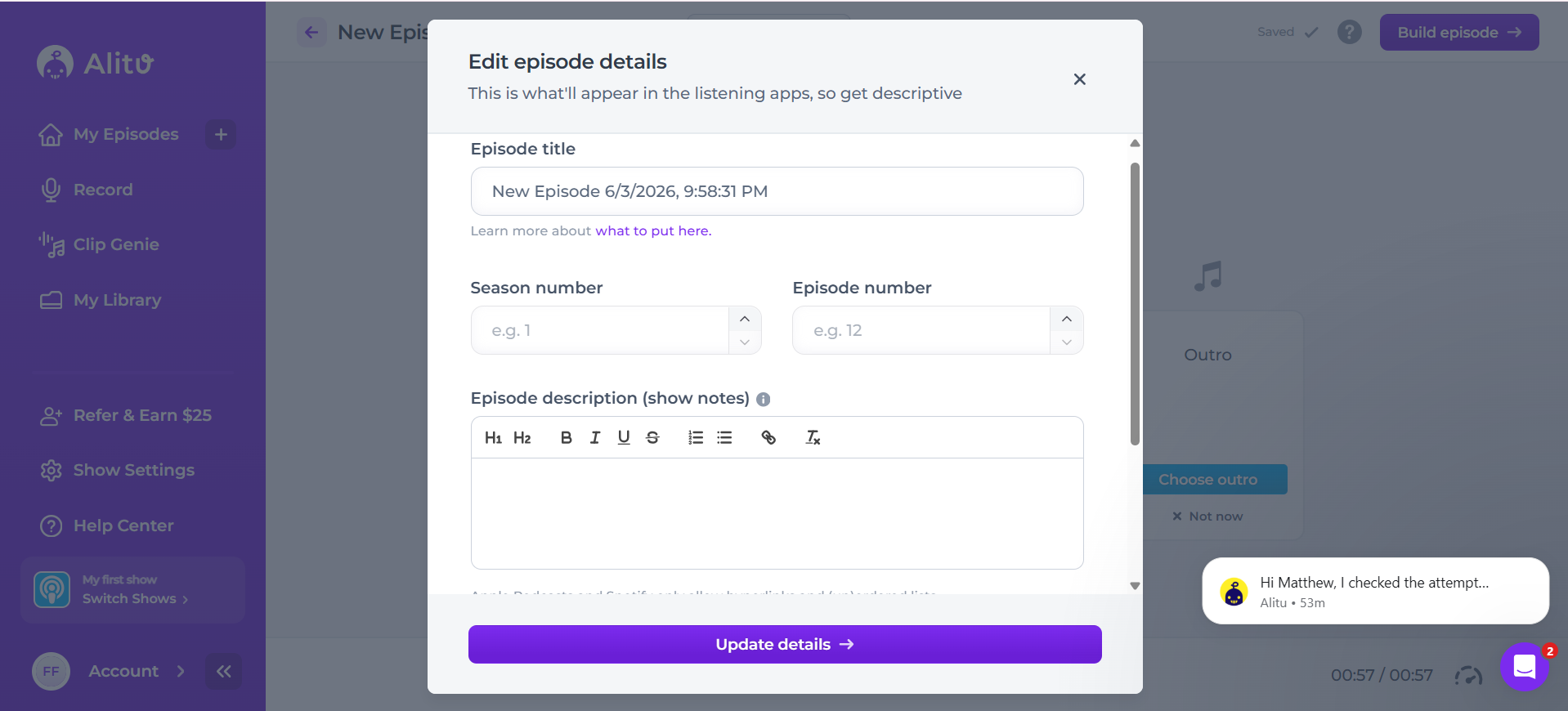
- Once you have this, hit the button that says Build Episode.
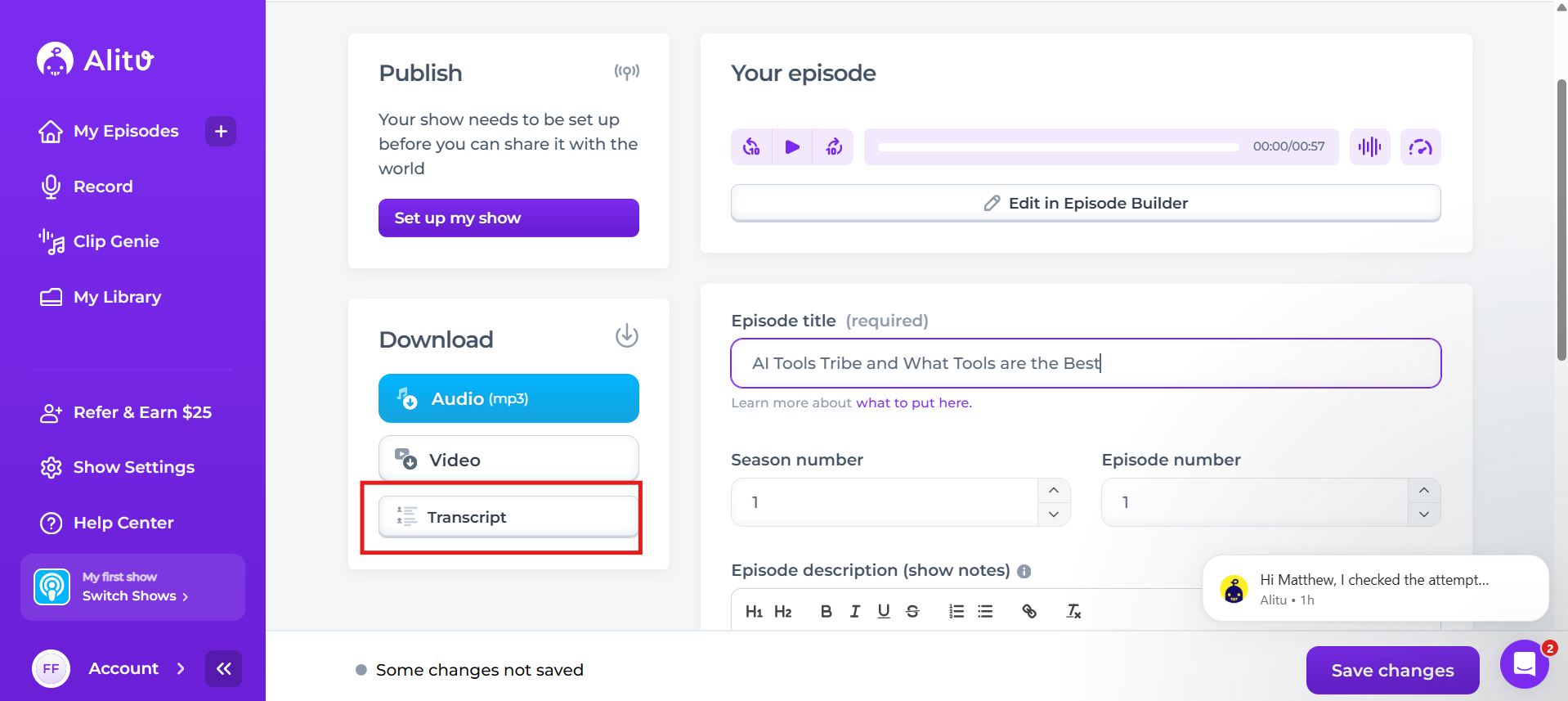
- After you’ve done this, you go into your episode, and it will let you grab the transcript from there, which I highlighted in the red box. When you click on that, it will ask how you'd like to generate it alongside your podcast episode. Generating the transcript will take about one minute.
Publishing Podcast Episodes
Alitu also helps streamline podcast publishing by integrating with podcast hosting platforms.
You can prepare episodes, add music and branding, and publish content more efficiently from a centralized workflow. Basically, we already covered how to publish an episode, so you just need to follow the steps outlined above.
What are the Key Features and Benefits of Alitu?
The key features and benefits of Alitu include:
AI Audio Enhancement
Alitu automatically improves podcast sound quality by reducing noise, balancing audio levels, and enhancing clarity.
This helps creators produce more professional-sounding episodes without needing technical audio engineering knowledge.
Beginner-Friendly Editing
Alitu focuses heavily on making podcast editing accessible for non-technical users.
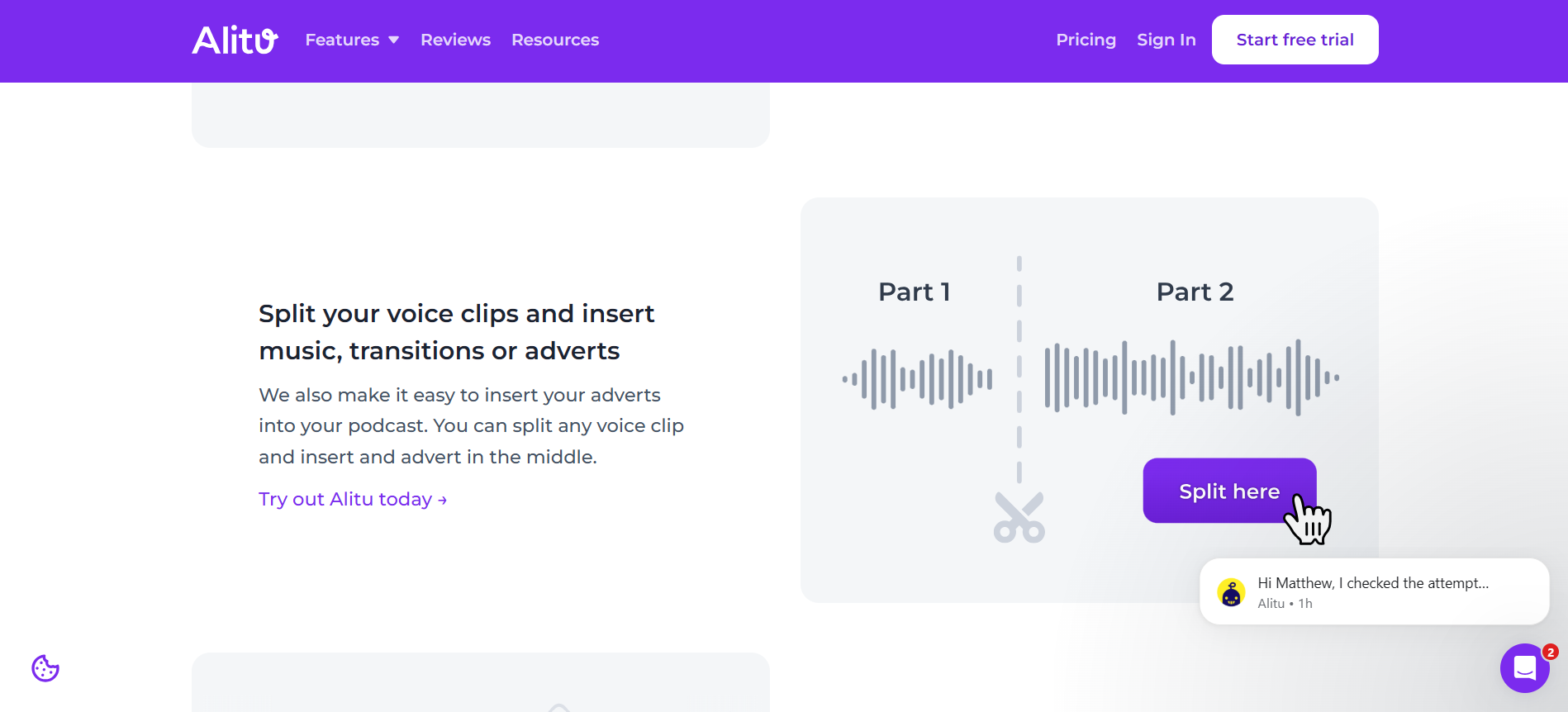
Instead of complicated production timelines, you can edit audio through simpler visual tools and transcript-style workflows.
Automatic Transcription
The platform supports podcast transcription, helping creators repurpose episodes into written content and improve accessibility.
This can also help with SEO and content marketing workflows.
Faster Podcast Production
One of the biggest benefits of Alitu is speed.
Instead of managing several separate tools for recording, editing, enhancing, and publishing, users can handle much of the workflow inside one platform.
Simplified Publishing Workflow
Alitu helps streamline publishing by supporting integrations and export workflows for podcast distribution platforms.
This allows creators to move from recording to publishing more efficiently.
What Makes Alitu Different?
What makes Alitu different is its strong focus on simplifying podcast production for creators who are not professional audio editors.
Unlike advanced audio engineering software that requires significant technical learning, Alitu is designed to make podcast creation accessible to beginners and busy creators.
The platform emphasizes:
- AI-powered audio cleanup
- Beginner-friendly workflows
- Built-in podcast recording
- Visual editing tools
- Faster publishing processes
- Simplified podcast production
- Integrated podcast workflows
- Content-focused creation
Alitu also stands out because it focuses much of its attention on reducing technical friction. Instead of requiring you to master complex editing software, the platform prioritizes ease of use and workflow simplicity.
For podcasters who want professional results without a steep learning curve, Alitu is designed to reduce production overwhelm.
Final Thoughts
Alitu positions itself as a simplified AI-powered podcast production platform focused on helping you to record, edit, and publish podcasts more easily. Rather than functioning as a highly technical audio engineering suite, the platform is built specifically for creators who want efficient podcast workflows without complicated software.
With features like AI audio enhancement, built-in recording, beginner-friendly editing, transcription, and streamlined publishing tools, Alitu is clearly aimed at podcasters, educators, coaches, marketers, and solo creators producing regular audio content.
Its biggest strength lies in helping creators reduce the time and technical complexity normally associated with podcast production. Try it today and see for yourself.
Frequently Asked Questions
Is Alitu worth it?
Yes, if you value time over granular control. It costs around $38/month, which is on the pricier side, but it replaces multiple tools by combining recording, AI-driven audio cleanup, text-based editing, transcription, and podcast hosting into one platform. If you want to push a button and have your audio automatically leveled and cleaned, it’s worth it. If you prefer to manually tweak EQ and audio tracks, you might find it too automated.
Is Alitu free?
No. Alitu does not have a permanent free tier. They offer a 7-day free trial so you can test out the features, but after that, you will need to sign up for a paid subscription (roughly $38/month, or less if billed annually).
Does Alitu record video?
Yes. Alitu supports high-quality HD video recording (up to 1080p) in its virtual studio, featuring "double-ender" recording—meaning it records each guest's video locally to prevent glitches from poor internet connections. You can also edit your video using their text-based editor, allowing you to cut footage simply by deleting words from the transcript.
Does Alitu include podcast hosting?
Yes, it does. One of Alitu's biggest perks is built-in hosting. It allows you to publish your finished episodes directly to major platforms like Spotify and Apple Podcasts right from the app. The hosting is included in your subscription and is free for up to 1,000 downloads per month, with scaled pricing if your audience grows past that.
Can I import audio recorded outside of Alitu?
Absolutely. If you prefer to record on a dedicated mic setup, Zoom, or a phone app, you can simply drag and drop your raw audio files (like WAV or MP3) into Alitu. The platform will still run its automatic mastering, leveling, and noise reduction on the imported files just like it would with native recordings.
