Flow AI is an all-in-one, cloud-based LinkedIn automation tool designed to handle your outbound prospecting, messaging, and inbox management in one single place.
Instead of juggling a messy tech stack—like paying separately for a lead database, an outreach sequencer, a Chrome extension, and a CRM—Flow AI bundles everything together. It finds qualified leads, reaches out using human-like pacing, and leverages a built-in AI sales assistant (co-pilot) to help you research prospects and draft contextual replies that actually lead to booked sales calls.
What Problems Does Flow AI Solve?
If you rely on LinkedIn to bring in clients or sales, you probably know this exact feeling:
You sit down on a Monday morning with the best intentions. You open LinkedIn or Sales Navigator, start manually scouring profiles, send 10 personalized invites, and by hour two, your eyes hurt and you haven’t done any actual client work.
Or maybe you’ve tried automating this before. You fired up a sketchy browser extension, set up a generic sequence like:
"Hey {First_Name}, loved your profile! Let's connect!"
...and either got left on "Seen," triggered aggressive LinkedIn weekly limit warnings, or worse, put your profile in LinkedIn jail.
Even when outreach does work, the operational headache kicks in. If you manage multiple profiles—say, your personal account, your co-founder’s account, or clients if you run an agency—you are constantly logging in and out, losing track of active conversations, and forgetting to follow up after three days.
Flow AI addresses these exact friction points:
- The Manual Outreach Grind: It eliminates the 10+ hours a week spent manually copy-pasting connection requests and follow-ups.
- The "Robotic Outreach" Drop-off: Generic templates don't convert anymore. Flow AI uses smart AI research to make cold outreach feel bespoke.
- Account Safety Anxiety: It is 100% cloud-based (no risky browser scripts running in your tabs) with automated sender warm-ups and randomized intervals.
- The Multi-Tab Inbox Nightmare: It stops high-intent leads from slipping through the cracks when managing conversations across accounts.
Who Should Use Flow AI?
Flow AI isn't built for enterprise giants with 200 SDRs who need complex telephone switchboards. It is tailor-made for lean, high-velocity teams who want pipeline without overhead:
- Solopreneurs & Freelance Consultants: If you are a team of one, your time is your inventory. You cannot afford to spend half your week prospecting. Flow AI runs your AI cold outreach in the background while you focus on client deliverables.
- Small to Medium Business (SMB) Owners & Founders: Founders who handle their own outbound sales and need a steady stream of qualified sales calls without hiring a full-time business development rep ($5,000+/month).
- B2B Lead Gen & Marketing Agencies: If you run multi-account LinkedIn outreach for clients, the ability to safely rotate senders and run everything from one dashboard is an absolute lifesaver.
- B2B Sales Reps (AERs/SDRs): Any sales rep whose primary deal-making happens on LinkedIn and who wants to automate repetitive touchpoints while preserving a human touch.
What Can Flow AI be Used For?
Think of Flow AI as your automated outbound engine. In day-to-day work, you can use it for:
- Precision B2B Lead Generation: Sourcing active decision-makers in your specific niche without buying external email lists or sketchy third-party contact databases.
- Multi-Step Outreach Sequences: Setting up smart connection flows where prospects receive a warm, tailored note, followed by spaced follow-ups if they don't answer right away.
- Event & Content Retargeting: Connecting with people who attended a specific industry webinar, commented on an influencer's viral post, or match specific job changes.
- Unified Client Communications: Consolidating all incoming messages across multiple team members into a single hub so whoever is on duty can reply instantly.
- Deal Pipeline Tracking: Keeping track of who is "Warm," who asked for a "Follow-up Next Month," and who booked a demo directly inside the tool.
How Should You Use Flow AI?
The biggest mistake people make with LinkedIn tools is blasting 500 pitches on day one. With Flow AI, the best approach is straightforward and conversational:
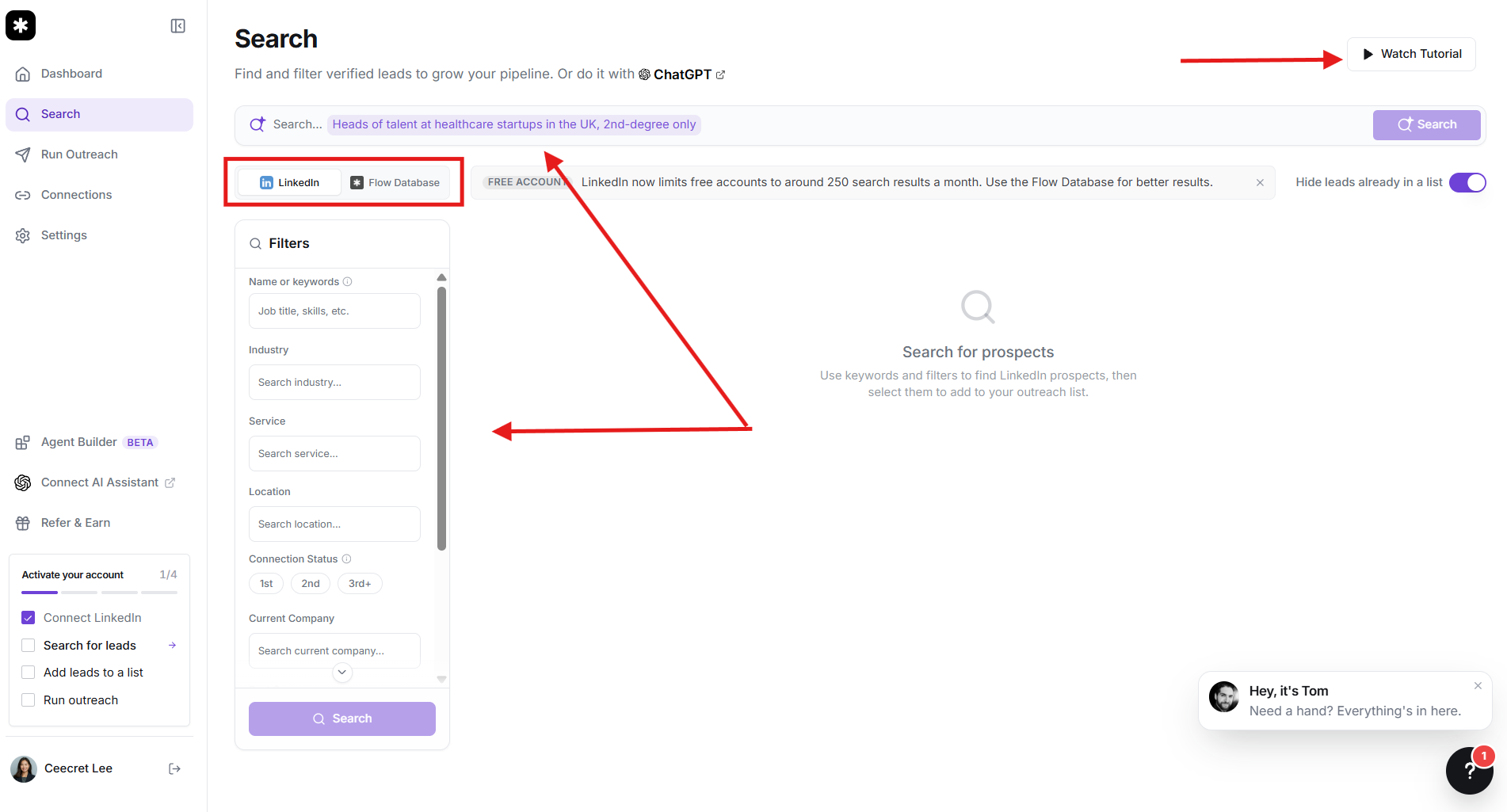
Step 1: Define Your Target Buyer
Use the built-in LinkedIn lead finder to zero in on your ideal customer profile (ICP). Filter by job title, headcount, geography, and industry. You can also import existing Sales Navigator lists directly.
Step 2: Let the AI Personalize Your Hook
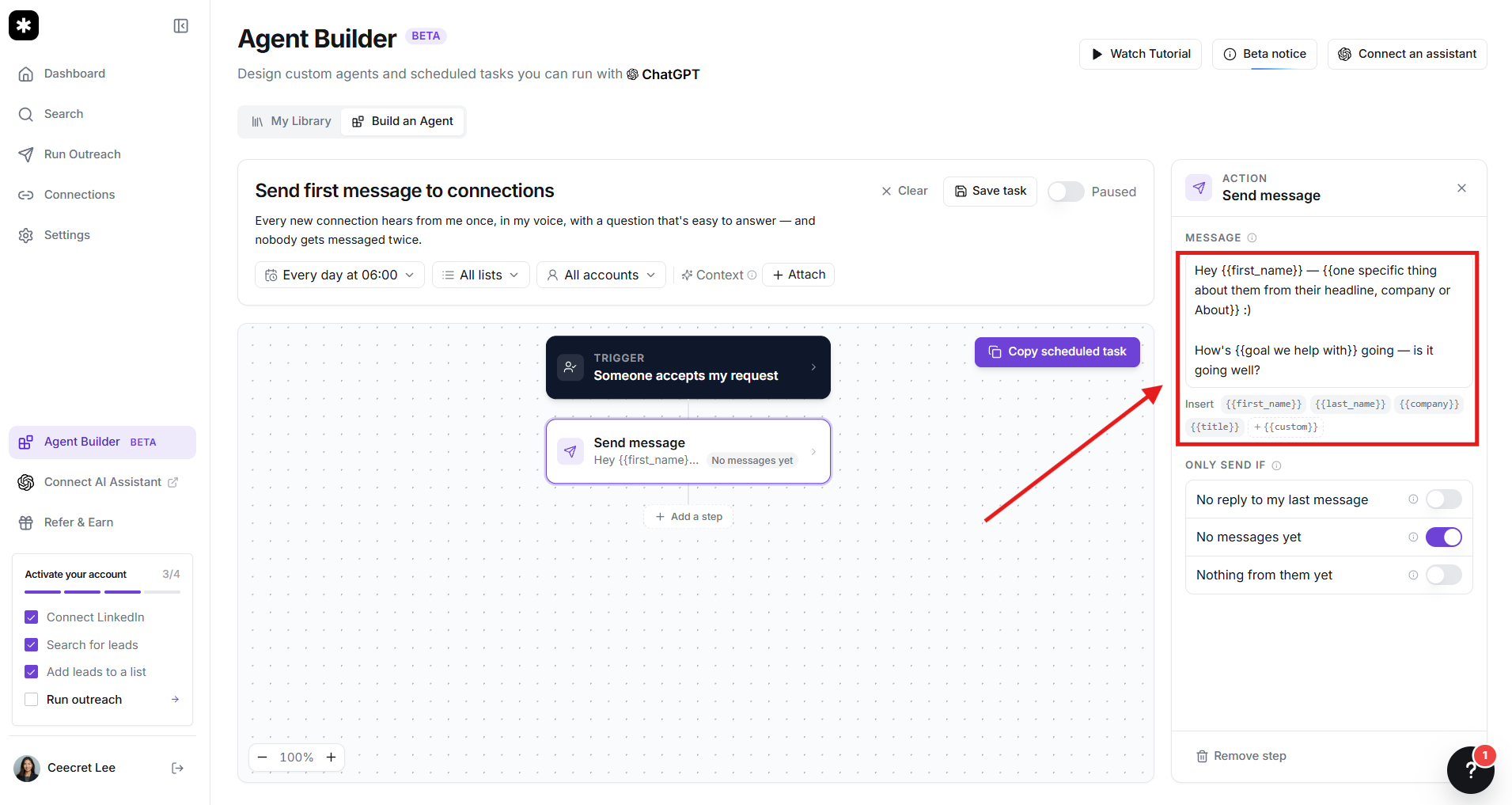
Instead of a canned pitch, use the AI co-pilot to scan prospect profiles. The AI pulls relevant hooks—such as their recent posts, company updates, or specific skills—so your initial invite feels like you actually did your homework.
Step 3: Set Up a Gentle Campaign Sequence
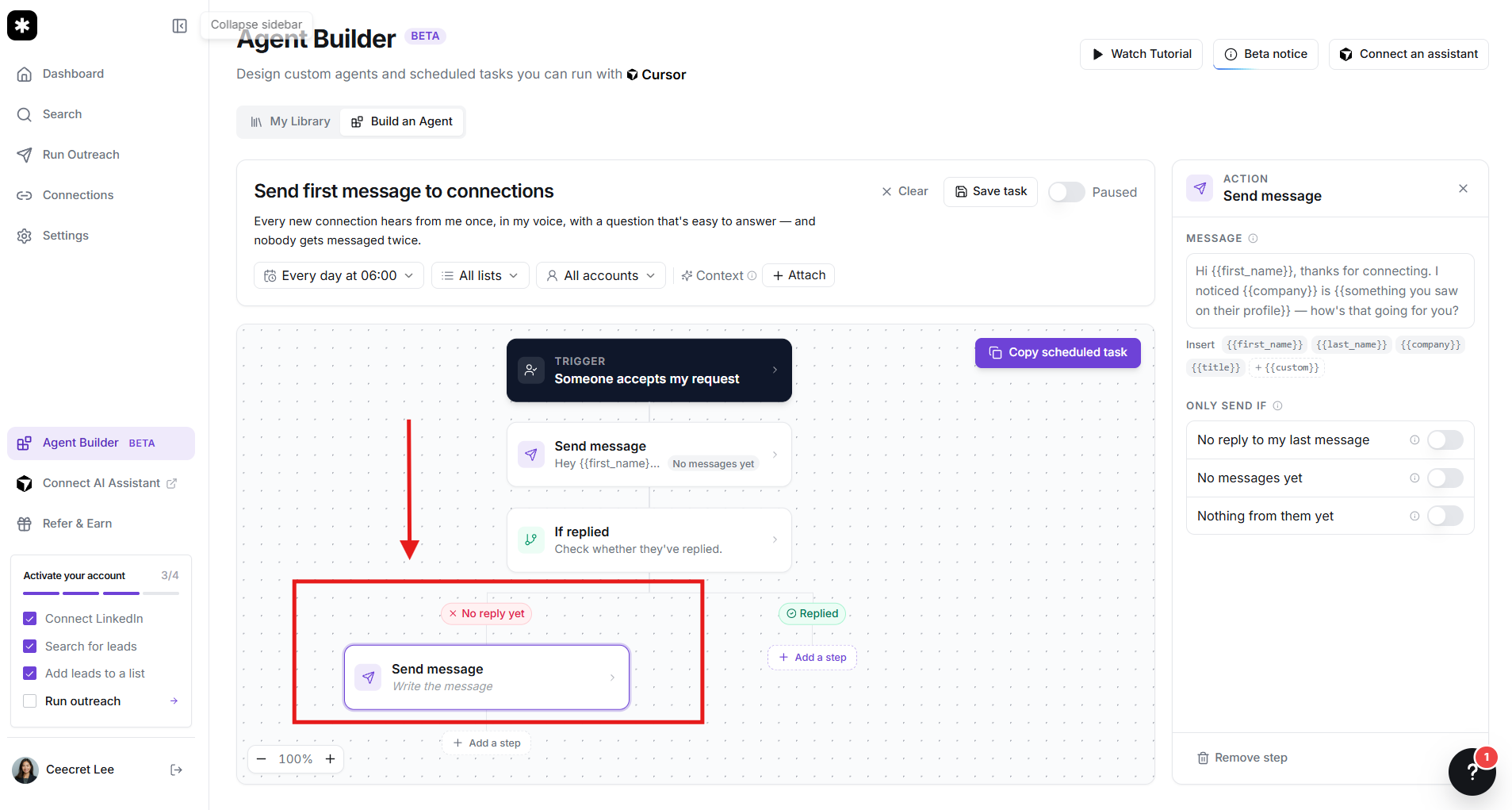
Set up a logical sequence: a personalized connection invite, a gentle value-add message 2 days after they accept (like a free resource, quick insight, or relevant question), and a brief follow-up. Flow AI automatically halts the sequence the moment someone replies.
Step 4: Handle Replies Like a Human
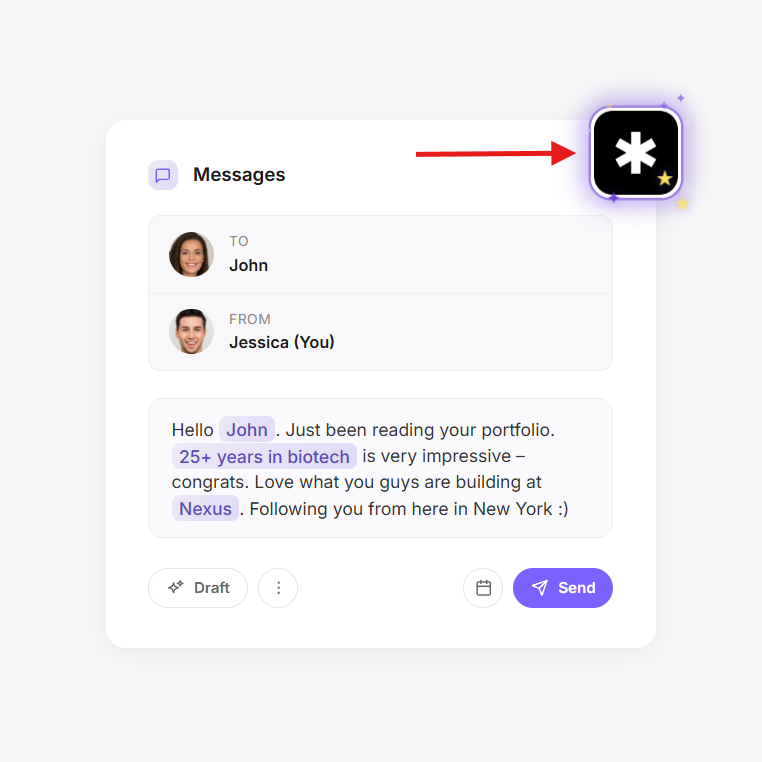
When someone responds, jump into the unified inbox. You can have the AI assistant draft a thoughtful response tailored to their question, tweak it to add your personal voice, and send it off in seconds.
What are the Key Features and Benefits of Flow AI?
Instead of bogging you down with dozens of niche settings you will never touch, Flow AI focuses on the few levers that actually move the needle for your pipeline:
- Agent Maya / AI Sales Assistant: This is the brains of the platform. Rather than just inserting basic tags like {Company}, the AI reads prospect profiles and generates context-aware hooks. When leads reply, the AI drafts intelligent counter-responses to help nudge the conversation toward a calendar booking.
- Built-In LinkedIn Lead Finder: You get access to a massive database of 300M+ B2B contacts. You don’t need to pay for Apollo or extra scraping tools just to get clean names and profile URLs into your campaign.
- Multi-Account Sender Rotation: Scaling up? You can attach multiple LinkedIn profiles to the same campaign. Flow AI intelligently rotates sending activity across accounts to keep daily volumes low and safe while multiplying your total outbound reach.
- Unified LinkedIn Inbox: All inbound messages across all connected profiles funnel into one clean dashboard. You can tag chats, snooze leads, and assign conversations to team members without logging out of anything.
- LinkedIn Message Scheduler: Precise timezone scheduling and randomized human-like delays ensure your messages go out when prospects are actually active at their desks, keeping your account safe from algorithmic detection.
- Built-in CRM & Pipeline Automation: Track where every lead sits—from initial connection to "Call Booked." Flow AI offers lightweight native deal tracking alongside two-way sync integrations with CRMs like HubSpot and Salesforce.
What Makes Flow AI Different?
Most LinkedIn automation software falls into two categories:
- Clunky Chrome Extensions: Cheap, but notorious for triggering LinkedIn security checkpoints and crashing your browser tabs.
- Fragmented Cloud Tools: Powerful, but they only do one thing—requiring you to buy HeyReach for sending, Clay or Apollo for data, and a third app for inbox management.
Flow AI bridges this gap cleanly. It feels like someone took the multi-account safety of HeyReach, the intelligent data sourcing of Apollo, and an intuitive AI co-pilot, and fused them into a single, clean workspace.
The biggest differentiator, though, is how deeply the AI is integrated into the reply stage. Most automation platforms abandon you the moment a prospect responds. Flow AI stays with you through the entire conversation, actively analyzing the prospect's reply and suggesting context-aware answers so you can close the meeting in fewer messages.
Final Thoughts on Flow AI
Outbound prospecting on LinkedIn shouldn't feel like a full-time data entry job, nor should it look like a spam cannon.
If you are a founder, solopreneur, or agency operator whose target clients spend their days on LinkedIn, Flow AI hits the sweet spot. It takes the tedious, repetitive mechanics of outbound off your plate, protects your personal profile with cloud-based pacing, and equips you with an AI assistant that keeps your communication feeling genuinely personal.
The best way to see if it fits your workflow is to run a low-stakes test. Set up a simple 20-person search for your exact niche, test the AI's suggested hooks, and see how your response rates compare to manual messaging.
Frequently Asked Questions
How does LinkedIn automation work?
It uses cloud software to handle repetitive manual tasks—such as finding prospect profiles, sending connection invites, and delivering timed follow-ups—using pre-set schedules and natural delays that mimic human browsing.
How to automate LinkedIn posts using AI?
Generate your content ideas and copy with an AI writer (like ChatGPT or Claude), then feed the drafts into a social media scheduler (like Buffer, Taplio, or Hootsuite) to publish them automatically at peak engagement hours.
Is Flow AI safe for my LinkedIn account?
Yes. Unlike risky browser extensions that inject code into your open tabs, Flow AI runs in the cloud with randomized human delays, dedicated proxies, and strict daily volume limits to keep your profile under LinkedIn's radar.
Do I need a LinkedIn Sales Navigator account to use Flow AI?
No. Flow AI includes a native B2B database of 300M+ contacts, so you can build lead lists without Sales Navigator. However, if you already have Sales Navigator, you can import saved lead searches directly.
Can Flow AI manage multiple LinkedIn accounts at once?
Yes. You can link multiple team or client accounts, rotate sending across them to scale outreach safely, and handle all incoming replies in a single, shared inbox.