

Reclaim AI is an AI calendar assistant that brings your to-do lists, habits, personal routines, and meeting links into your calendar. Instead of a static grid where you manually drag blocks around, you get an adaptive schedule that reshuffles itself whenever priorities change, urgent calls come in, or something runs late.
Reclaim is now part of Dropbox, and it has expanded beyond scheduling into an AI Assistant you can chat with, ready-made AI agents (for things like defending focus time or detecting meeting overload), and time analytics for teams.
What Problems Does Reclaim AI Solve?
If you are running a business or managing multiple projects, your calendar probably feels like a constant battle ground. Here are the exact pain points Reclaim eliminates:
- The "Tetris" Calendar Fatigue: Spending 30 to 60 minutes every morning manually rearranging task blocks because yesterday’s emergency derailed your schedule.
- Constant Context Switching: Jumping between an isolated task manager (like Todoist or Asana) and your calendar, never quite knowing when you’ll actually execute those tasks.
- Guilt-Driven Overcommitment: Saying "yes" to meetings because your calendar looks open, only to realize later that you sacrificed the four hours of deep work required to finish a critical deliverable.
- Meeting vs. Deep Work Conflict: Having your workday fragmented into awkward 30-minute gaps that are too short for deep focus, leaving you exhausted with zero high-value output.
- Work-Life Boundary Erasure: Constantly skipping workouts, lunches, or family time because work meetings overran your personal hours.
Who Should Use Reclaim AI?
Reclaim AI is built specifically for people whose productivity relies on uninterrupted focus time:
- Solopreneurs and Founders: Anyone wearing ten hats who needs strict guardrails around their time to execute both strategy and client work.
- Small to Medium Business Owners: Leaders trying to balance operational management with dedicated strategy time without drowning in administrative scheduling overhead.
- Freelancers and Consultants: People managing multiple client projects, tracking billable time, and scheduling discovery calls alongside actual execution tasks.
- Remote Teams and Managers: Teams needing clear visibility into workload capacity while maintaining cross-functional calendar syncs across work and personal accounts.
What Can Reclaim AI be Used For?
Reclaim functions as a central nervous system for your workday. You can use it to:
- Automate Task Scheduling: Feed your task list into Reclaim, set priority levels and deadlines, and let the algorithm place the work on your calendar automatically.
- Protect Focus Time: Reserve dedicated, uninterrupted blocks for high-cognitive work that automatically lock when your day fills up.
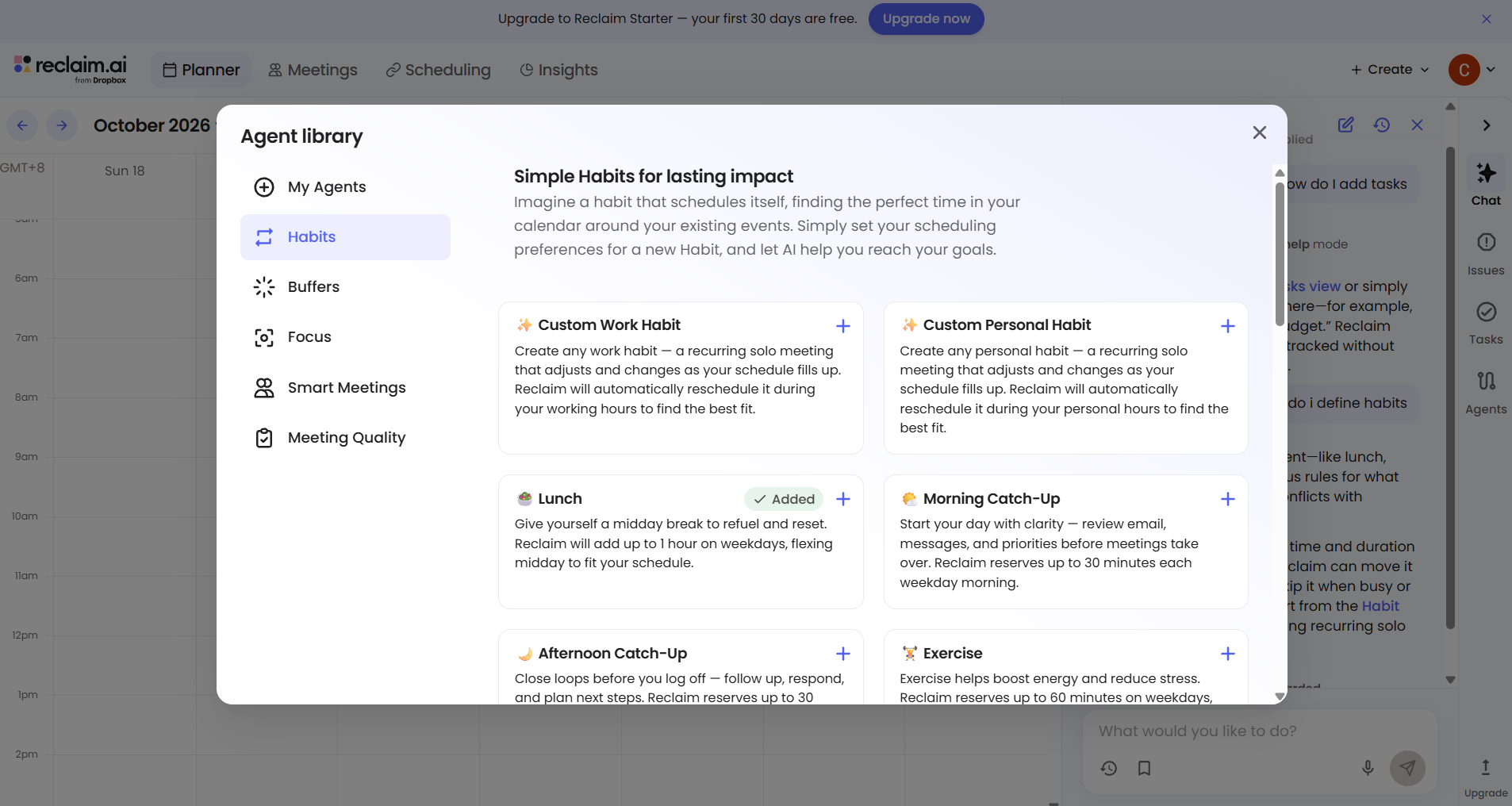
- Schedule Recurring Habits: Build consistent daily or weekly routines—like workouts, email triage, or team check-ins—that flexibly adapt around meetings.
- Manage One-on-One Meetings: Automate recurring 1-on-1s with team members by finding ideal mutual openings without manual back-and-forth messaging.
- Sync Personal and Work Calendars: Keep personal events confidential on your work calendar while automatically blocking out that time so co-workers don't double-book you.
How Should You Use Reclaim AI?
Getting the most out of Reclaim comes down to setting up a simple workflow:
- Connect Your Primary Google Calendar: Integrate your primary work account, then link any personal or side-project calendars via Reclaim's Calendar Sync feature.
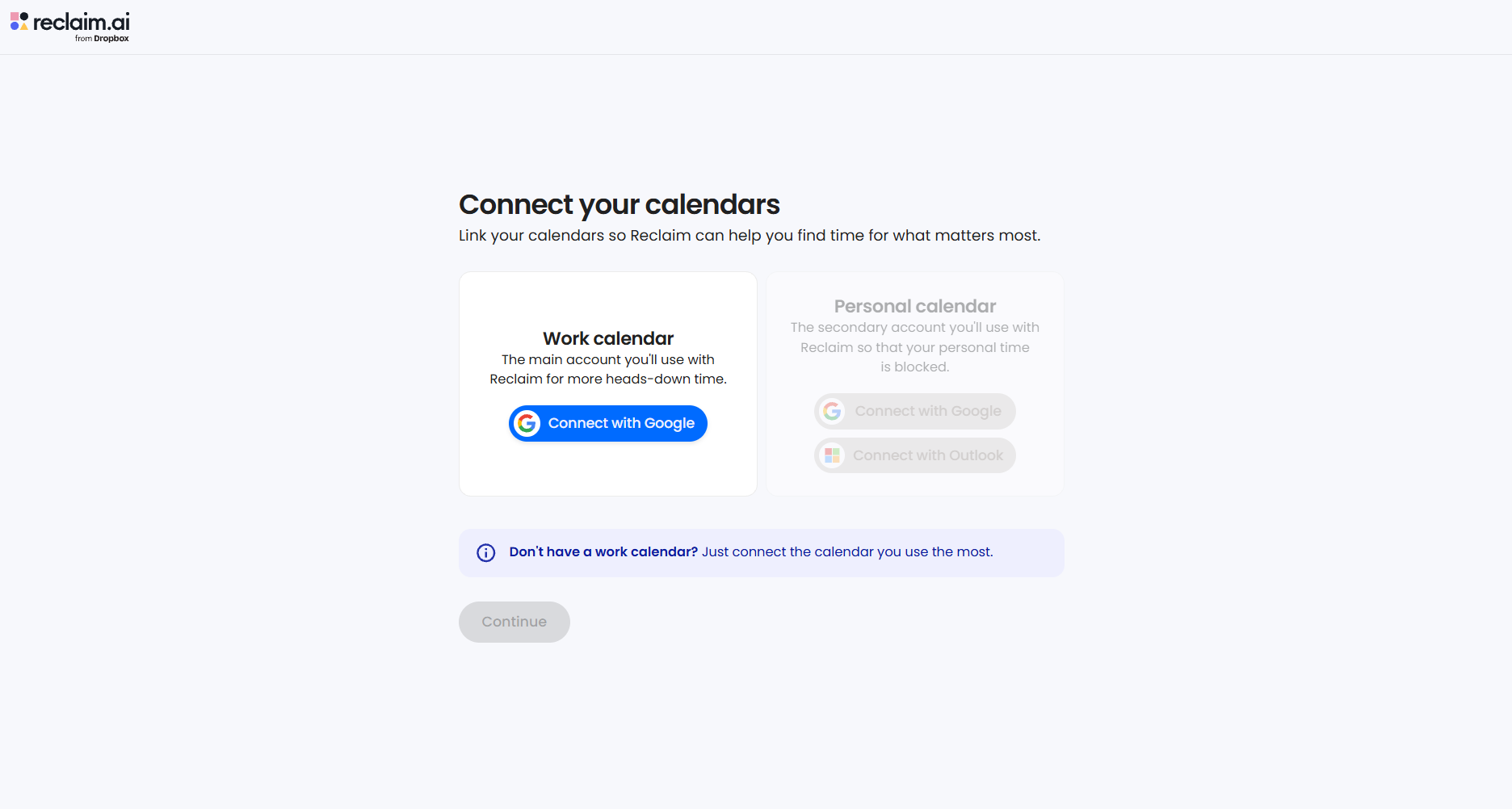
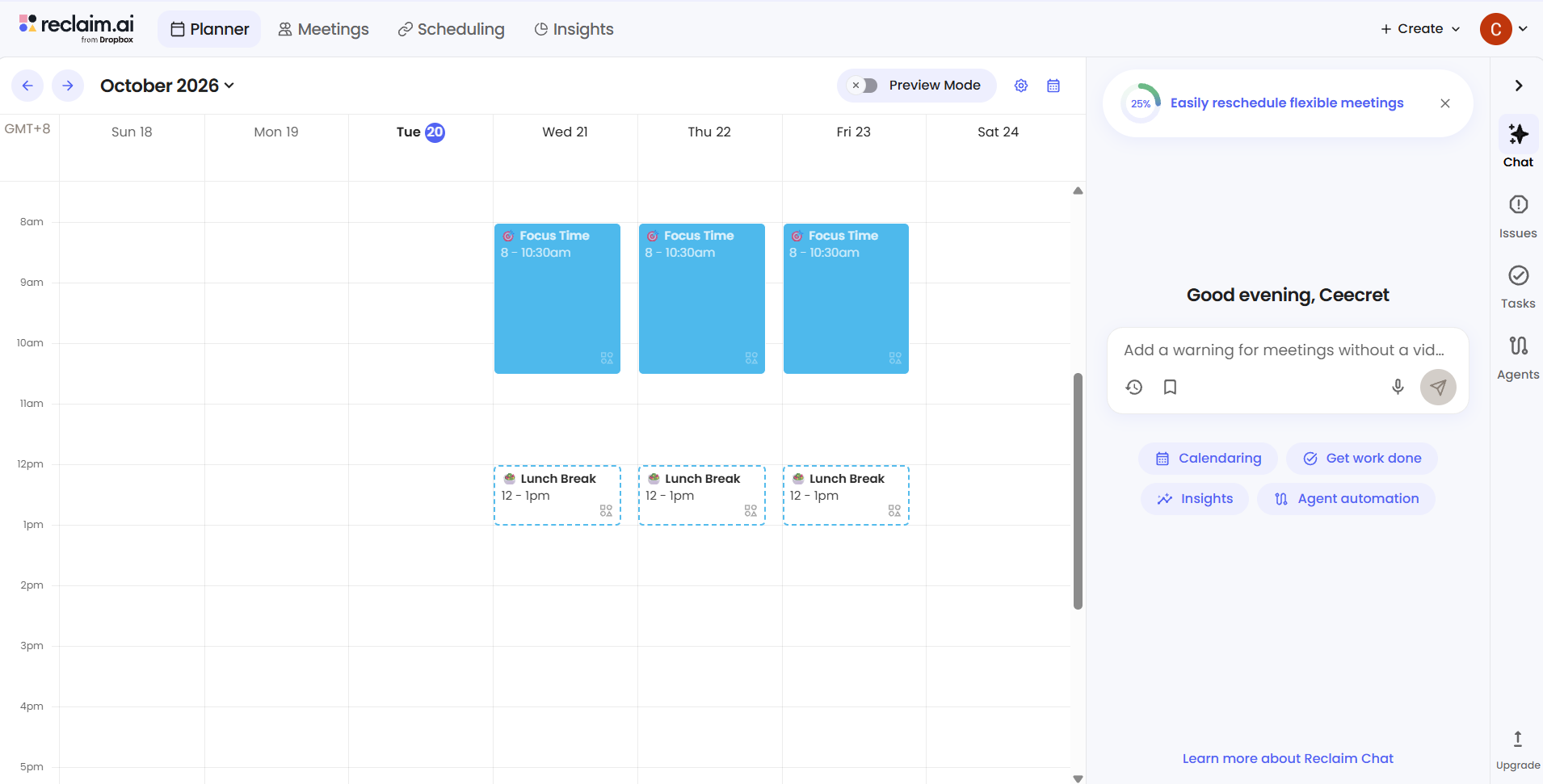
- Set Your Working Hours and Guardrails: Define your general availability (e.g., core work hours, preferred lunch hour, meeting-free zones).
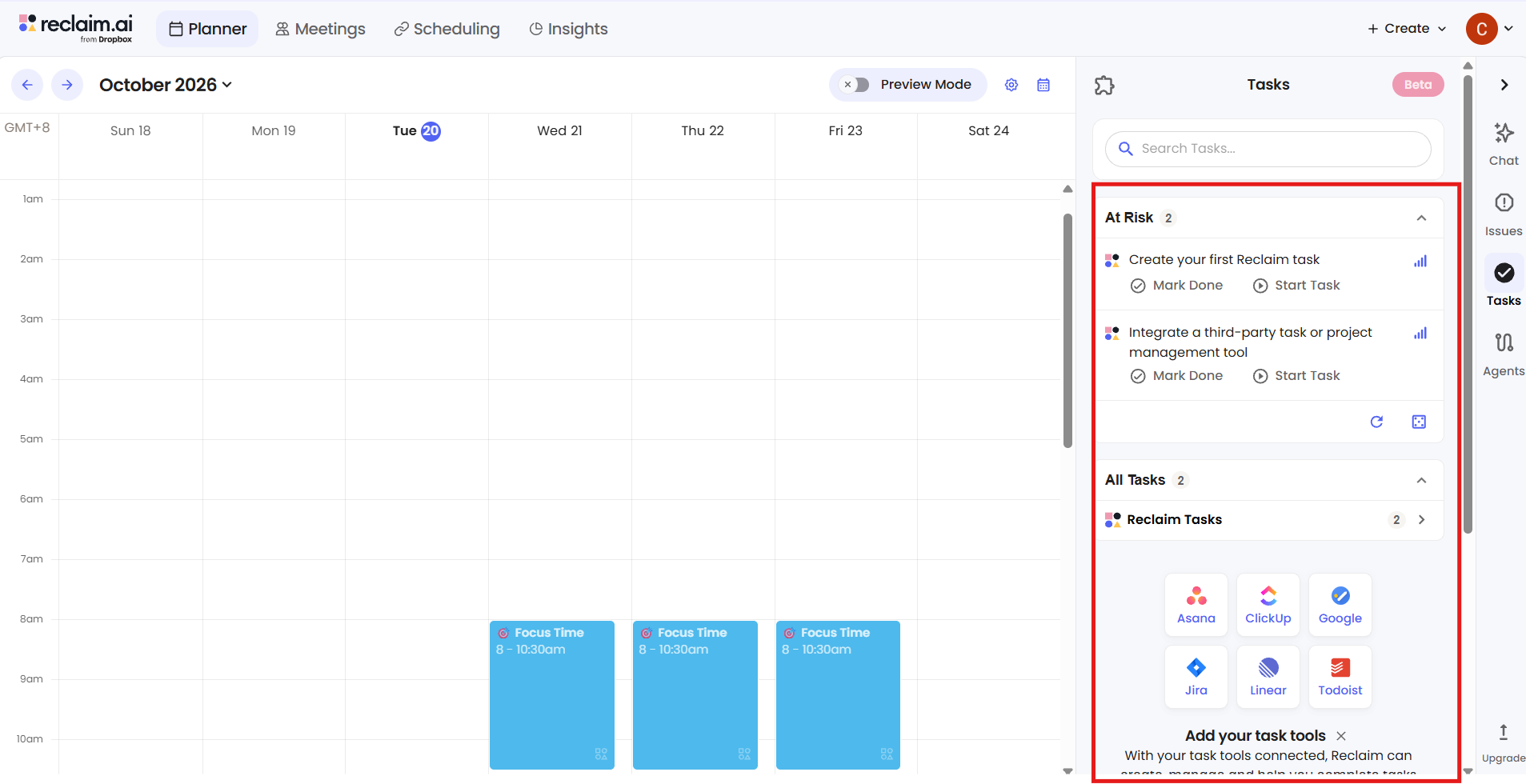
- Import or Input Tasks: Connect your favorite project management tool (Asana, ClickUp, Todoist, Jira, or linear) or enter tasks directly into Reclaim. Add time estimates and due dates.
- Define Habits: List routines you want to preserve (e.g., "Read industry updates for 30 mins daily," "Workout 3x a week").
- Let the AI Run: Let Reclaim place items tentatively ("Free" state). As your day fills with external meeting requests, Reclaim shifts tasks automatically. Once a deadline nears, it flips the slot to "Busy" so no one can book over it.
What are the Key Features and Benefits of Reclaim AI?
1. Smart Task & Habit Auto-Scheduling
Instead of hard-coding a task to 2:00 PM on Tuesday, you tell Reclaim: "I need 3 hours for this proposal by Thursday." The AI scheduling tool breaks the task down into workable chunks and weaves it into open slots on your schedule.
2. Defensive vs. Offensive Time Blocking
Reclaim uses a unique "Free/Busy" status model for calendar time blocking:
- Flexible (Free): Events sit on your calendar, but if a colleague needs an urgent meeting, they can book over it, and Reclaim pushes your task to another available slot.
- Locked (Busy): As your open time shrinks or deadlines approach, Reclaim locks the slot, preventing anyone from booking over your critical work.
3. AI Focus Time Protection
Reclaim calculates how much high-priority work you need to finish each week and automatically guards blocks for AI focus time. It dynamically updates Slack statuses to "In Focus" or "In a Meeting" so team members know when not to interrupt you.
4. Native Project Management Integrations
You don't need to change where you manage work. Reclaim syncs directly with ClickUp, Asana, Todoist, Jira, Linear, and Google Tasks, turning static task tickets into dynamic time blocks instantly.
5. Smart Scheduling Links (Calendly Alternative)
Reclaim offers scheduling links that rival dedicated tools, but with much smarter logic. Instead of exposing rigid availability blocks, your links adapt dynamically based on your high-priority tasks and energy levels.
What Makes Reclaim AI Different?
Reclaim vs. Motion
When considering an AI calendar assistant, the main comparison is usually Reclaim vs Motion.
- Motion acts as a complete project management ecosystem with an AI calendar built on top. It is complex, has a steeper learning curve, and costs significantly more ($19–$34/month).
- Reclaim AI focuses purely on calendar optimization and seamlessly plugs into your existing tech stack (Google Calendar, Slack, Asana, Todoist). It is lighter, much faster to set up, and significantly more affordable.
Reclaim as a Calendly Alternative
While Calendly simply exposes open calendar slots to outside callers, Reclaim acts as a protective layer. It ensures external guests can only book times that don't compromise your priority tasks or personal boundaries, making it a far superior Calendly alternative for busy operators.
Reclaim.ai Pricing: Is It Fair?
Reclaim offers a generous tiered plan structured for individuals and scaling teams:
- Free Plan: Includes 1 calendar sync, basic habit/task scheduling, and 3 weeks of scheduling lookahead. Perfect for testing the waters.
- Starter Plan (~$8/user/month): Unlocks unlimited habit tracking, task scheduling, 3 calendar syncs, and custom scheduling links.
- Business Plan (~$12/user/month): Adds advanced team features, company-wide scheduling policies, and longer lookahead windows.
- Enterprise Plan: Designed for larger organizations needing custom security and dedicated support.
Given that saving just two hours of manual calendar shuffling per month pays for the subscription several times over, the Reclaim.ai pricing model is extremely competitive.
Final Thoughts: Is Reclaim AI Worth It?
If you constantly end your workday feeling like you reacted to everyone else's priorities while making zero progress on your own, Is Reclaim AI worth it? Absolute verdict: Yes.
Unlike rigid productivity hacks that break the moment your schedule changes, Reclaim provides the dynamic flexibility real-life business demands. It combines the power of a Google Calendar AI with true workload automation, allowing you to protect your focus time without dropping the ball on client meetings or team requests.
Frequently Asked Questions
Is Reclaim.ai safe to use?
Yes. Reclaim uses OAuth to connect to your accounts (meaning it never stores your passwords) and only accesses the calendar metadata required to manage your availability. It is SOC 2 Type II certified and compliant with standard data protection regulations.
Is Reclaim.ai free to use?
Reclaim has a permanent free plan that gives you access to core features like basic habit auto-scheduling, task scheduling, and a single calendar sync. For unlimited habits and advanced team features, paid plans start at around $8/month.
Does Reclaim.ai have an app?
Reclaim offers web app access along with a dedicated desktop app (macOS and Windows), a Chrome extension, and integrations directly inside Google Calendar and Slack. Mobile functionality is handled natively through your Google Calendar app sync.
Does Reclaim AI work with Outlook/Microsoft 365?
Yes, Reclaim supports Outlook/Microsoft 365 integration alongside Google Calendar, allowing you to sync events across both platforms and keep your work and personal schedules aligned.
How does Reclaim AI handle unexpected meetings or schedule disruptions?
If an urgent meeting is booked over an auto-scheduled task or habit, Reclaim's engine immediately reschedules that work into the next best available slot within your working hours, so nothing gets lost or forgotten.
