

The restaurant industry is a competitive industry where nearly 50% of all restaurants fail within the first five years. Over the course of 10 years, an estimated 65% to 70% fail. All of this meaning, you need every competitive advantage you can think of. AI is one of the newest advantages that you can turn to your side.
I designed this workflow to help small restaurant owners and café operators streamline daily operations, reduce manual workload, and deliver faster, more consistent customer experiences from the first online interaction to repeat visits. Let’s take a look at how you can do this.
Stage 1: Customer Attraction & Marketing
Consistently attract new customers with high-quality, conversion-focused content.
All restaurants face one ever-present question: How do I get more customers to come to my restaurant? Through the use of AI marketing tools, you can attract more customers to your business. You can make it much easier to create content through the use of AI.
The Problem
- Hard to get customers to eat at your business
- Even when you have customers eating, you still want more
- Low revenue at your restaurant, and you want to increase it
The Solution: Automated Marketing Machine
Jasper.ai: Your Campaign Engine.
Run an end-to-end marketing workflow. Jasper will deliver on speed and control to bring you a measurable impact. Generate email promotions, event announcements, and limited-time offers that drive foot traffic and repeat visits. You can use it to cut your drafting time by 50%.
How to Use Jasper AI for Marketing
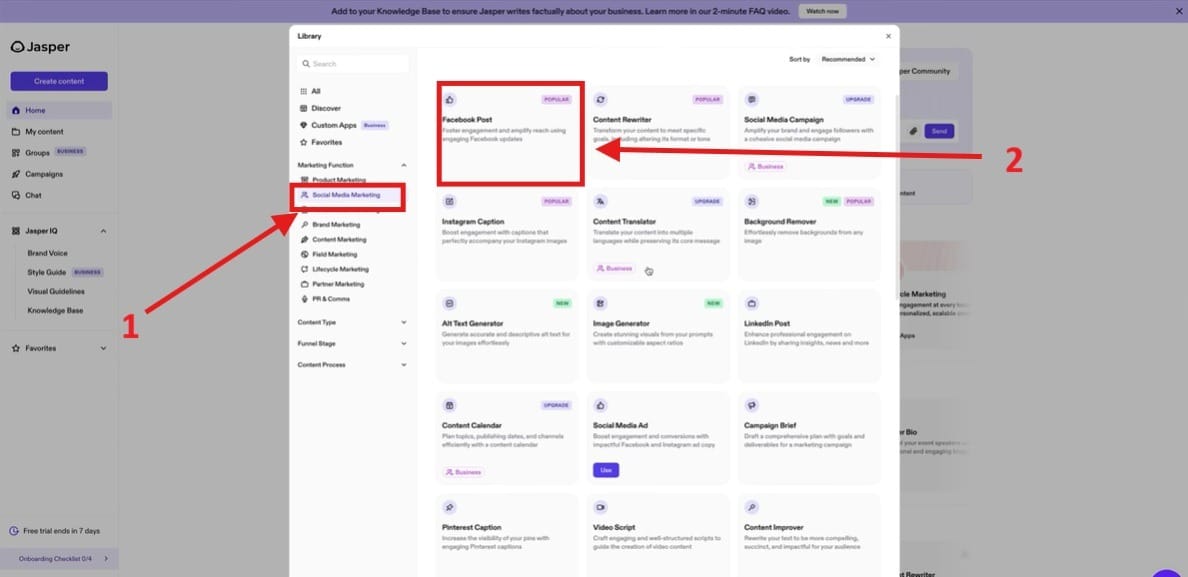
- Let’s say that you want to create a Facebook post to do social media marketing. First, you need to go to the section that says “Social Media Marketing” highlighted in Red Box 1. Next go to Red Box 2 that says “Facebook Post.”
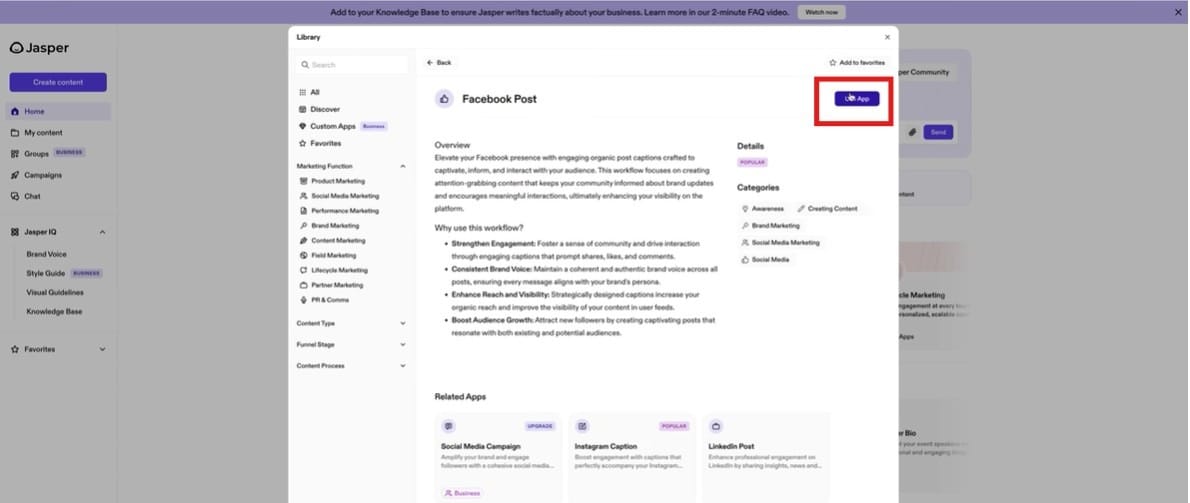
- Next, it will take you to a screen that overviews how it will create a Facebook post for you. Go up to the app section in the righthand corner highlighted as a red box.
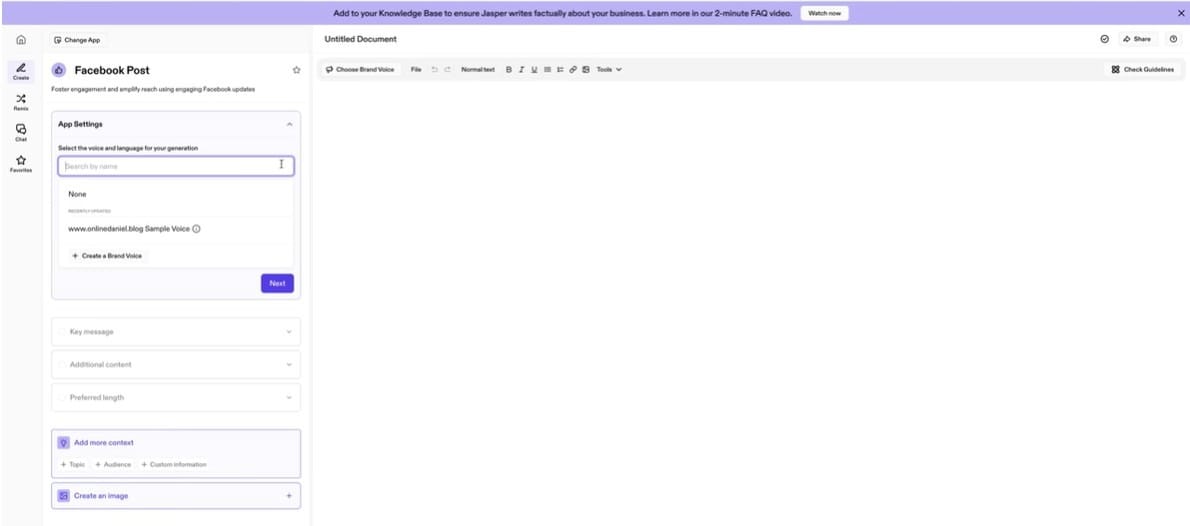
- Once you get to this section it will let you create your Facebook post. You can customize the post by using your brand voice, and you can upload source material. Once you upload your materials, press next, and it will take you to the next section.
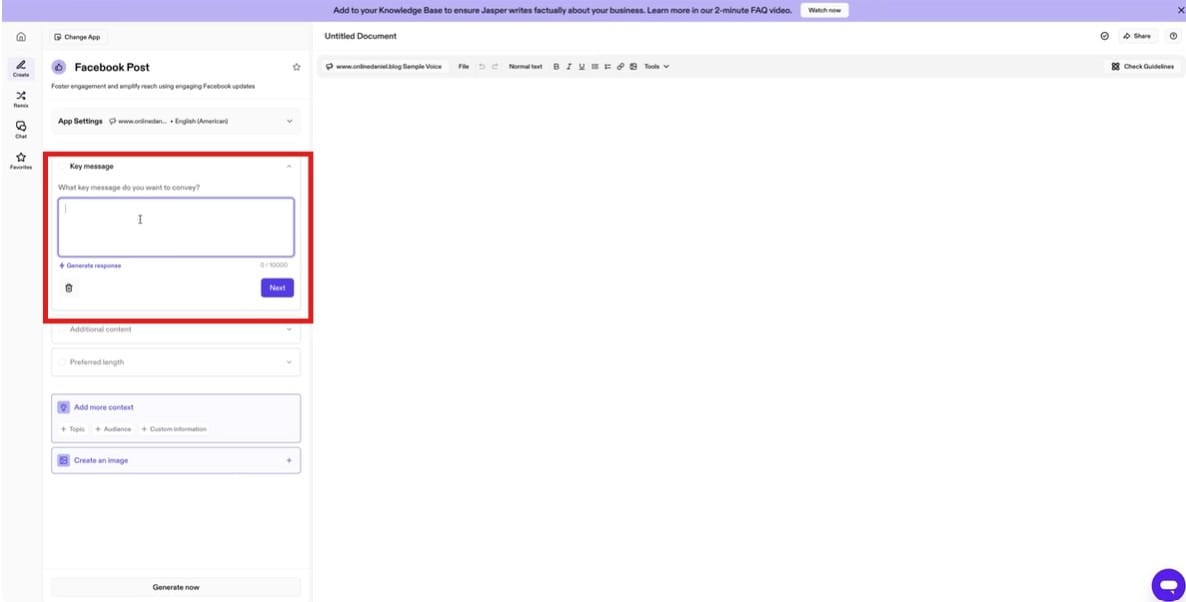
- Next, press the button for Key Message, and it will take you through creating your key message for your Facebook post. When you type in the Key Message, highlighted as a red box, you want to define the main goals of your post and what you wish to communicate.
- For Step 5, choose your preferred post length.
- Finally, go to the bottom of the page and hit the button “Generate Now.”
Canva Pro: Your Visual Content Studio.
Design menus, social posts, and in-store promotions using premium templates and AI tools without hiring a designer. Grow your business with the least investment. You can even use it to edit videos like cutting or trimming sections.
How to Edit Videos in Canva
- First, you need to upload the video over to Canva. Simply drag the file and drop it into the Uploads tab.
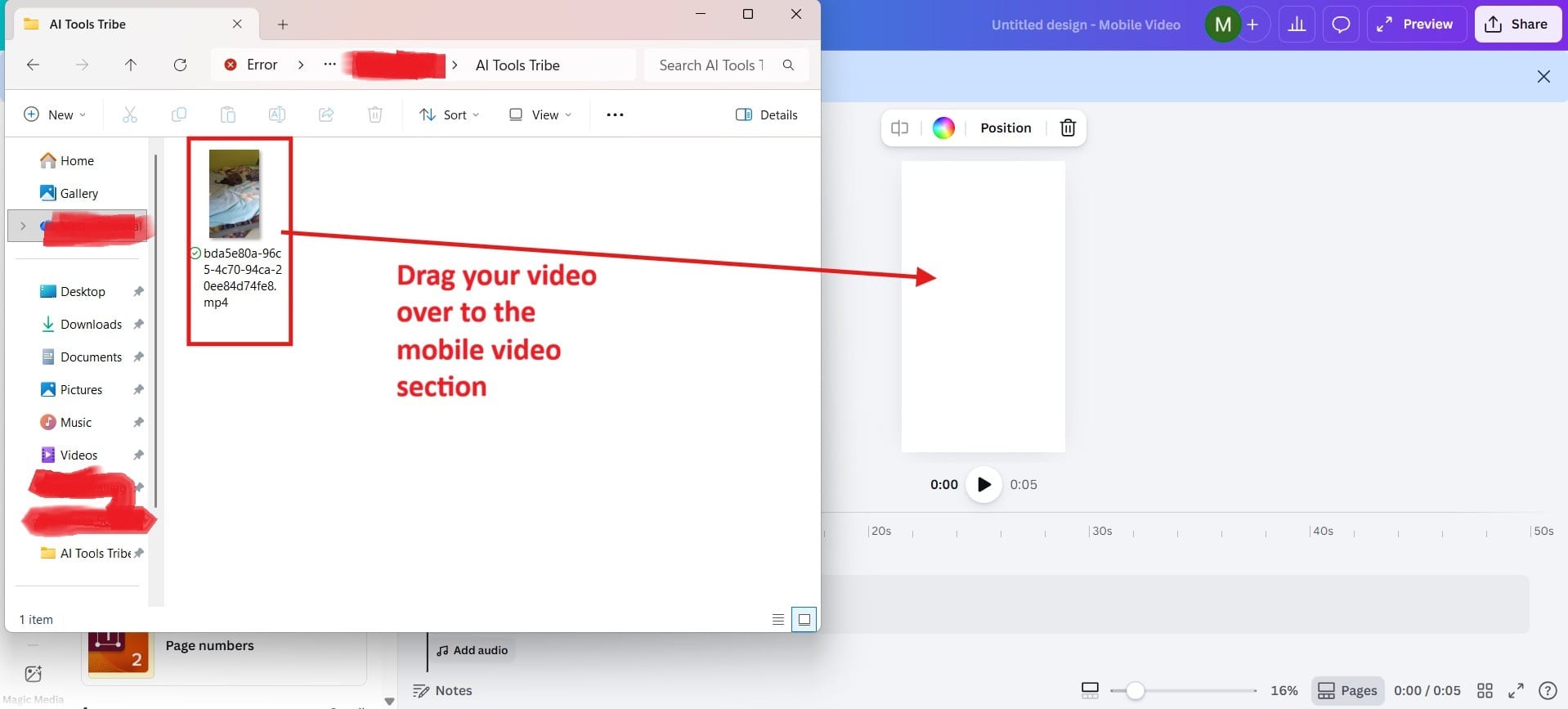
- Next, you need to click on the video and resize it so that it will fit your screen that you will be editing.
- Once you’re there, you can choose to cut sections or trim out the dead space to make it more engaging. When finished, simply go up to the section that says Share in the upper righthand corner and share it to your social media.
Stage 2: Order & Operations Management
Create a smooth, organized backend that reduces errors and saves time.
Once orders start coming in, efficiency becomes everything. Here we focus on using AI to streamline order handling and daily operations, helping restaurants and cafés reduce mistakes, speed up service, and keep everything running smoothly. From automated order tracking to smart workflow management, this stage is about building a reliable system that saves time and lets teams focus on delivering a better customer experience.
The Problem
- Orders get lost, duplicated, or miscommunicated during busy hours
- Staff rely too much on manual input, increasing human error
- Slow order processing leads to longer wait times and frustrated customers
- Lack of real-time coordination between front-of-house and kitchen
The Solution: Automation of Orders
Notion AI (Plus Plan): Your Operations Command Center.
Manage inventory, SOPs, staff schedules, and internal documentation in one centralized system powered by AI. Notion AI is a quiet but powerful backbone for restaurants and cafés. It doesn’t replace your systems, it organizes them. With one workspace, you can manage orders, track inventory, assign tasks, and document daily operations without the usual chaos of scattered tools.
How to Organize Your Orders with Notion
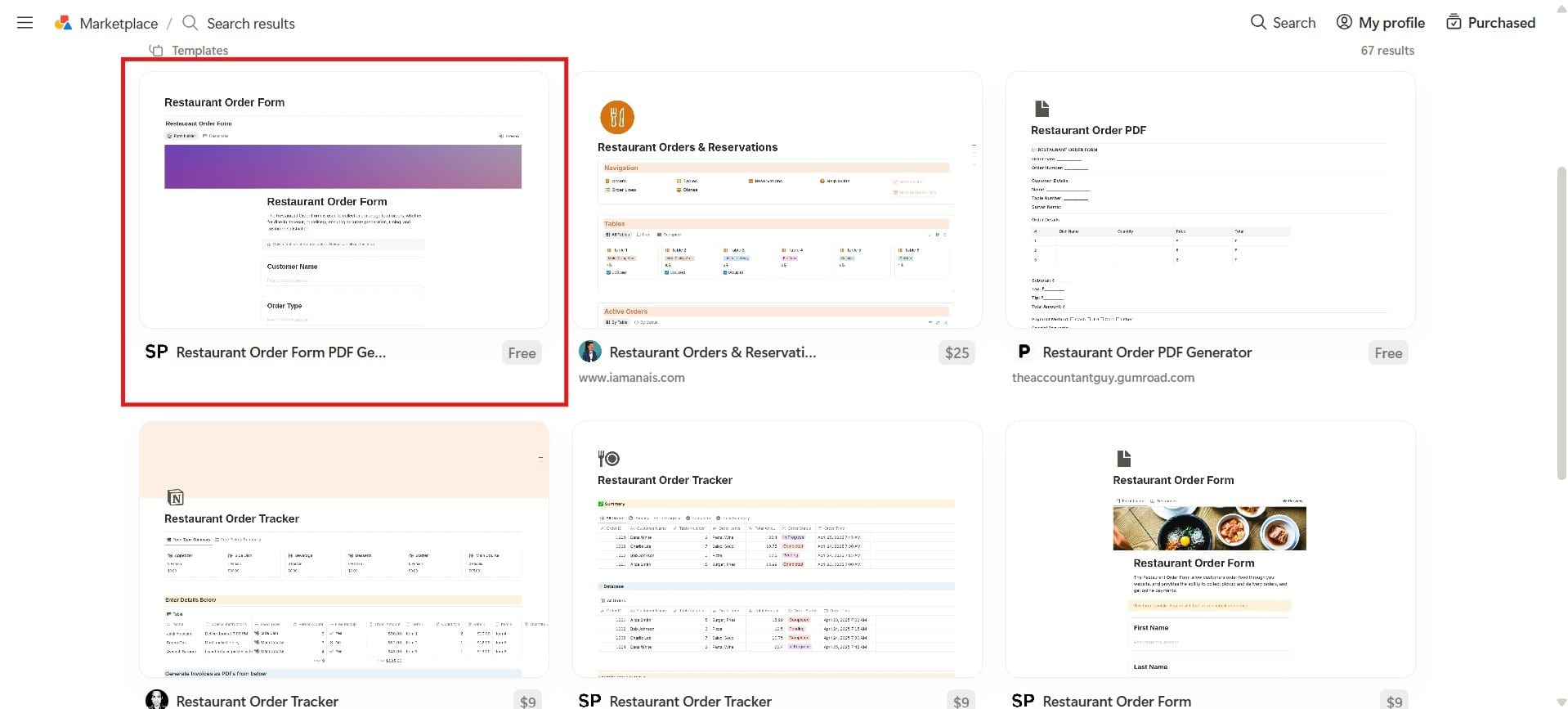
- First, you need to go to the Templates section and type in “Restaurant Orders.” When you do this, it will come up with a set of templates. You can choose any of them, but I would choose the one I highlighted in the Red Box because you can follow along with this tutorial.
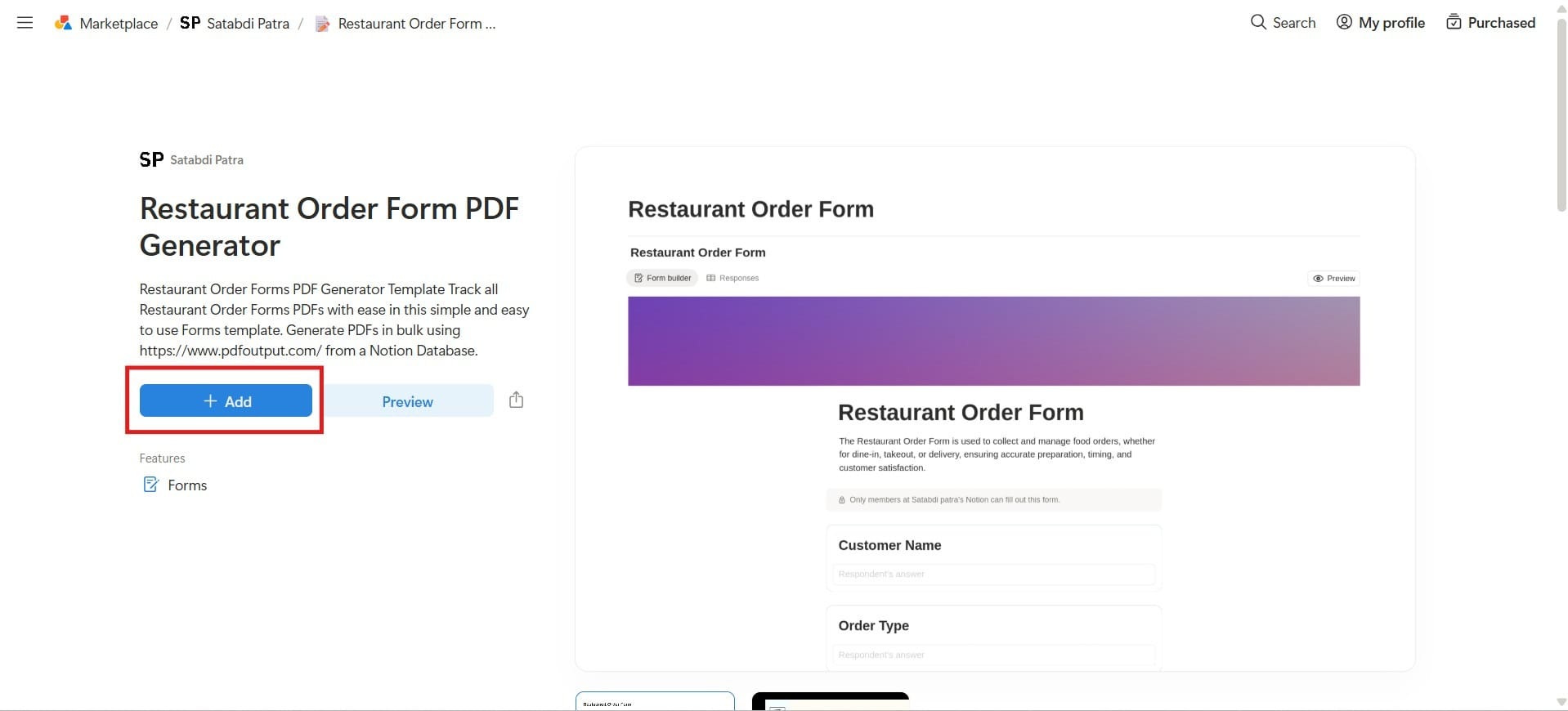
- Next, it will take you to a screen, and you want to click the area that says “Add,” highlighted in the Red Box.
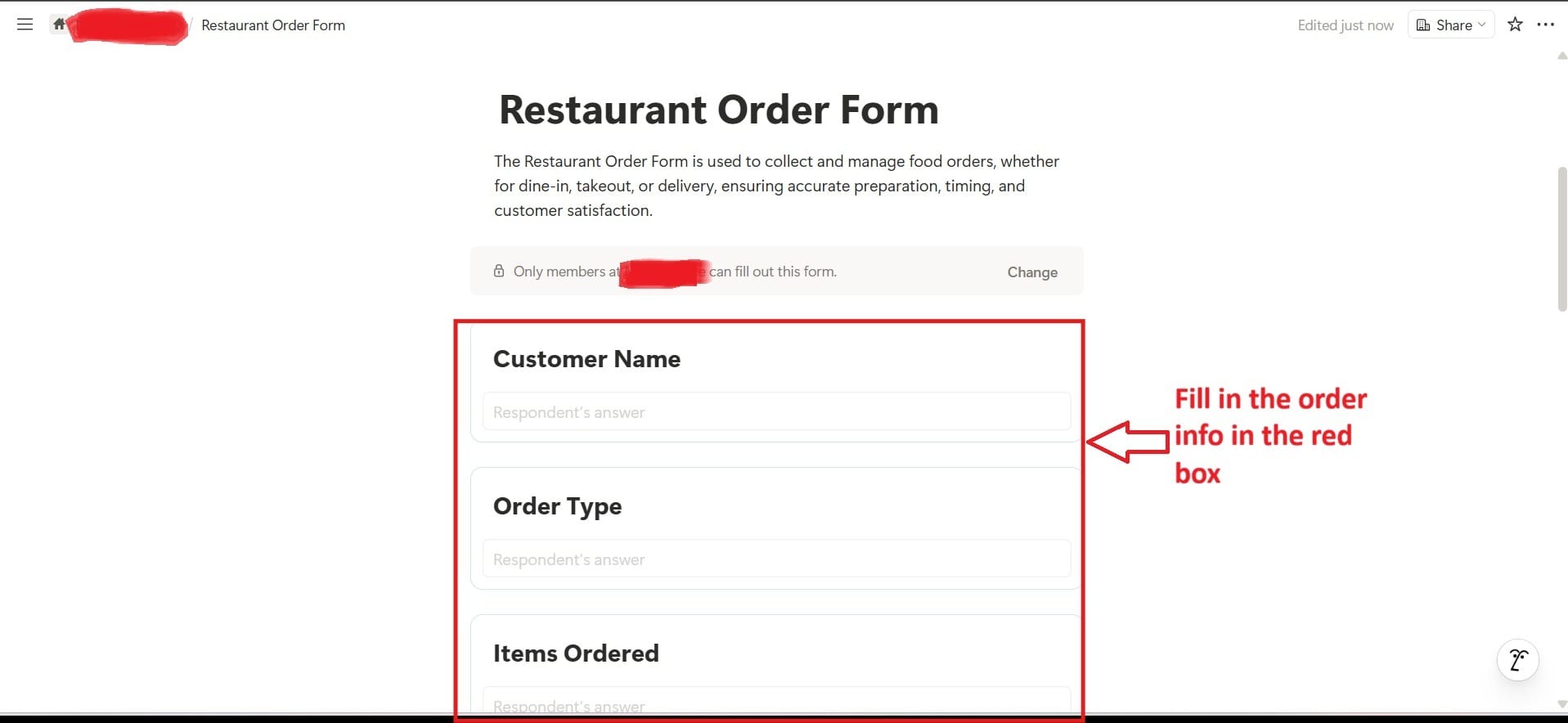
- For Step 3, you need to fill in the order information highlighted in the Red Box. This will include key information like customer name, order type, items ordered, quantity, and special instructions. At the bottom, there is also a Plus sign, which gives you options to Add Question.
- Next, you would share your form with those who can fill it out, found near the top as the blue button.
Fireflies.ai (Pro): Your Meeting Intelligence Tool.
For restaurants and cafés, where clear communication directly impacts daily operations, this means fewer misunderstandings, stronger accountability, and smoother execution behind the scenes. Automatically records, transcribes, and summarizes team discussions, ensuring clear communication and accountability.
How to Use Fireflies.ai for Your Meetings
- To get started, first you need to sign up for the software. They do have a free option that you can use. After you sign up, you will need to review your settings. This lets you choose your meetings and under what circumstances.
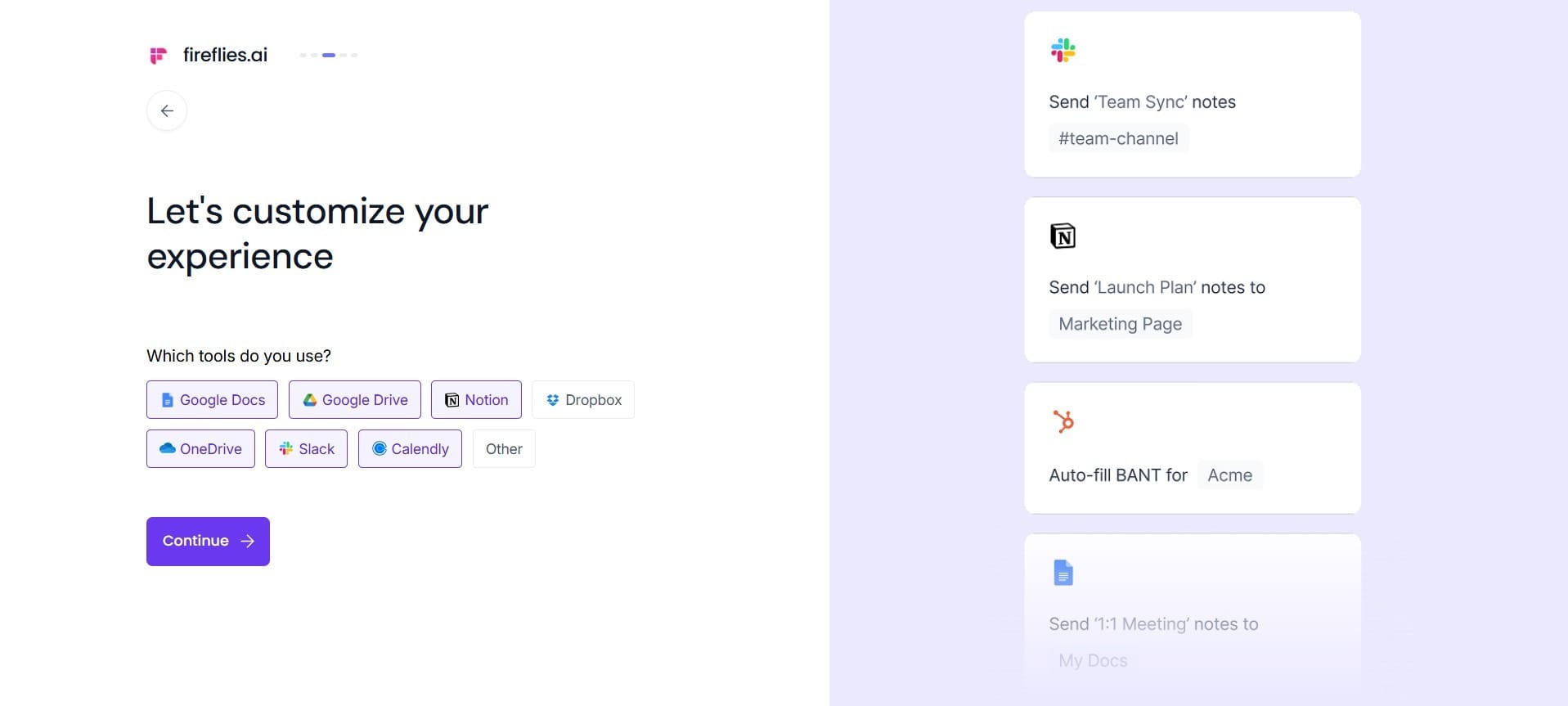
- Next, you’re taken to a screen where you can customize your experience. This is fairly straightforward. After you complete that page, you will be taken to another page where you need to choose the tools that you might use in a meeting like Google Docs, Google Drive, Notion, Slack, and Calendly.
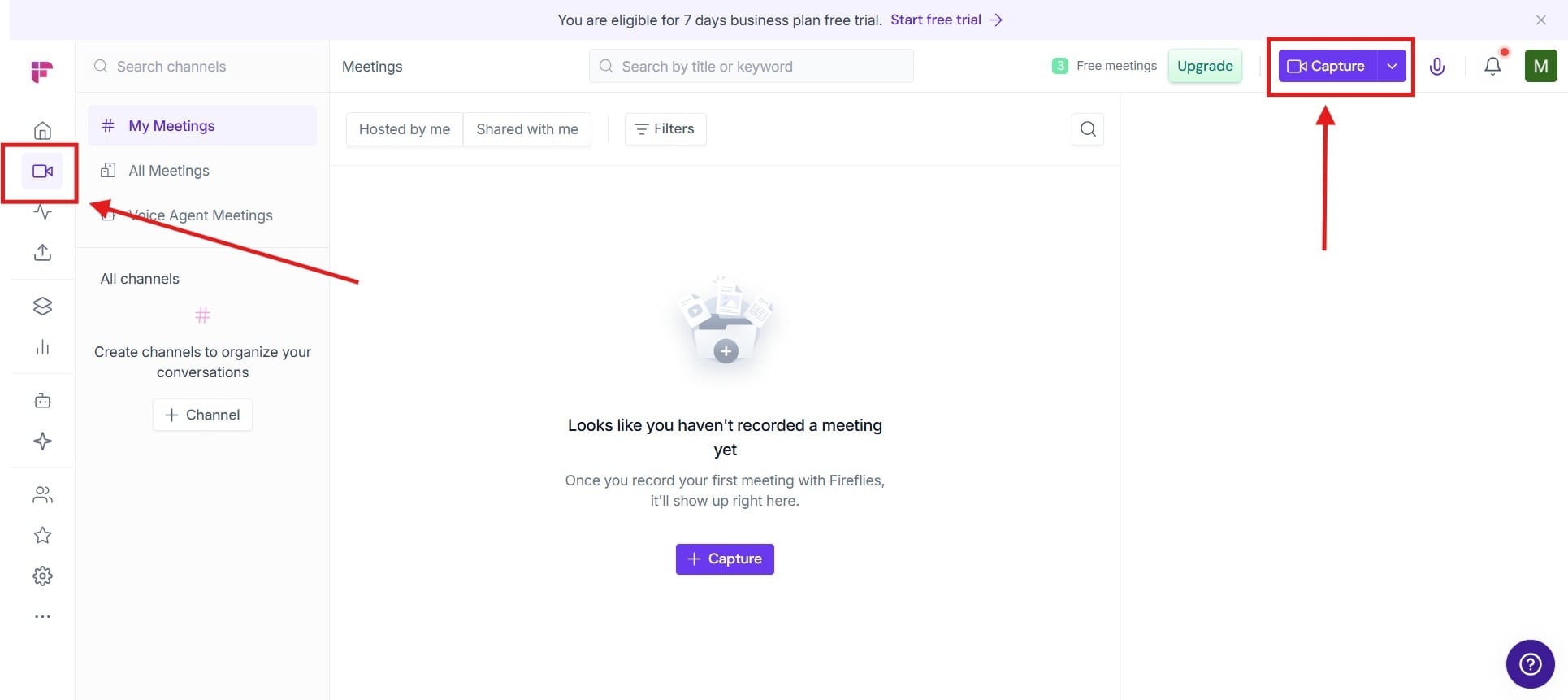
- After you get through that page, you will need to go to the Meetings section found on the lefthand side of the screen. From there, you hit Capture found at the top of the screen on the right, and doing this will start to take notes for you using the AI.
Advanced Option: Customized AI Call Handling & Client Intake
Many restaurants lose valuable business simply because staff cannot answer every incoming phone call during peak hours. Reservation requests, catering inquiries, event bookings, order questions, and general customer concerns often come in when employees are already overloaded.
A customized AI Voice Agent can act as a 24/7 frontline receptionist — answering common questions, collecting reservation details, qualifying catering leads, and routing important requests without requiring staff intervention.
For restaurants looking to automate this process at a deeper level, Agentzio develops tailored AI voice agents designed around each business’s customer communication workflow.
Stage 3: Customer Experience & Feedback
Turn customer feedback into clear, actionable improvements.
What customers experience and what they say about it can either grow your business or hold it back. Here we focus on using AI to capture, organize, and translate customer feedback into clear next steps. Instead of guessing what needs improvement, restaurants and cafés can spot patterns, fix issues faster, and consistently refine the experience they offer, turning everyday feedback into real, measurable progress.
The Problem
- No clear system to collect and organize feedback consistently
- Difficulty identifying patterns or recurring issues
- Slow response to complaints or negative experiences
- Decisions are based on assumptions instead of real customer data
The Solution: Automated Tracking of the Customer Experience
Notion AI: Your Feedback Database.
Before we used Notion AI to track your orders. This time we’re going to use it as a feedback database. You can use Notion AI to organize and track customer feedback trends so your team can act on real data, not guesswork.
How to Track Customer Feedback with Notion AI
- To begin, we will need to go to the Template section, type in “Customer Reviews” and select the template that says Customer Feedback Form.
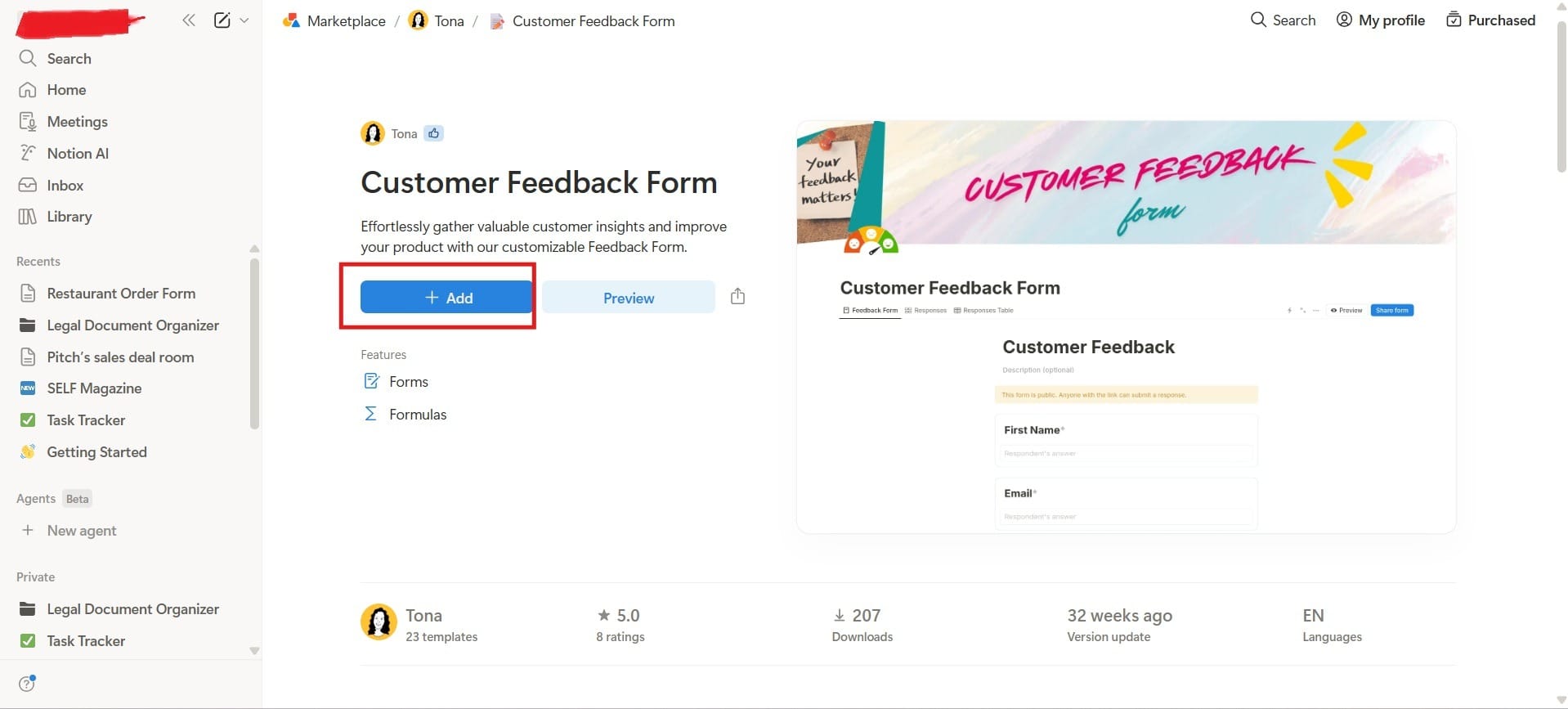
- After you have added it to your workspace, you will go there to create the form you desire. Some of the things that already come on it include First Name, Email, How Satisfied You Are with Your Overall Experience, On a Scale of 1 to 10 How Likely You are to Recommend Our Restaurant to a Friend or Colleague, and Additional Comments.
Important to note: You can change the text around as you see fit.
- Finally, you go to the top of the screen on the righthand side and Share the form with those you want feedback from.
ChatGPT (Plus / Team): Your Experience Analyst.
Break down customer reviews into insights, identify recurring issues, and generate ideas to improve service and menu offerings. One of the cool things about ChatGPT is how it can take a look at a review and you can use it to get insights on how to improve your restaurant or cafe. You can then use it to improve your business even more.
How to Use ChatGPT to Analyze Your Reviews for Insight
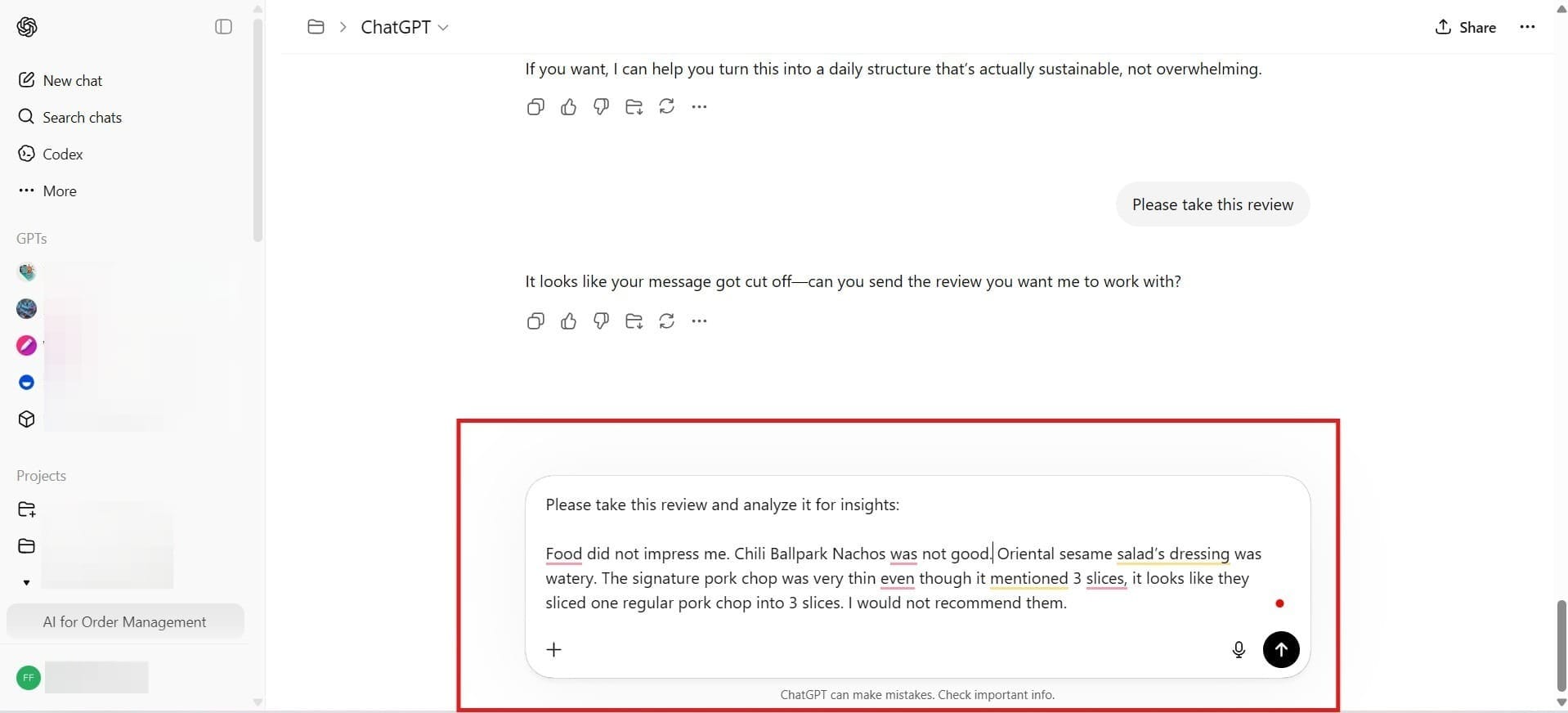
To use ChatGPT to analyze your reviews, there isn’t much to doing this. The only thing you need to do is write the prompt, “Please take this review and analyze it for insights: ” Below that point, you would add your review from Notion. While the screen below only shows that prompt, you can also do this with multiple reviews to analyze for common patterns, which is something ChatGPT is extremely good at doing.
Stage 4: Retention & Growth
Build a system that brings customers back consistently.
Getting customers through the door is only the beginning. The real growth comes from bringing them back. For this part, we’re going to look at using AI to build simple, reliable systems that turn one-time visitors into your most loyal regulars.
The Problem
- Customers visit once but don’t return consistently
- No system in place to track customer behavior or preferences
- Over-reliance on walk-ins or one-time promotions for revenue
- Inconsistent communication with past customers
The Solution: AI-Assisted Growth
Instantly AI (Growth Plan): Your Re-Engagement Engine.
AI is a practical way to stay connected with your customers without more manual work. Instead of letting past guests forget about your restaurant, it helps you automatically send personalized emails, promotions, and follow-ups based on their behavior.
How to Re-Engage Customers with Instantly AI
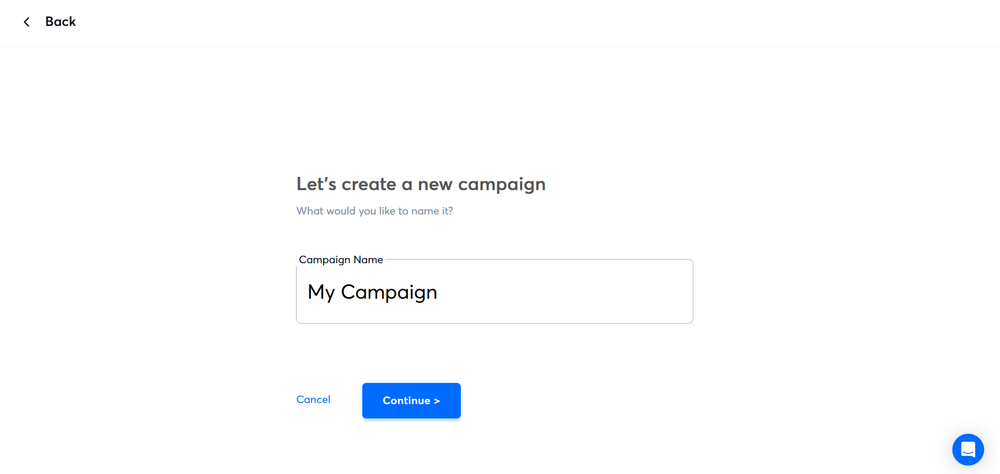
- To begin, you first need to click on your Campaigns and begin a New Campaign. You’ll want to name your campaign so that you can find it later.
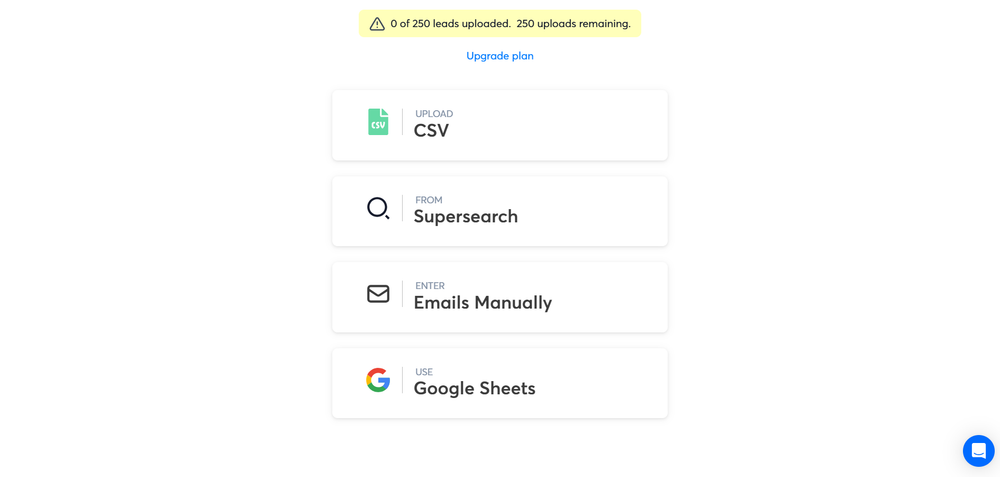
- Next, you will want to add leads to your campaign that you will reach out to. These are people who may have filled out your feedback form, and they put down their email addresses, so you can use it as an opportunity to reach out to them.
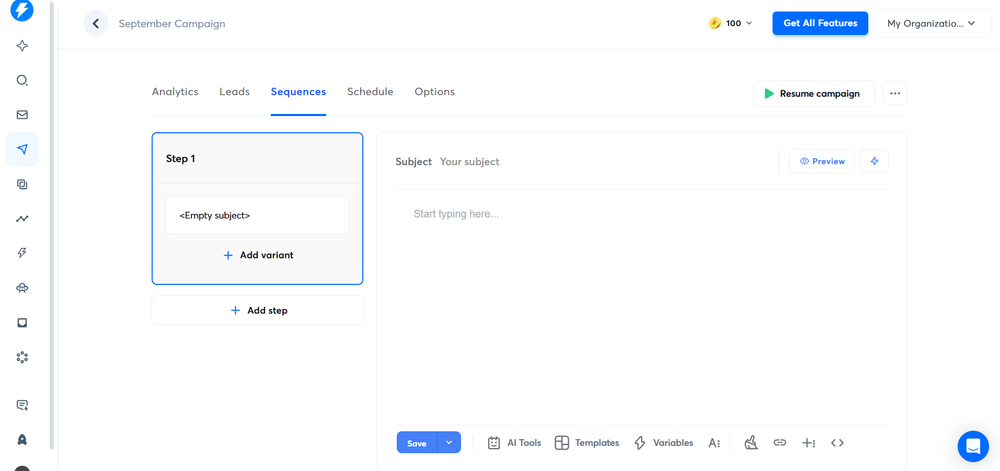
- After you go into the campaign, you go to the sequences and add a step. Next, you’ll need to write your first email, and then you’ll need to write your follow-up emails.
- For the next step, go over to Settings. Here, you choose how many emails you send per day and per hour.
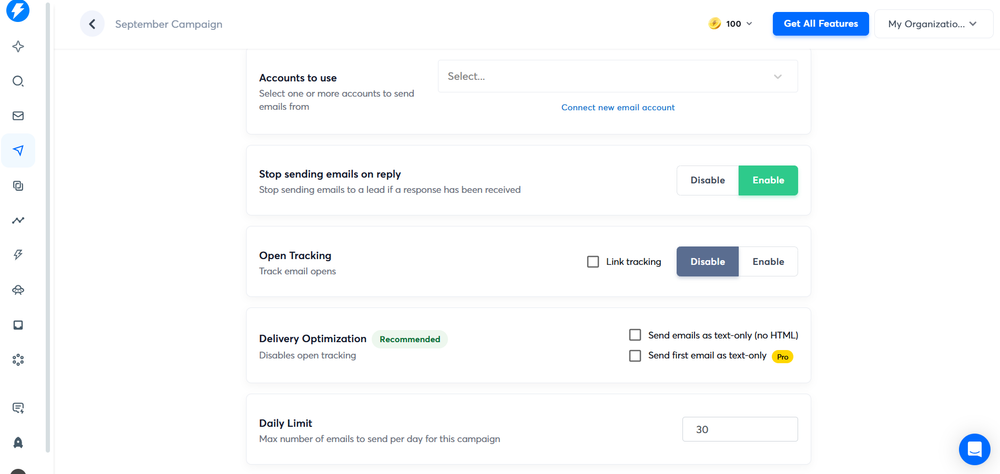
- Finally, you check your settings one more time to see that it will send how you want them to be sent. After you’re sure, hit the button to launch your campaign.
GoHighLevel (Automation): Your Loyalty System.
GoHighLevel has a useful setup where you can automatically create a loyalty system to keep your loyal customers coming back. Every business owner knows how it is 5x more costly to acquire new customers versus keeping your old ones happy. You can do this by using a loyalty program that helps you to keep your customers.
The Loyalty Rewards System
You can create a loyalty rewards system in GHL where you reward them based on taking certain actions that you want, such as refer a friend. You can do birthday campaigns, Facebook campaigns, and more!
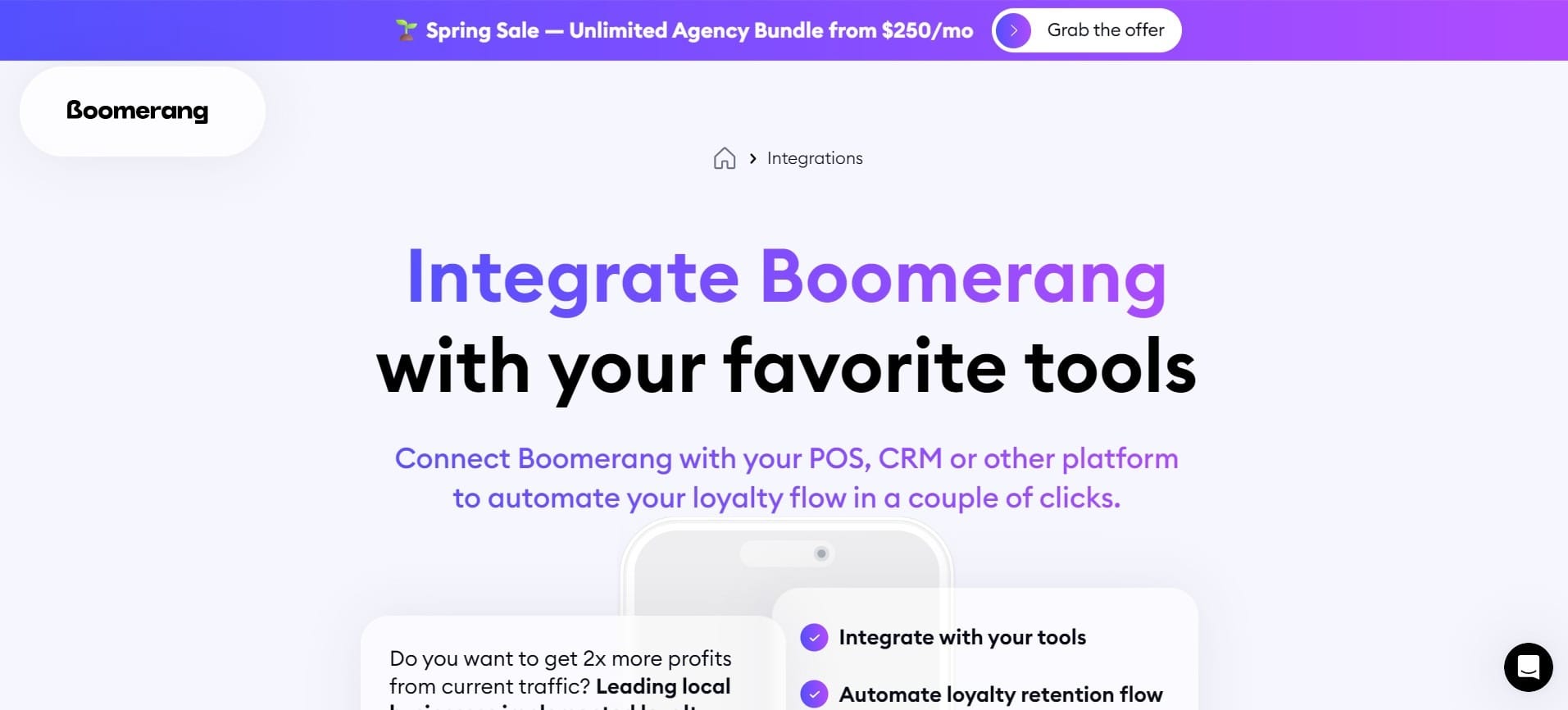
You can get them to either scan a link or fill out a form to register and register a rewards card. Basically, they will scan it over their phone to add more points. To do this, you’ll need to integrate the software with Boomerangme.com and integrate it with GoHighLevel.
The Success System for the Restaurant & Café Bundle
When you combine these AI tools together, you will create a powerful advantage for your restaurant and cafe to beat your competition:
- Attraction:
- Primary Tool: Jasper AI
- Key Benefit: High-converting marketing content that attracts new customers
- Operations:
- Primary Tool: Notion AI
- Key Benefit: Centralized and organized workflows that reduce errors and save time
- Experience:
- Primary Tool: ChatGPT
- Key Benefit: Insight-driven service improvements based on customer feedback
- Retention:
- Primary Tool: Instantly AI
- Key Benefit: Automated customer re-engagement that drives repeat visits
Especially when AI tools can make your restaurant more effective, you would be crazy not to use them!
Alternatively, if you want a simple automated AI solution customised for your business, contact Agentzio Ltd - CLICK HERE
