Noota is an all-in-one AI meeting assistant and voice intelligence platform that automatically records, transcribes, and summarizes your online, phone, and in-person meetings, and then pushes those notes directly into your favorite work tools.
Unlike basic transcription tools that just hand you a massive wall of text to read later, Noota acts like a real executive assistant. It pulls out action items, drafts follow-up emails, updates your CRM, and even lets you dictate text across any app on your computer.
What Problems Does Noota AI Solve?
If you run a business, you probably know the exact exhaustion of living in back-to-back calls. Here are the specific headaches Noota takes off your plate:
- Only half-listening to the person talking: When you are busy typing notes during a call, you cannot really pay attention. You miss small details, forget to ask good questions, and end up sounding distracted.
- Doing extra work after every call: A 45-minute meeting easily turns into another 20 minutes of fixing messy notes, writing a follow-up email, and typing everything into HubSpot, Pipedrive, or Notion.
- Forgetting what you promised: Three weeks later, when a client asks about something you casually agreed to on a call, you do not have to dig through old notebooks or try to guess what was said.
- Awkward bots joining your meetings: A lot of people get uncomfortable when an uninvited recording bot suddenly pops into a Zoom or Google Meet call. Noota lets you record straight from your computer without a bot showing up, so your calls feel normal.
Who Should Use Noota AI?
While massive enterprises use it, Noota really shines for lean teams where every hour counts:
- Solopreneurs and Freelancers: When you are the salesperson, project manager, and account executive all at once, you don't have the luxury of a human assistant. Noota gives you back hours of admin time every week.
- Small to Medium-Sized Business (SMB) Owners: If you are managing client relationships, hiring new team members, and running internal ops, having a searchable database of every conversation keeps everyone aligned without endless status meetings.
- Agencies, Consultants, and Coaches: Anyone whose business relies on client discovery, feedback loops, and accurate project scoping will immediately feel the relief of automated, structured summaries.
What Can Noota AI Be Used For?
Most people start using it just as a Noota meeting recorder, but its AI toolkit covers a lot more ground:
- Video Calls (Zoom, Google Meet, Microsoft Teams): Auto-joins via your calendar or records silently through your desktop audio.
- In-Person Meetings: Sitting across a coffee table or in a conference room? Pull out the iOS or Android mobile app to record and transcribe face-to-face chats.
- Phone & VoIP Calls: On higher tiers, you can record actual phone calls directly, which is a lifesaver for sales and recruitment calls.
- Hands-Free Voice Dictation: Noota includes a desktop voice-to-text feature that lets you speak naturally and dictate clean, formatted text into Slack, Gmail, or any browser window.
- Automated Follow-Ups: Its built-in AI Email Agent drafts personalized recap emails based on what was actually discussed on the call.
How Should You Use Noota AI?
Getting started takes less than five minutes. Here is how to let Noota’s AI do the heavy lifting for you:
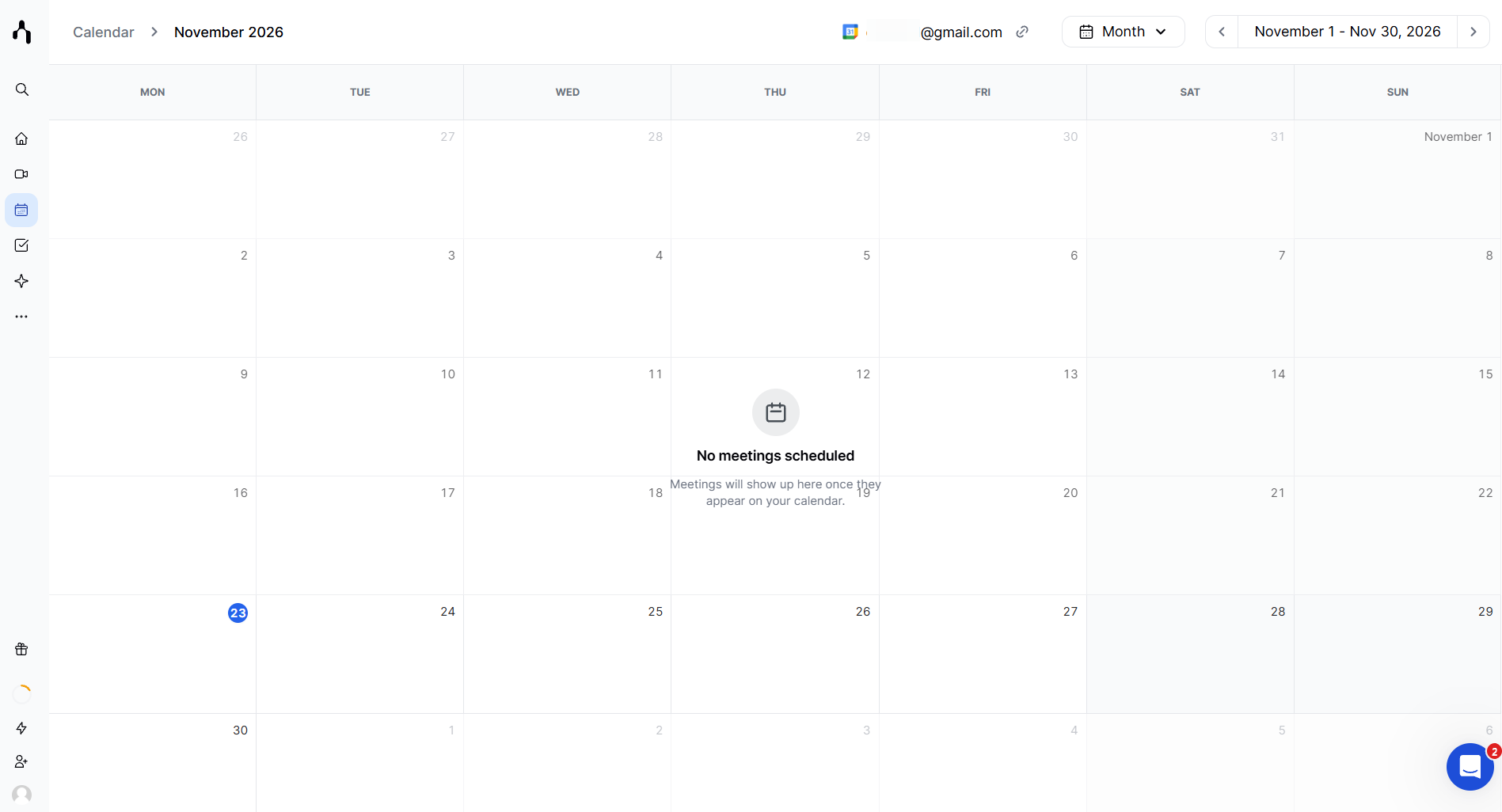
- Connect Your Calendar for Auto-Capture: Sign up for free and link your Google or Outlook calendar. Noota’s AI automatically detects upcoming Zoom, Meet, or Teams calls and joins to record and transcribe in real time.
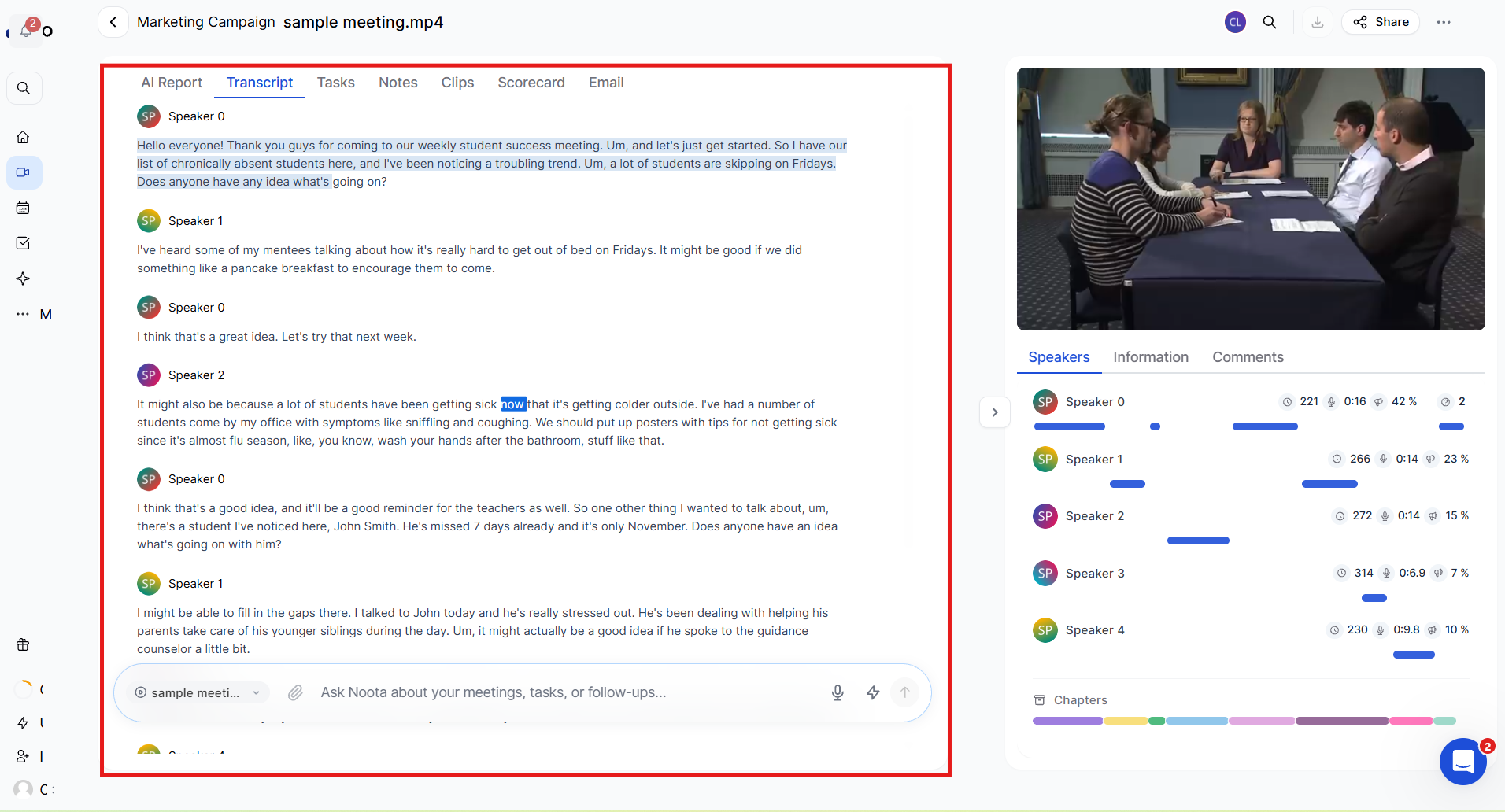
- Turn on Smart Speaker Detection: Before your call, enable speaker labels and select your language. The AI automatically separates voices and converts messy speech into clean, punctuated text—or lets you upload old audio files for instant transcription.
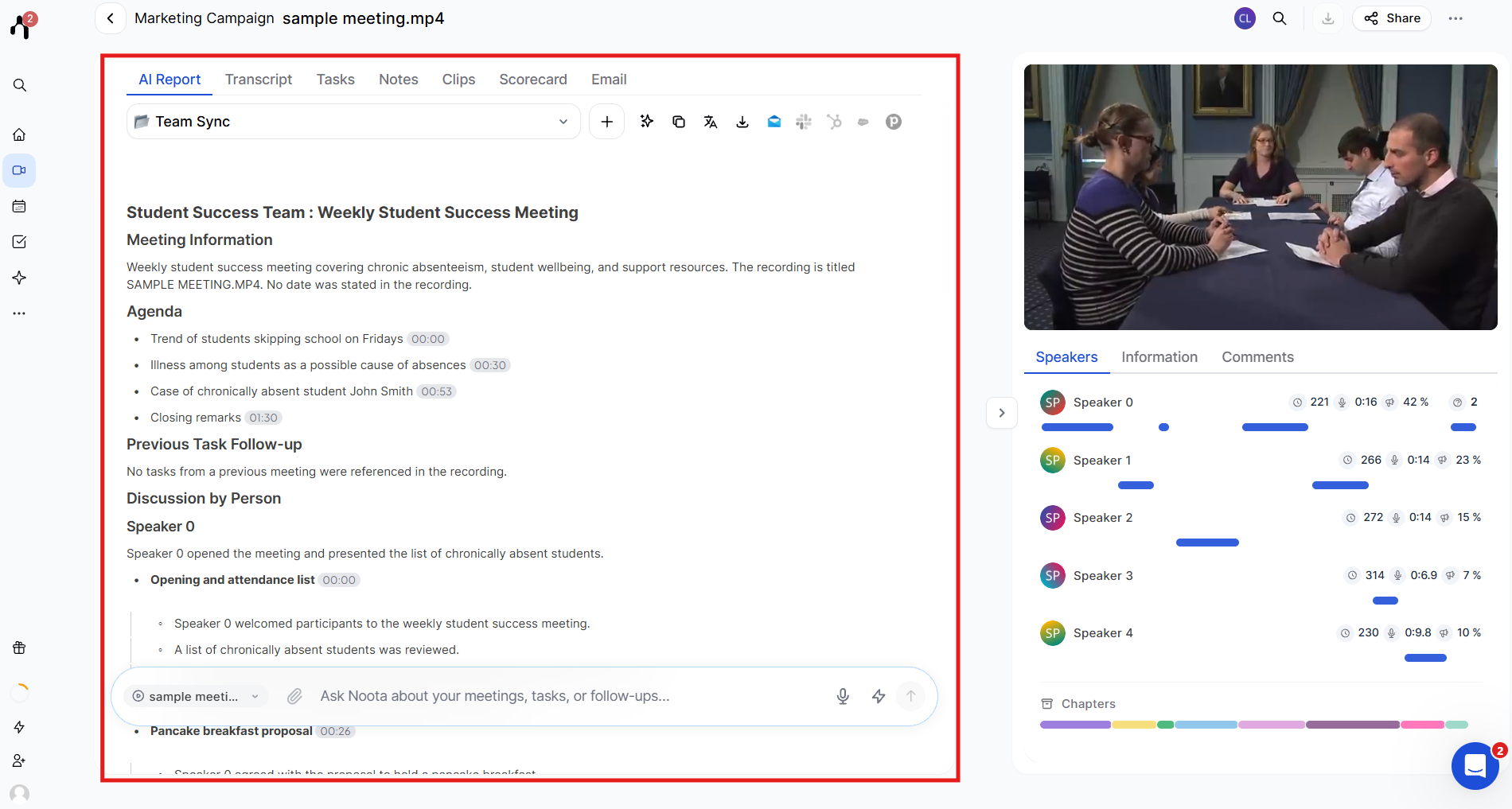
- Generate Instant AI Summaries: Once the call ends, pick a smart template (like Sales Call or Client Sync). Noota’s AI instantly condenses an hour-long meeting into key takeaways and action items.
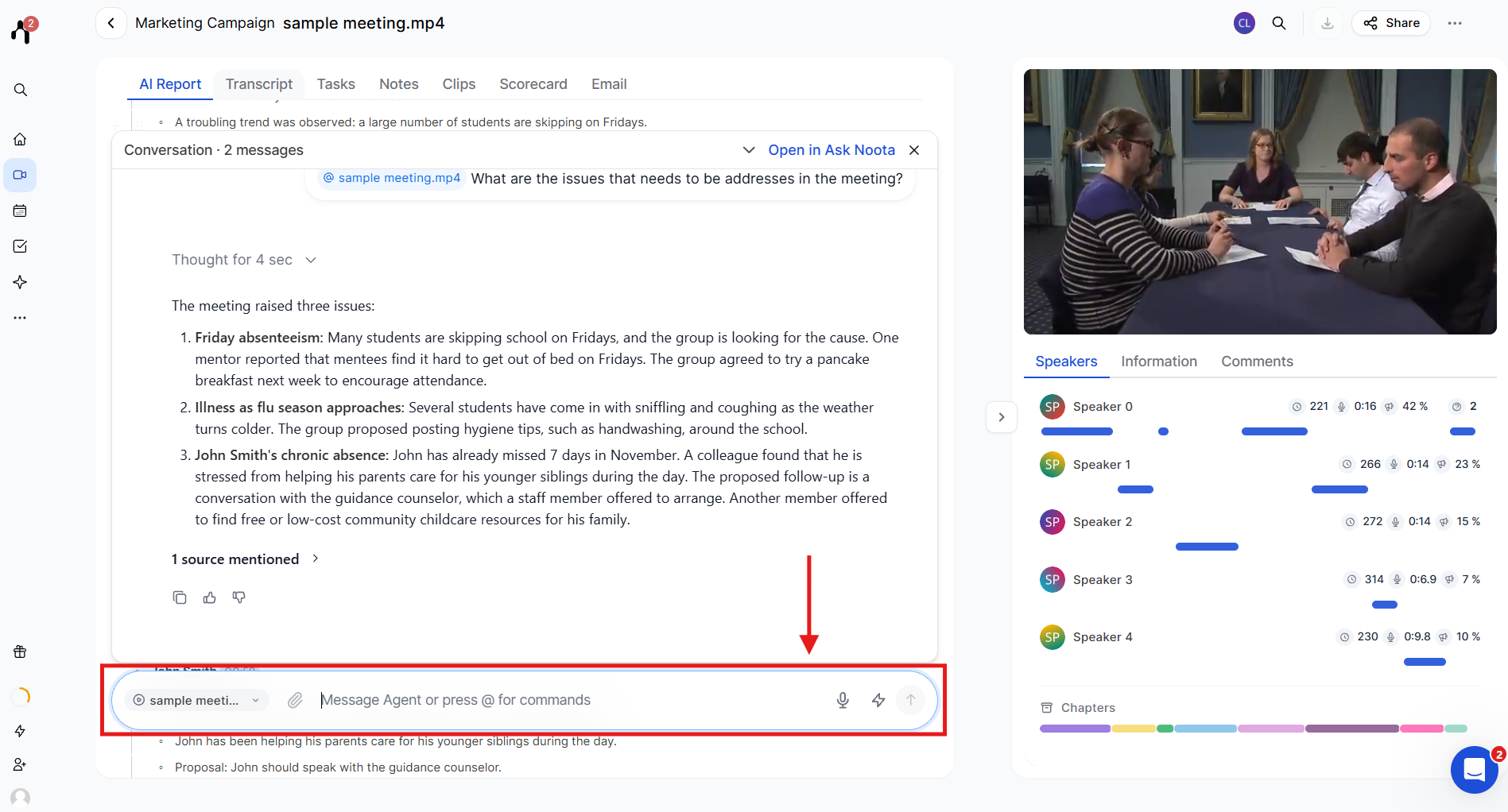
- Chat with Your Notes & Sync: Use the built-in Ask Noota AI chat to pull quick answers from past calls, then one-click sync everything straight to Notion or your CRM.
What Are the Key Features and Benefits of Noota AI?
When evaluating Noota AI features, it helps to look at how they actually save you time in daily operations:
- High Noota AI Transcription Accuracy: Supporting over 80 languages, Noota handles industry jargon, multiple speakers, and fast-paced conversations surprisingly well. It automatically labels who said what, even when recording without a meeting bot.
- Custom AI Summaries & "Ask Noota": Instead of reading a 10-page transcript, you get clean bullet points, key decisions, and next steps. Even better, you can use the Ask Noota AI chat to query your past meetings—for example, asking, "What budget did Sarah mention on Tuesday's call?"
- Seamless Noota CRM Integration: This is where the magic happens for business owners. Once a call ends, Noota automatically pushes the call summary, action items, and deal insights straight into Salesforce, HubSpot, Pipedrive, or your ATS if you are hiring.
- Built-in AI Email Agent: It drafts your post-meeting follow-up automatically, saving you from staring at a blank email screen at 5:00 PM.
What Makes Noota AI Different?
There is no shortage of tools competing for the title of best AI meeting notetaker, from Otter.ai to Fireflies and Fathom. Here is what sets Noota apart, along with a quick look at Noota AI pros and cons:
The Pros:
- Bot or No-Bot Flexibility: You get to choose whether a bot joins your call or if you record discreetly via the desktop app.
- More Than Just Meetings: Combining meeting notes, voice dictation, VoIP call recording, and an AI email agent in one dashboard replaces two or three separate subscriptions.
- Strict Data Privacy: Hosted on European servers with GDPR compliance, Noota explicitly guarantees that your sensitive client conversations are never used to train public AI models.
The Cons:
- Free Plan Limitations: While the free tier offers unlimited meetings if you let the bot auto-join and share summaries with participants, bot-free recording on the free plan is capped at 300 minutes per month.
- Pricing Tiers: If you want full CRM sync, bot-free unlimited recording, and phone call capabilities, you will need a paid seat.
A Quick Look at Noota Pricing and Plans
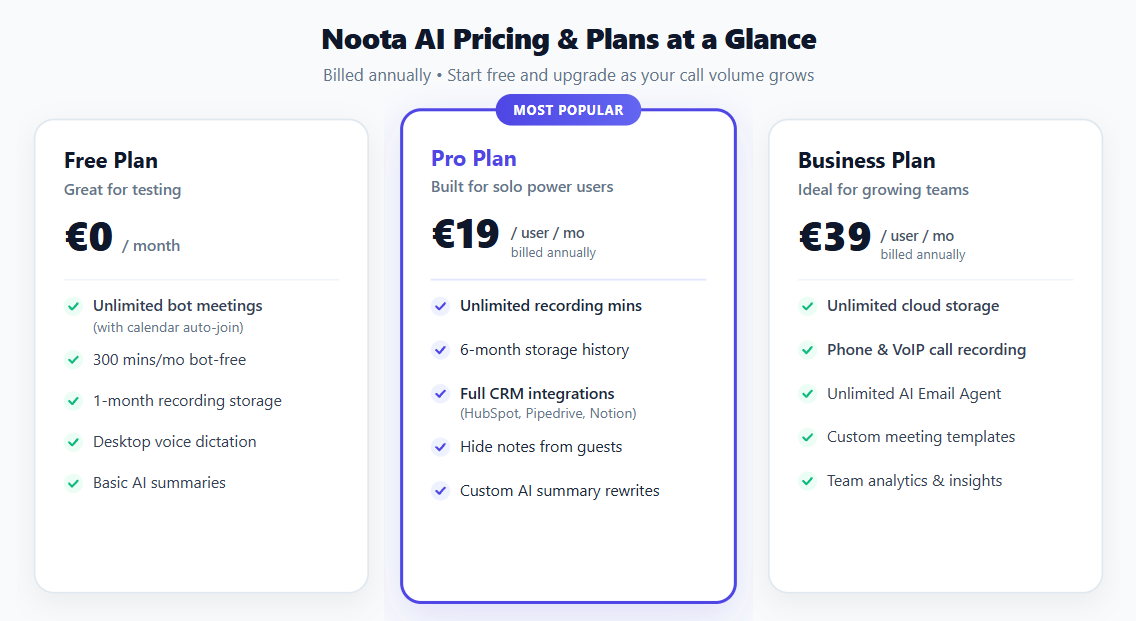
- Free Plan (€0/month): Great for testing. Includes unlimited bot-recorded meetings (with calendar auto-join), 300 minutes/month of bot-free recording, 1-month storage, voice dictation, and basic AI summaries.
- Pro Plan (€19/user/month billed annually): Built for solo power users. Removes minute limits, extends storage to 6 months, unlocks CRM integrations, lets you hide summaries from external guests, and allows custom AI summary rewrites.
- Business Plan (€39/user/month billed annually): Ideal for growing teams. Adds unlimited storage, phone call recording, unlimited AI email agent credits, custom templates, and team analytics.
Final Thoughts on Noota AI
So, is Noota AI worth it?
If you only have one or two casual meetings a week, the free plan is more than enough to keep you organized without spending a dime. However, if you are a solopreneur or small business owner whose revenue depends on client calls, sales demos, or consulting sessions, upgrading to a paid plan easily pays for itself within the first few days. Saving even 30 minutes of manual note-taking and CRM data entry a day frees up over 10 hours a month for actual revenue-generating work.
If you are tired of choosing between paying attention to your clients and taking good notes, give Noota's free plan a spin on your next call—you will feel the difference immediately.
Frequently Asked Questions
Does Noota AI train its AI models on my private meeting recordings?
No. Noota is fully GDPR-compliant, hosts its data on secure European servers, and strictly guarantees that your transcripts, audio, and client conversations are never used to train third-party or public AI models.
Can Noota AI record meetings without an awkward bot joining the call?
Yes. By using the Noota desktop app or Chrome extension, you can capture system audio discreetly without sending a visible recording bot into your Zoom, Google Meet, or Microsoft Teams room.
What is the difference between Noota AI and Notta AI?
While they sound almost identical, Noota (with two "o"s) is a European-built AI meeting and voice intelligence platform tailored heavily toward sales, recruitment, and CRM workflows, whereas Notta (with two "t"s) is a separate Japanese-founded transcription tool.
Can I transcribe pre-recorded audio or video files with Noota AI?
Yes. Aside from live meetings, you can upload existing MP3, MP4, WAV, or M4A files directly into your Noota dashboard to generate speaker-labeled transcripts and AI summaries in minutes.
How many languages does Noota AI support for transcription and summaries?
Noota supports over 80 languages and dialects, automatically detecting the spoken language to deliver accurate transcriptions, translations, and localized AI meeting summaries.