

Ocoya is an AI-powered social media management platform that combines graphic design, copywriting, and automated scheduling into a single interface. Think of it as having Canva, ChatGPT, and Hootsuite living together inside one tab.
Instead of constantly bouncing between multiple apps to design an image, write a caption, research hashtags, and schedule a post, you handle the entire creation-to-publishing pipeline from one dashboard.
What Problems Does Ocoya Solve?
If you manage social media for clients or your own business, you are likely suffering from "tab fatigue" and workflow bottlenecks. Ocoya directly targets the most painful parts of the daily publishing grind:
- The Multi-App Shuffle: You no longer need to design in Canva, copy-paste into ChatGPT for a caption, use a third tool to find hashtags, and manually load everything into a scheduler. Ocoya collapses these four steps into one fluid workflow.
- Creative Block: Staring at a blank screen trying to write twenty unique captions for the week is exhausting. Ocoya’s built-in AI copywriter handles the initial heavy lifting so you never start from zero.
- The Client Approval Nightmare: Waiting for clients to approve content over messy spreadsheets or email threads is slow and chaotic. Ocoya features dedicated workspaces with shared public links where clients can review, comment, and approve drafts instantly.
- Manual E-commerce Posting: Manually turning a Shopify store of 50+ products into fresh social content takes hours. Ocoya integrates directly with e-commerce platforms to automatically convert product listings into social media posts.
Save Time & Sanity Today
You can try Ocoya entirely risk-free with their 7-day free trial. See how much faster you can draft and schedule your first week of content in under 10 minutes.
Who Should Use Ocoya?
While any business can use it, Ocoya is specifically optimized for people who handle content at scale. Here is a quick breakdown of who benefits the most:
Social Media Managers & Agencies
- Daily Pain Point: Client approval bottlenecks & managing multiple separate brand assets.
- How Ocoya Solves It: Dedicated, isolated workspaces with professional, public client-approval portals.
Solopreneurs & Small Businesses
- Daily Pain Point: Wearing too many hats with zero time to dedicate to social media creation.
- How Ocoya Solves It: Acts as an automated AI assistant to generate and schedule posts in minutes.
E-commerce Store Owners
- Daily Pain Point: Manually creating promotional posts for dozens of inventory products.
- How Ocoya Solves It: Integrates with Shopify/WooCommerce to sync products and auto-create posts.
What Can Ocoya be Used For?
Ocoya goes beyond simply scheduling posts. With it, you can:
- Draft Multichannel Campaigns in Minutes: Generate a post, customize the captions to fit LinkedIn's professional vibe, Instagram’s visual aesthetic, and X’s punchy constraints, and schedule them all simultaneously.
- Automate Content Triggers: Set up smart AI agents. For example, you can connect an RSS feed so that every time a new blog post goes live, Ocoya’s AI automatically drafts a summary caption, finds hashtags, and schedules a post.
- Drive Sales via DM Automation: Set up "Comment-to-DM" workflows. When followers comment a specific keyword on your post, Ocoya can automatically send them a direct message containing a discount code or a link to your course.
- Repurpose Content: Turn raw product links, blog posts, or brief ideas into polished graphics and copy variations ready for publication.
How Should You Use Ocoya?
To get the most out of the platform without getting overwhelmed, here is the most efficient workflow to follow:
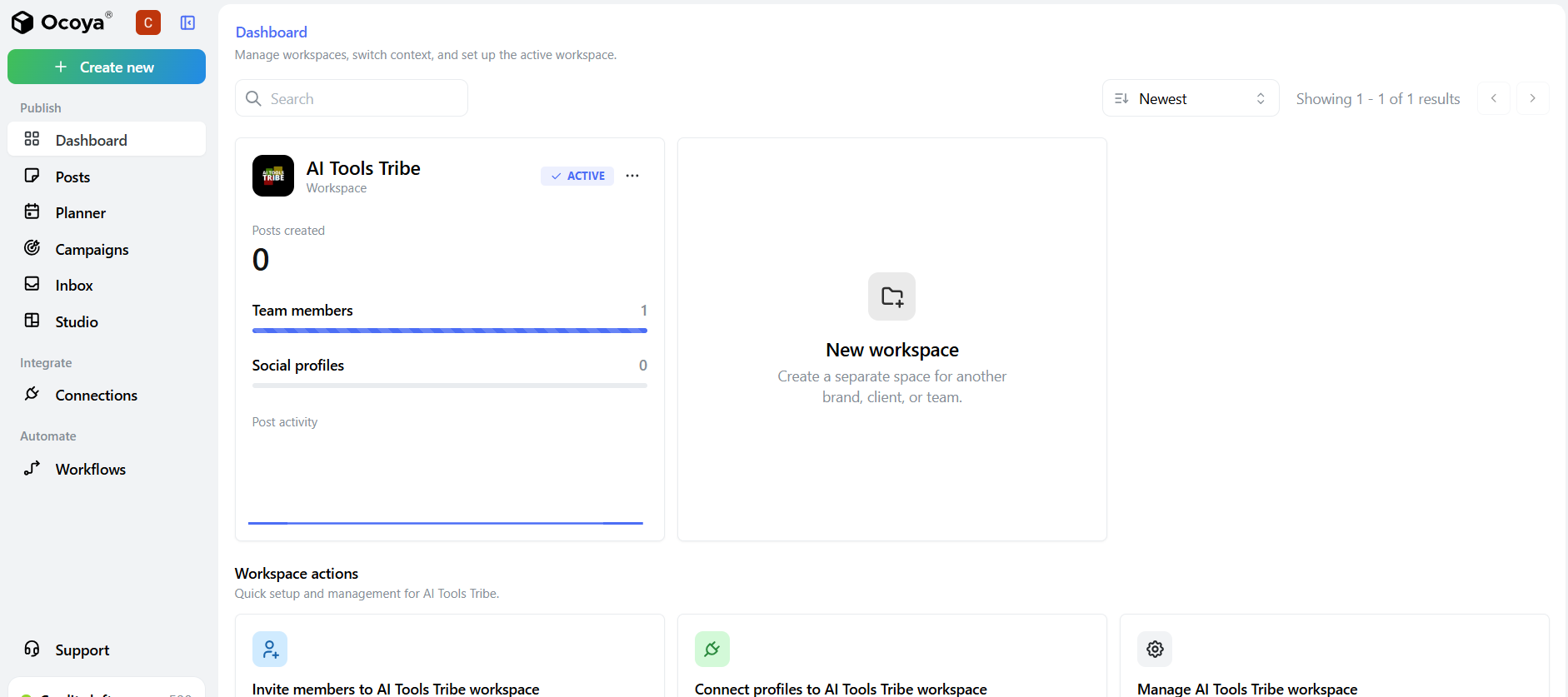
Step 1: Set Up Your Workspaces & Brand Kits
If you manage multiple clients or distinct brands, start by creating separate workspaces. Upload their specific logos, brand colors, and fonts. This keeps your client assets strictly organized and prevents embarrassing cross-posting mistakes.
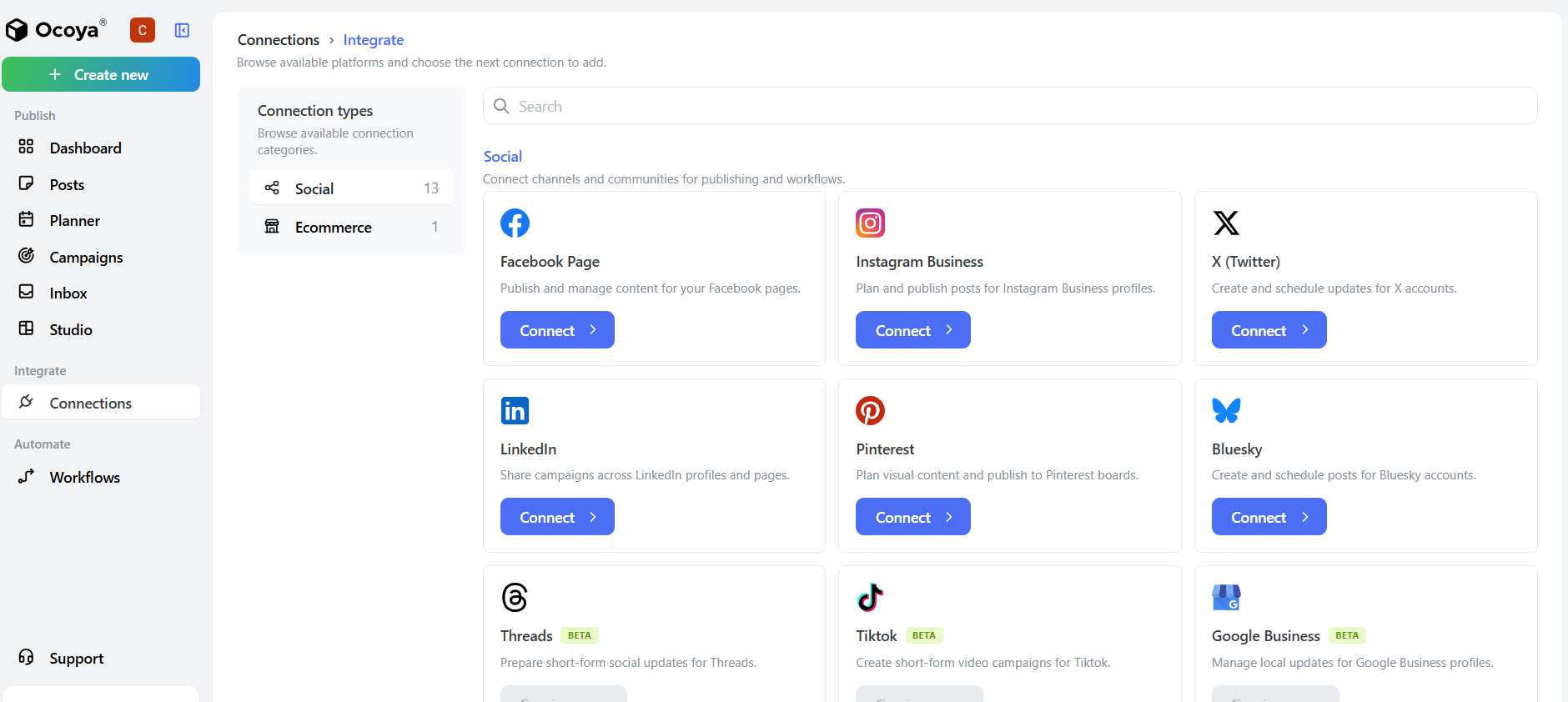
Step 2: Connect Your Social Profiles
Link your Facebook Pages, Instagram Business profiles, LinkedIn Company Pages, TikTok, X, and e-commerce stores.
Step 3: Run an AI Campaign
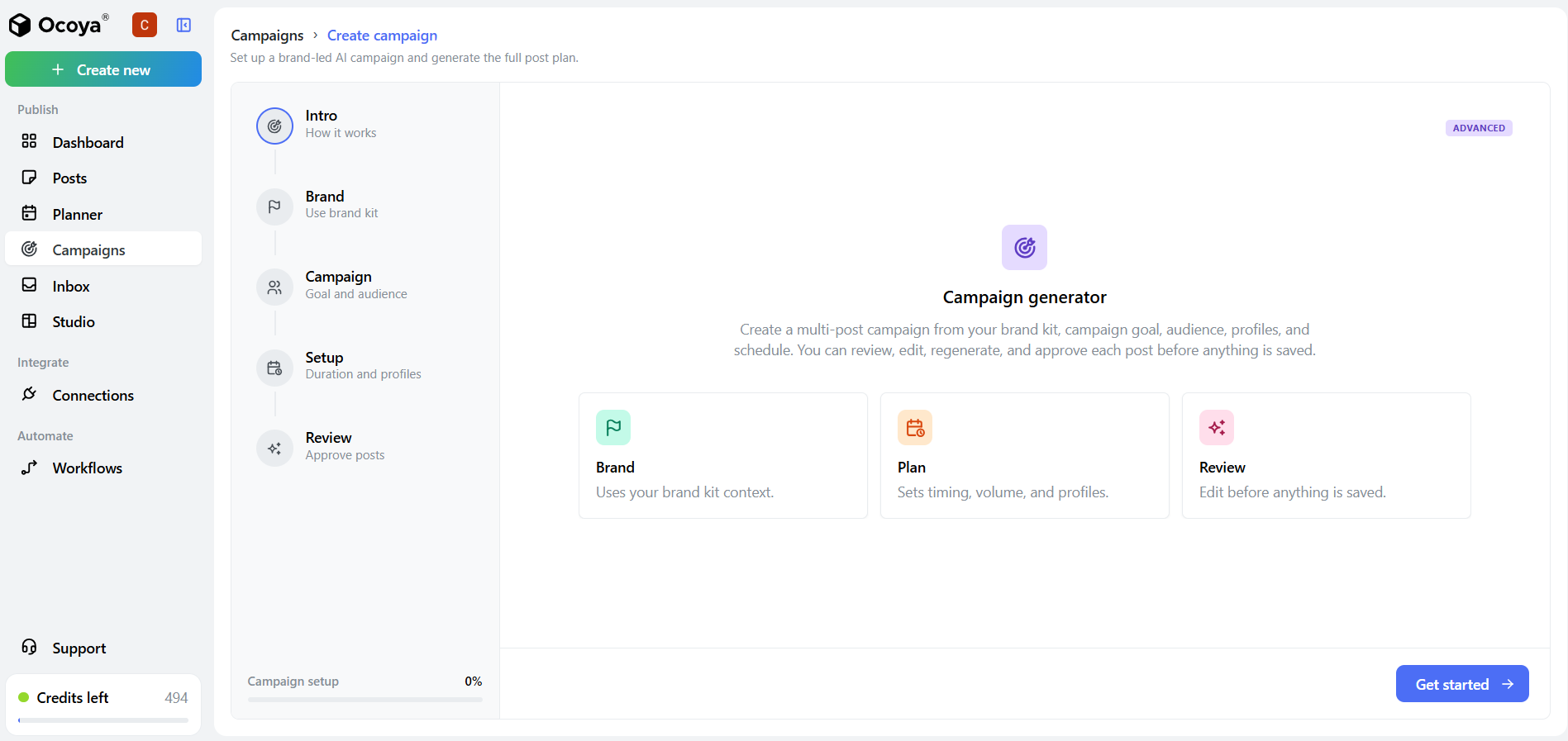
This is where the magic happens. Instead of manually building every individual post, you can let Ocoya's AI generate a complete, cohesive multi-day campaign for you.
- Go to the Campaign tab at the left navigation bar of Ocoya (as shown in the screenshot below) and click Get Started.
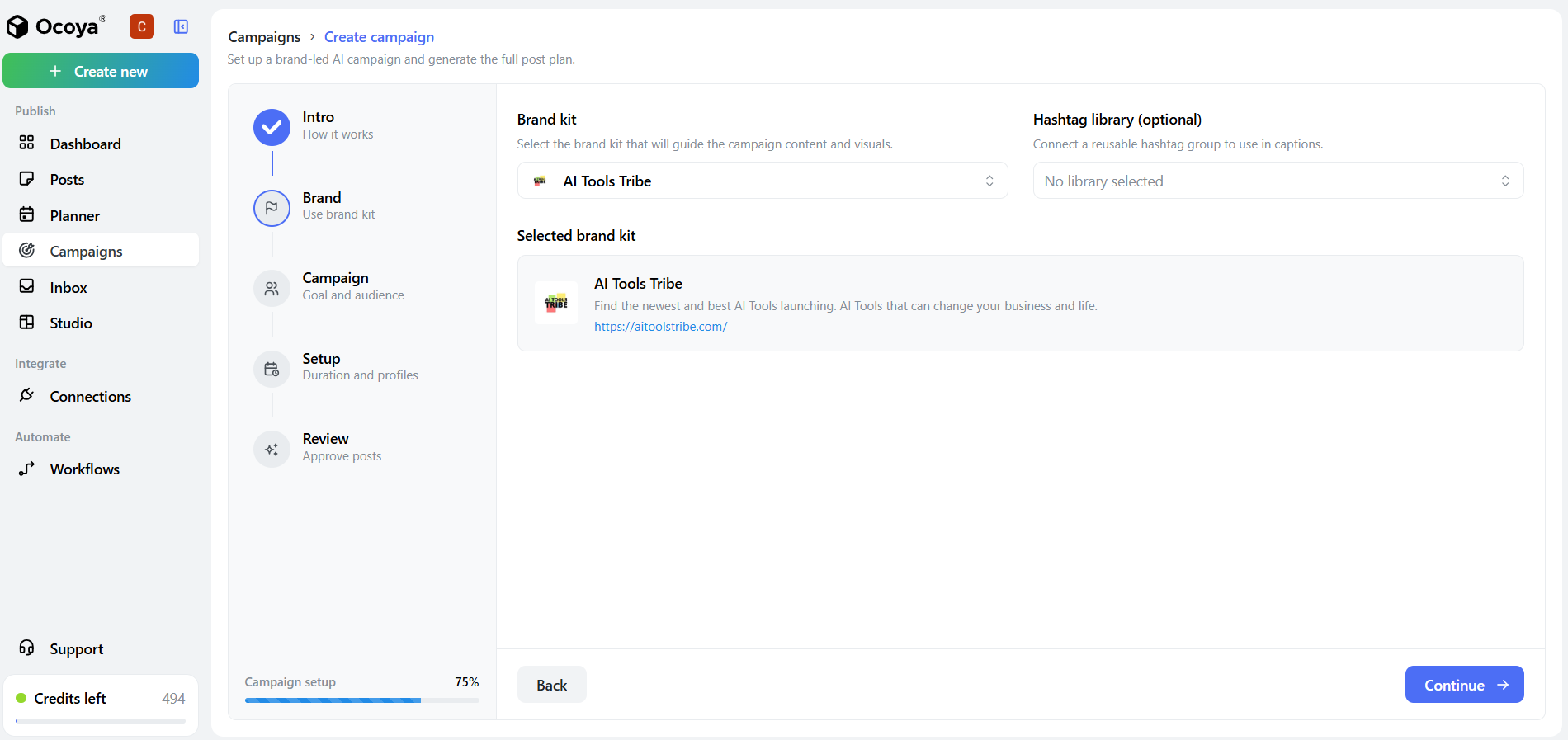
- Next, simply click the Brand Kit you want to use for your campaign and hit the Continue button.
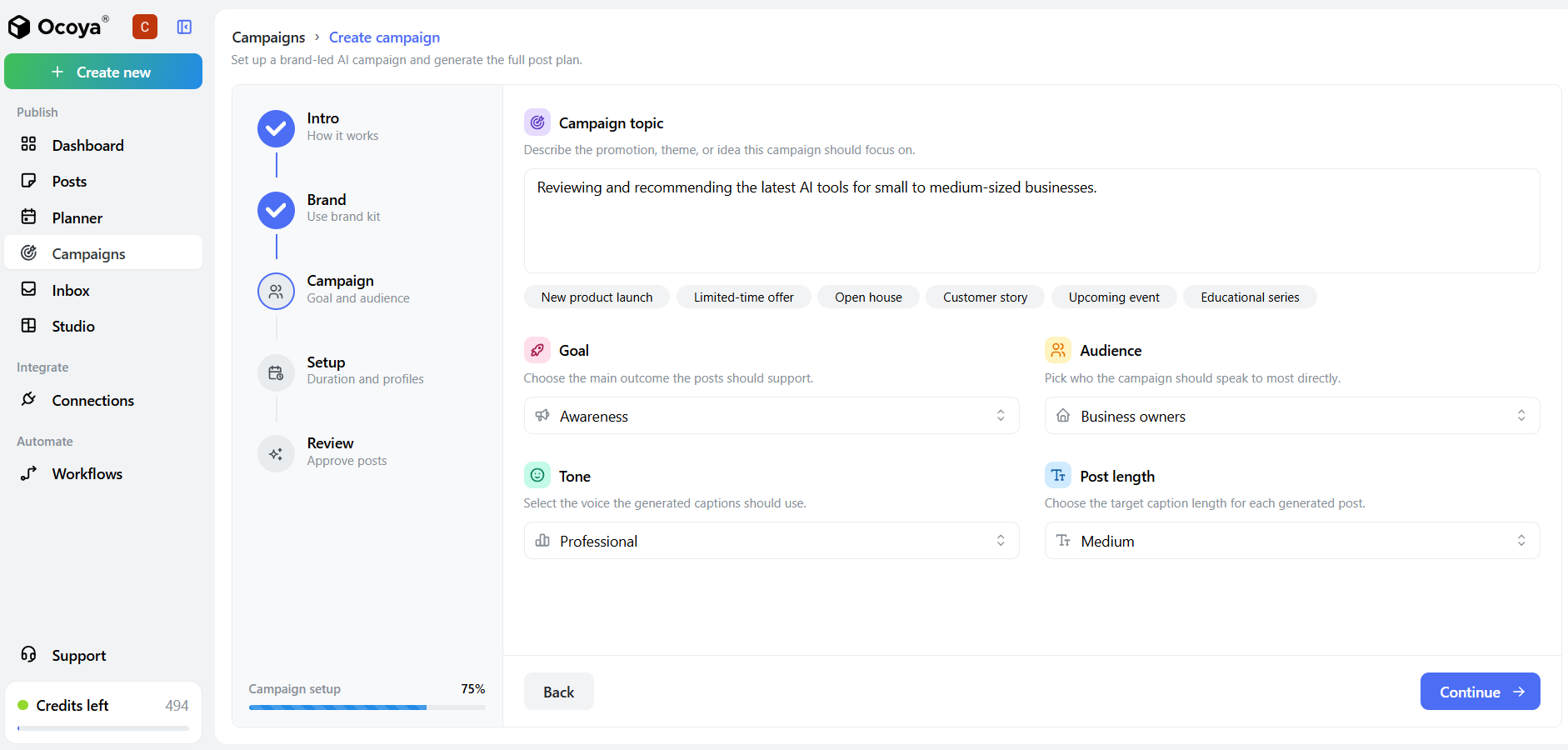
- Simply describe the promotion, theme, or idea this campaign should focus on. You can easily click the premade tabs below the text box, and then click the drop-down menus to set parameters like Goal, Tone, and Audience. Once your settings are selected, hit the Continue button.
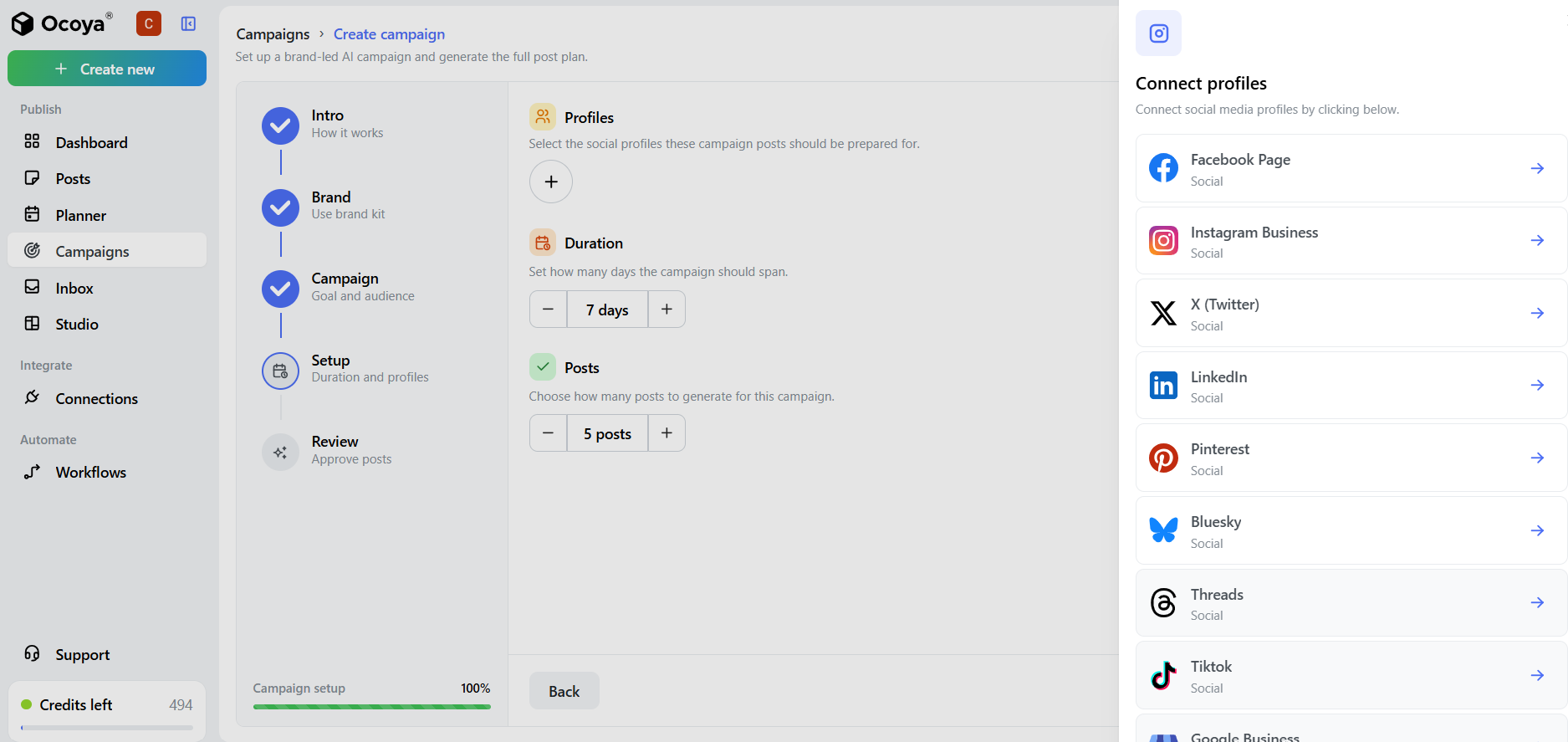
- Then, connect the specific social media profiles you integrated earlier, specify the number of days and the number of posts you want generated, and hit the Generate Campaign button. Now, wait a few seconds while the AI builds everything for you.
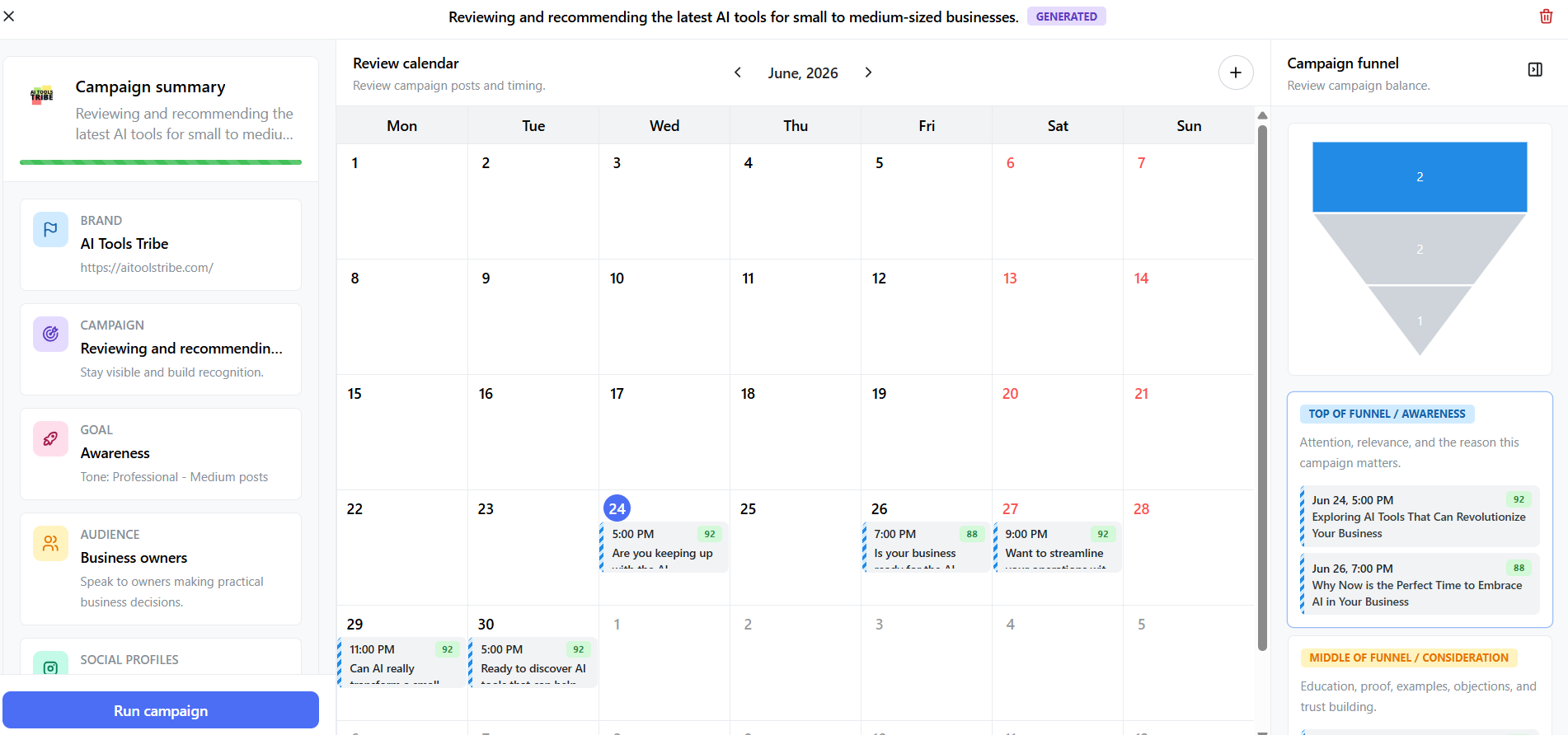
- Here is where the real wizardry comes in: Ocoya will automatically generate a complete content calendar populated with titles, graphics, and funnel descriptions. All you have to do is review the scheduled assets, add your own human touches, and make quick copy adjustments if needed. Once you are satisfied, hit the Run Campaign button and you’re set.
What are the Key Features and Benefits of Ocoya?
Ocoya combines powerful AI tools with intuitive design features to help businesses and creators streamline their workflow and boost their online presence.
1. Built-In AI Copywriter & AI Agents
Ocoya’s AI Copywriter includes proven marketing templates like PAS, AIDA, product descriptions, and video hooks, helping you create conversion-focused content faster. You can also train custom AI Agents to match your brand voice and niche.
2. Seamless Visual Editor & Canva Integration
You do not have to leave the dashboard to create eye-catching graphics. Ocoya features a native drag-and-drop design tool packed with templates, licensed music, animations, and stock assets.
If you are already deeply committed to Canva, the direct Canva integration allows you to pull your designs into Ocoya instantly.
3. AI Automation Workflows & Triggers
Ocoya’s automation is remarkably advanced. You can build triggers such as:
- New Product Release: Whenever you add a new item to Shopify or WooCommerce, Ocoya notices, writes an engaging promotional post, pairs it with the product image, and queues it.
- Scheduled Triggers: Have the AI automatically generate and post content every set number of days to ensure your feed never looks abandoned.
4. Interactive Content Calendar
The visual calendar makes it incredibly easy to spot gaps in your content strategy. You can easily drag and drop scheduled posts to change their dates, keep track of holidays, and schedule campaigns months in advance.
What Makes Ocoya Different?
Most social media tools on the market are just schedulers (they expect you to bring finished content to them). Other tools are just creators (like Canva or ChatGPT, which help you make content but don't publish it).
Ocoya is different because it sits perfectly in the middle as an AI-first platform.
The Tool-Stack Reality Check (The Math)
If you are running a modern agency or a growing business, you are likely paying multiple subscription bills every month. Let’s look at how the costs stack up when you consolidate your tools:
- Graphic Design: Canva Pro — approximately $15/month
- AI Copywriting: ChatGPT Plus or Jasper — approximately $20/month
- Post Scheduling: Buffer or Hootsuite — approximately $15–$99/month
Combined, this traditional multi-tool setup typically costs between $50 and $134+ per month.
With Ocoya, these capabilities are included in a single platform:
- Native Design Studio for graphic creation
- AI Copywriter and AI Agents for content generation
- Multi-Channel Calendar for scheduling and publishing
Plans start at $15/month, making Ocoya a more affordable all-in-one alternative.
Traditional Marketing Stack vs. Ocoya
Graphic Design
- Traditional Stack: Canva, Photoshop, or external designers
- Ocoya: Built-in design suite with direct Canva integration
Copywriting
- Traditional Stack: ChatGPT, Jasper, or manual content creation
- Ocoya: Native AI Copywriter and customizable AI Agents
Hashtags & Trends
- Traditional Stack: Manual research or third-party tools
- Ocoya: Automated trending hashtag generation
Publishing
- Traditional Stack: Copy and paste content into Buffer, Hootsuite, or similar schedulers
- Ocoya: One-click scheduling and publishing across major social networks
Client Feedback
- Traditional Stack: Email threads, WhatsApp messages, and spreadsheets
- Ocoya: Shareable approval links for direct client review and feedback
Instead of managing multiple disconnected tools, Ocoya combines design, AI content creation, scheduling, and collaboration into a single platform.
How Much Does Ocoya Cost? (Pricing Plans)
Ocoya is designed to scale with your workload. All of their plans come with a 7-day free trial, letting you test-drive the AI features with zero risk. If you choose an annual billing plan, you also get a 20% discount.
🥉 Bronze — $19/mo ($15/mo billed annually)
Best for: Solo freelancers and side-hustlers
- 1 User
- 1 Workspace
- 5 Social Profiles
- 100 AI Credits
🥈 Silver — $49/mo ($39/mo billed annually)
Best for: Small marketing teams and growing businesses
- 5 Users
- 5 Workspaces
- 20 Social Profiles
- 500 AI Credits
🥇 Gold — $99/mo ($79/mo billed annually)
Best for: Mid-sized agencies and active content managers
- 20 Users
- 20 Workspaces
- 50 Social Profiles
- 1,500 AI Credits
💎 Diamond — $199/mo ($159/mo billed annually)
Best for: High-volume agencies and enterprise brands
- 50 Users
- Unlimited Workspaces
- 150 Social Profiles
- Unlimited AI Credits
Annual billing saves 20% across all plans.
Note: AI Credits are used by the built-in AI Copywriter and AI Agents to generate high-performing captions, hooks, and blog summaries. At the Diamond level, these credits become entirely unlimited.
Final Thoughts on Ocoya
If you are currently paying separate subscriptions for an AI writing assistant, a graphic design tool, and a social media scheduler, switching to Ocoya is a logical decision. It streamlines your budget and, more importantly, recovers hours of lost time spent switching tabs and copying data between different apps.
It isn't about letting AI run your marketing on complete autopilot—it's about removing the tedious, manual friction points from your daily creative process so you can focus on building actual relationships with your audience.
Frequently Asked Questions (FAQs)
Is Ocoya good for beginners?
Yes. Its user interface is highly intuitive, featuring a straightforward drag-and-drop workflow. Plus, having the AI Copywriter built right into the dashboard eliminates "blank page syndrome," making it easy to generate professional copy and hashtags even if you have zero marketing experience.
Is Ocoya free?
No, Ocoya is a premium service, but they offer a fully functional 7-day free trial on all of their subscription tiers. This lets you test out the visual editor, copywriting assistant, and integrations completely risk-free before committing.
Who uses Ocoya?
Ocoya is built primarily for social media managers, marketing agencies, solopreneurs, small-to-medium-sized business owners, and e-commerce brands looking to scale their social presence efficiently.
Is Ocoya an AI platform?
Yes. Unlike traditional social media schedulers where you have to paste finished content, Ocoya is built from the ground up as an AI-first platform. It integrates a native AI Copywriter, smart visual suggestions, custom AI Agents, and automated e-commerce post generation into a single pipeline.
Is Ocoya worth the investment?
Absolutely. If you currently pay separate bills for an image editor (like Canva), an AI writer (like ChatGPT or Jasper), and a scheduling hub (like Buffer), consolidating those into Ocoya will easily save you anywhere from $35 to $100+ per month while getting hours of your time back.
