

Upcoach is an AI-powered coaching software designed to help coaches, consultants, and creators build, manage, and scale transformation-driven programs. Unlike traditional course platforms that simply host videos and dump documents on users, Upcoach combines course building, client management, habit tracking, interactive agendas, and deep artificial intelligence integration into a unified ecosystem.
Whether you run high-ticket 1:1 sessions, group coaching, or active cohorts, Upcoach gives you the operational backbone needed to deliver actual student results without getting bogged down in administrative tasks.
What Problems Does Upcoach Solve?
If you run a coaching or consulting business, you’ve likely experienced the "platform puzzle." You use a Learning Management System (LMS) for course content, Google Docs for worksheets, Calendly for bookings, Slack or Facebook for community, ClickUp or Notion for task tracking, and email or WhatsApp for check-ins.
This fragmented setup creates several painful problems:
- Client Disengagement: When clients have to jump across four different apps to do one week's homework, they drop off. They miss tasks, stop filling out worksheets, and lose momentum.
- Administrative Fatigue: You spend more time chasing people down for check-ins, updating spreadsheets, and managing calendar links than actually coaching.
- Lack of Actionable Insights: In standard LMS platforms, you only see if a student watched a video—not if they took action, built the habit, or completed the implementation task.
- Scale Bottlenecks: Scaling from 5 clients to 50 or 500 without losing personal connection usually requires hiring an army of community managers and operations assistants.
Upcoach fixes this by bringing content, accountability, scheduling, and progress tracking into one clean dashboard—and layering smart automation on top to handle the heavy lifting.
Who Should Use Upcoach?
Upcoach is built specifically for people and teams who sell outcomes, not just passive content. It is ideal for:
- Solopreneurs and Consultants: Individual operators who want to offer high-touch coaching without spending 20 hours a week on admin work.
- Course Creators transitioning to Cohorts: Anyone moving away from self-paced courses toward active, high-ticket group programs.
- Small to Medium Businesses (SMBs): Training companies, agencies, and agencies running structured employee or client onboarding programs.
- Mastermind Hosts and Bootcamp Leaders: Organizations looking for specialized software for running masterminds and bootcamps where peer accountability and live check-ins matter.
If your primary business model is selling $20 video courses where clients never speak to you, a simple video host might be fine. But if your brand relies on accountability, execution, and client retention, Upcoach is built for you.
What Can Upcoach Be Used For?
Upcoach’s modular structure makes it surprisingly versatile. You can configure it for:
- 1:1 Executive Coaching: Create customized private portals with meeting agendas, direct tasks, habit trackers, and personal program roadmaps.
- Cohort-Based Programs & Bootcamps: Run timed 6-week or 12-week intensive bootcamps with dripped content, group check-ins, and shared group feeds.
- Masterminds: Set up accountability groups where members share goals, log weekly wins, and track long-term milestones.
- Hybrid LMS for Coaches and Consultants: Store video lessons and resource libraries right alongside interactive worksheets and implementation action items.
- Corporate Onboarding and Training: Train client teams with progress reporting that lets admins see who is on track and who needs support.
How Should You Use Upcoach?
To get the best results out of Upcoach, you should treat it as your core business engine rather than just a content repository. Here is a practical workflow to set up:
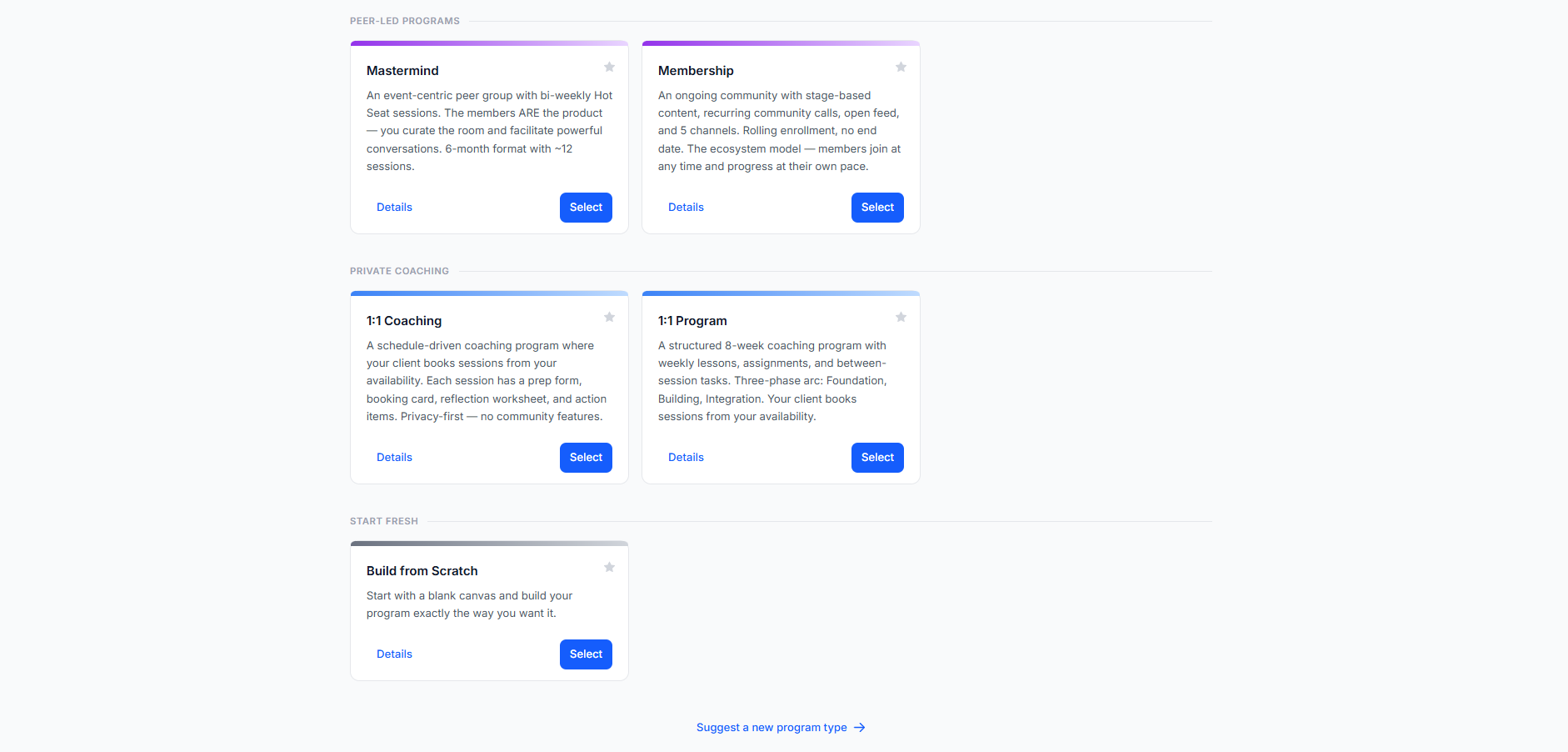
- Sign up and set up your profile. Create your account, add your branding, and pick the program format you want to run (1:1 coaching, group cohort, or mastermind).
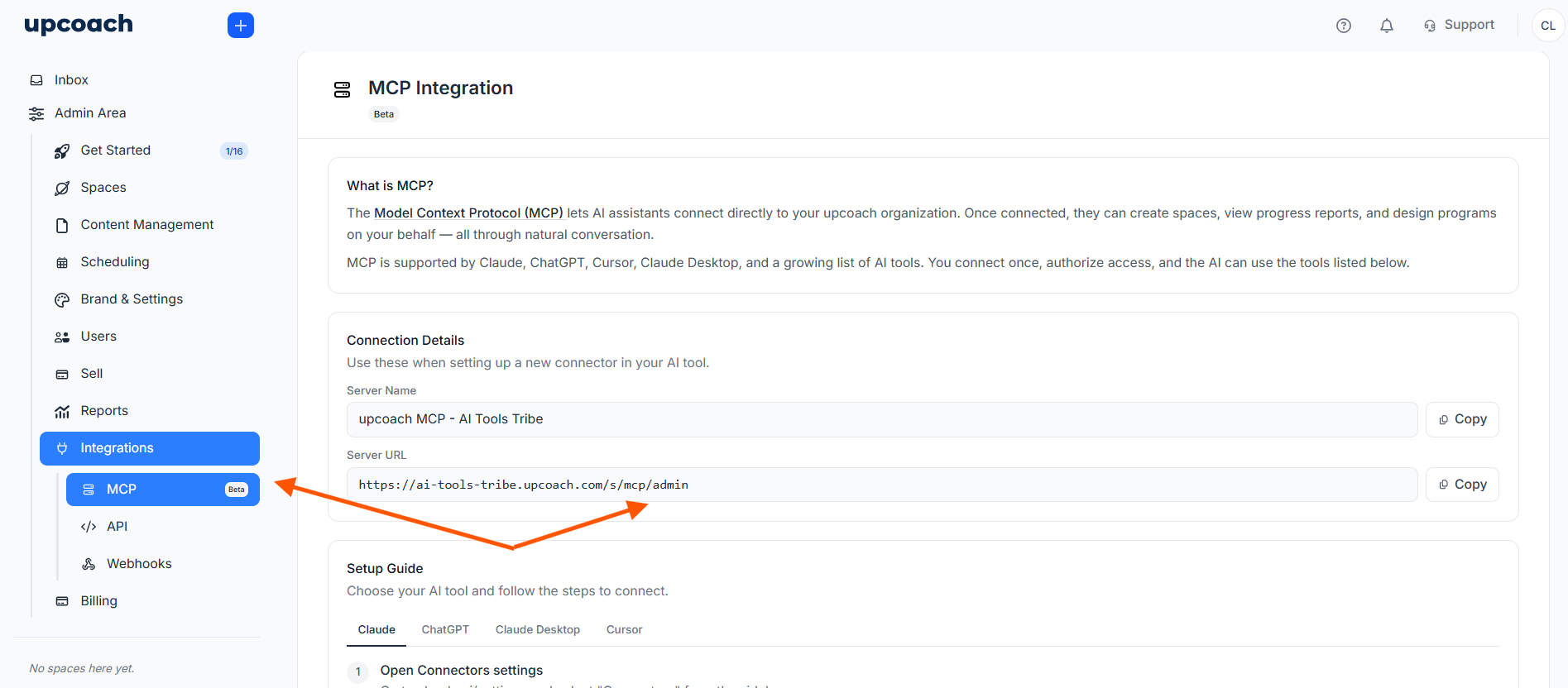
- Connect your AI assistant. In your admin sidebar, go to Integrations > MCP, copy your server URL, and add Upcoach as a connector in Claude or ChatGPT. Approve the one-click OAuth prompt — no password sharing involved.
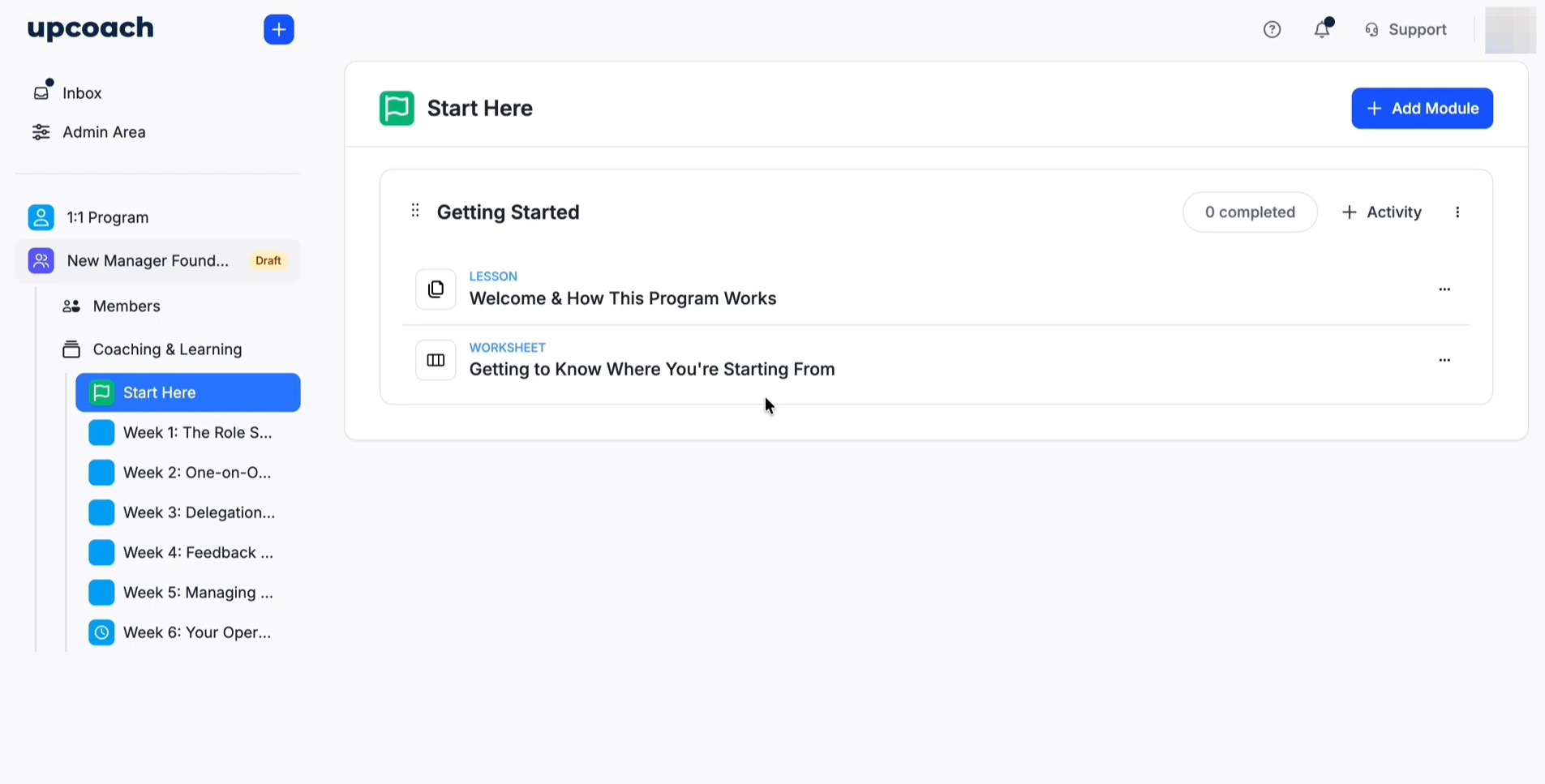
- Let AI build your first program. Open a fresh chat with your connected assistant and ask it to design a curriculum, create worksheets, or set up check-ins. Upcoach's AI can generate an entire program structure in minutes.
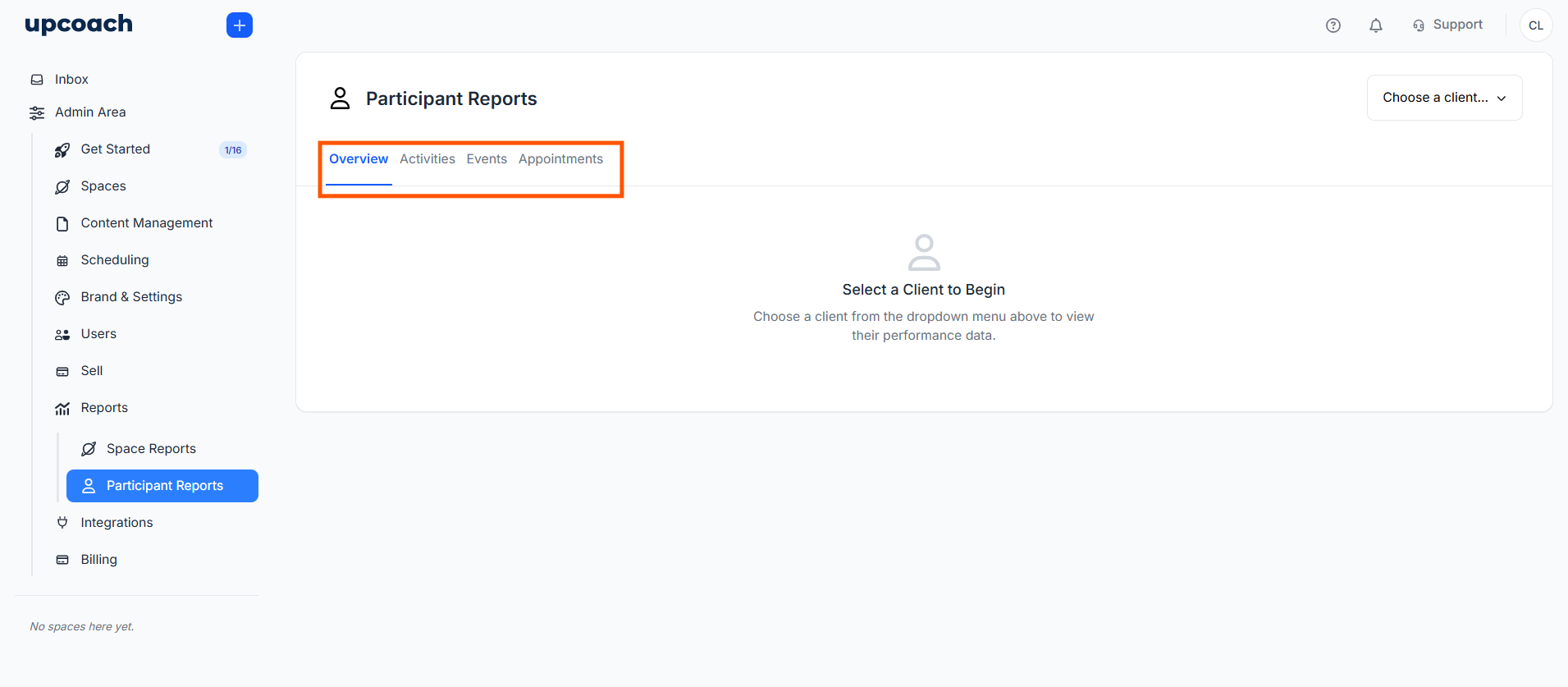
- Launch and track progress. Invite clients, then ask your AI assistant to pull live progress reports or flag inactive participants — no manual digging through dashboards required.
- Refine as you go. Everything the AI builds is fully editable, so you stay in control.
What Are the Key Features and Benefits of Upcoach?
In this upcoach coaching software review, let’s break down the flagship features that matter most to modern business owners.
1. Interactive Program & Course Builder
Upcoach isn't a passive video platform. When you create a module, you pair videos with embedded interactive worksheets, to-do lists, and habit trackers. Students don't just watch—they do.
2. Native AI & Coaching Software with MCP Support
The headline feature in our upcoach v3 review is its cutting-edge AI ecosystem. Upcoach was among the first in the space to embrace native Model Context Protocol (MCP) support.
- Connect Claude to Upcoach: You can run your entire backend operation from your favorite Claude desktop app or interface. You can literally type, "Show me all clients in Cohort A who haven't completed Worksheet 2," or "Create a 4-week habit tracker for executive stress management," and it updates your account instantly.
- Upcoach ChatGPT Integration: If you prefer OpenAI's tools, you can use the same natural language capabilities to automate administrative reporting, summarize client progress notes, and draft personalized feedback.
3. Built-In CRM, Scheduling, and Agendas
Forget toggling between external tools. Upcoach includes native appointment scheduling with calendar sync. You can attach interactive agendas directly to scheduled calls, ensuring clients fill out pre-call notes before you jump on Zoom.
4. Real-Time Analytics and Outcome Measurement
Upcoach measures baseline assessments against post-program check-ins. The AI analyzes client worksheet responses to surface the qualitative story behind client performance metrics, showing you exactly where participants succeed or get stuck.
What Makes Upcoach Different?
When doing an online coaching business software comparison, most platforms fall into one of two categories: pure course hosts (like Teachable or Kajabi) or administrative client portals (like Dubsado or Paperbell).
Upcoach is fundamentally different because it sits in the sweet spot: an all-in-one execution platform.
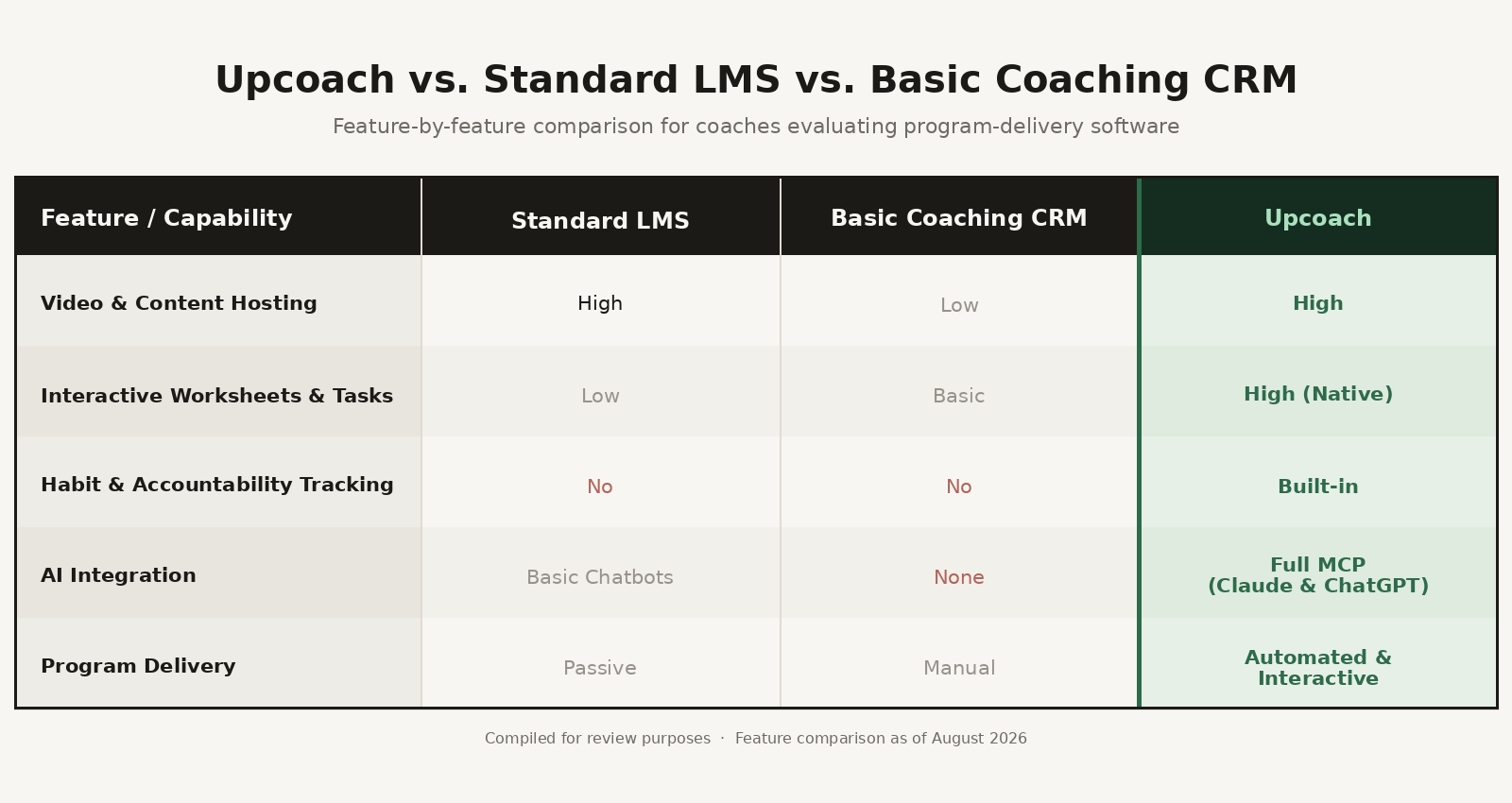
The introduction of full MCP integration makes Upcoach feel like a next-generation tool. Instead of clicking through menus to tweak program settings, your AI assistant handles administrative tasks in seconds.
Upcoach Features and Pricing Breakdown
Understanding coaching platform pricing comparison is vital for running an efficient tech stack. Upcoach offers straightforward tier structures designed to scale with your business growth:
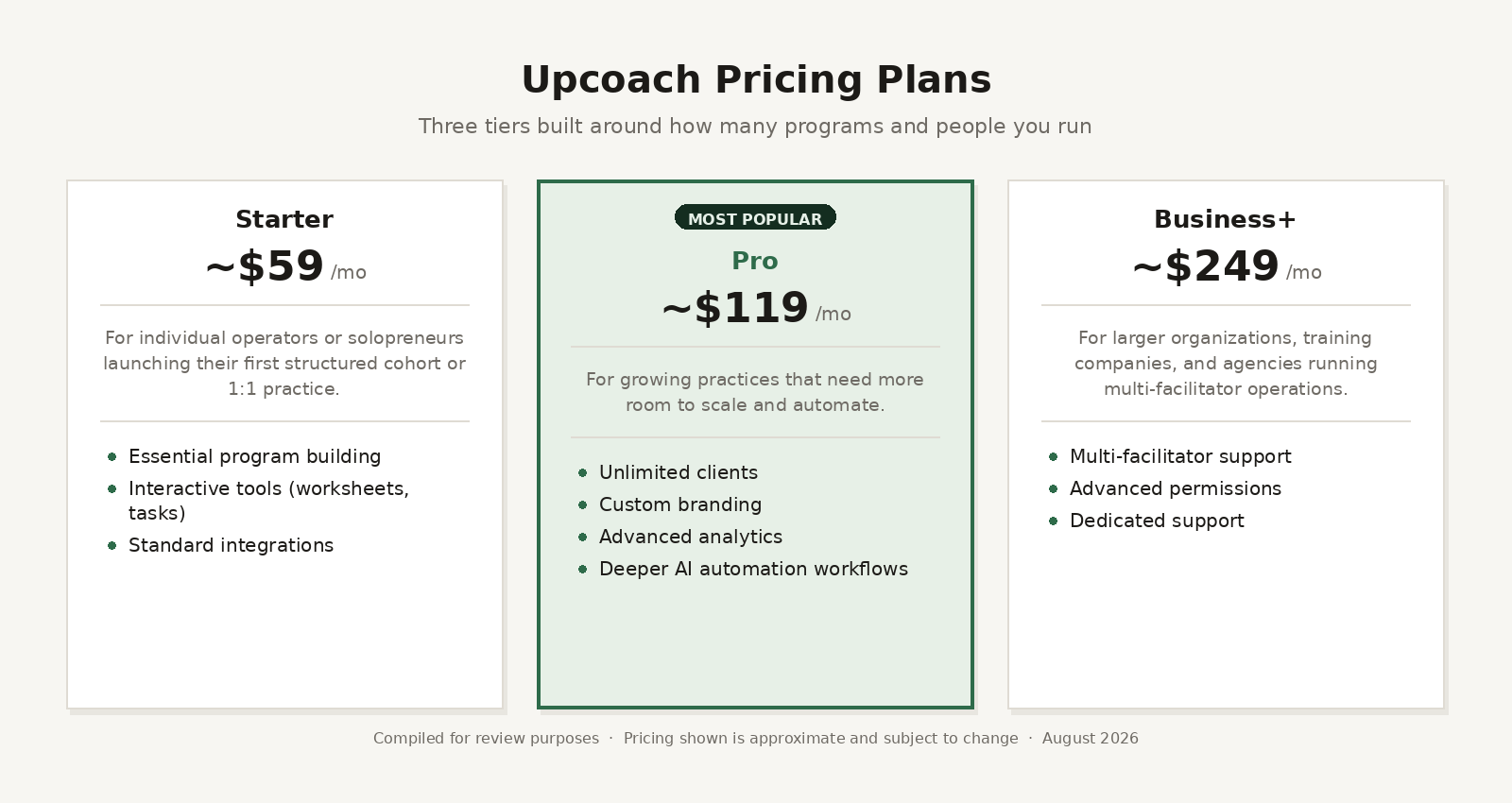
Pricing and plan specifics may adjust slightly over time, so it's always best to check their official site for the latest options.
Upcoach Pros and Cons
To keep this upcoach honest review practical, here is a quick look at where it shines and where it has room for improvement:
Pros
- Unmatched Accountability: Built-in habit trackers and to-do lists keep client completion rates significantly higher than industry averages.
- Cutting-Edge AI: True coaching software with MCP support lets you interact with your portal using Claude or ChatGPT naturally.
- Clean User Experience: The interface is sleek, intuitive, and modern for both coaches and clients.
- All-in-One Efficiency: Replaces separate tools for scheduling, course delivery, habit tracking, and progress reporting.
Cons
- Not a Full Marketing Suite: Upcoach focuses heavily on delivery and client outcomes rather than complex sales funnels or advanced email marketing campaigns (you'll still want your standard email marketing tool like ConvertKit or ActiveCampaign).
- Initial Setup Mindset: Because it offers so much flexibility beyond basic video courses, setting up your first interactive methodology takes a little planning.
Final Thoughts
If you are looking for a simple video dump platform, cheaper alternatives exist. But if you are building a modern, results-focused business that relies on client satisfaction, peer accountability, and efficient scaling, is Upcoach worth it? Absolutely.
Upcoach elevates what it means to be the best all-in-one coaching platform. By combining program delivery with deep AI integrations like MCP, it frees up hours of administrative time every week, allowing you to focus on high-impact coaching and growing your revenue.
If you are ready to modernize your client experience and let AI handle your operational workload, giving Upcoach a spin is a smart next move for your business.
Frequently Asked Questions
Does Upcoach replace my email marketing software?
No, Upcoach is focused strictly on program delivery, client management, and accountability. You will still want a dedicated tool like ConvertKit or ActiveCampaign for your complex marketing funnels and newsletters.
How hard is it to connect Claude or ChatGPT using the MCP integration?
It’s incredibly straightforward. The native MCP support means you simply link your account, and you can immediately start using natural language in your AI desktop app to pull reports or create program drafts. No complex coding required!
Can I use Upcoach for 1:1 coaching, or is it only for group cohorts?
It works perfectly for both. For 1:1 clients, you can spin up customized private portals complete with individual meeting agendas, personal habit trackers, and private resource libraries.
Is there a way to test out Upcoach before committing?
Yes! Upcoach generally offers a trial period or demo so you can get inside, play with the program builder, and test out the AI assistant tools before moving your entire business over.
