

Repurpose is an automated content distribution and republishing platform designed to automatically reformat, schedule, and publish your audio and video content across more than 15 social media channels simultaneously.
Instead of manually editing, downloading, removing watermarks, and re-uploading the exact same video to TikTok, YouTube Shorts, Instagram Reels, Facebook, and LinkedIn, Repurpose.io acts as a background pipeline. You post once on your primary channel, and the platform automatically handles the rest based on rules you set once and forget.
What Problems Does Repurpose.io Solve?
If you are running a business or building a personal brand as a solopreneur, you probably know the exact feeling: you spent hours recording a single great piece of content, only to realize the "distribution tax" takes three times longer than the actual creation.
Here are the specific headaches Repurpose.io removes from your daily routine:
- The Endless Downloading and Re-uploading Loop: Downloading a video from TikTok, logging into Instagram, uploading it as a Reel, re-typing captions, opening YouTube, uploading it as a Short... over and over again.
- The Watermark Penalty: Social algorithms (especially Instagram and YouTube) notoriously suppress videos containing visible TikTok watermarks. Repurpose.io automatically strips watermarks clean off your source videos without degrading video quality.
- AI Tool Isolation: Many modern teams use AI video generators (like HeyGen, Munch, or Descript) to create realistic avatars or edit short clips. Moving these AI outputs into daily social feeds manually creates an unwanted bottleneck.
- Distribution Burnout: Most small business owners give up on multi-channel presence simply because maintaining 5+ platforms manually requires a full-time social media manager or hours of tedious admin work.
Who Should Use Repurpose.io?
Repurpose.io isn't meant for casual users who post once a month. It is specifically tailored for high-output creators and lean business operations:
- Solopreneurs and Lean Teams: Founders who need maximum brand exposure without hiring a full social media management agency.
- AI Content Creators: Businesses leveraging AI video tools to create short-form spokespersons, automated tutorials, or marketing clips, needing a direct pipeline to push these AI assets across all networks automatically.
- Podcasters and Live Streamers: Creators producing long-form video or audio who want snippets automatically clipped, formatted into vertical video with custom waveforms, and distributed across TikTok, Reels, and YouTube.
- Agencies and Marketing Consultants: Agencies managing multiple brand accounts who need to streamline client video distribution across dozens of connected profiles without doing it manually.
What Can Repurpose.io Be Used For?
The flexibility of Repurpose.io lies in its customizable "Workflows." Here are a few practical setups:
- Automatically Post YouTube Videos to TikTok: Take full-length YouTube videos or YouTube Shorts and trigger automated posting straight to your TikTok account.
- Repurpose TikTok to Shorts & Reels: Every time you post a video on TikTok, automatically strip the watermark and push it directly as an Instagram Reel, Facebook Reel, and YouTube Short.
- Scale AI Video Workflows: Connect AI generators like HeyGen. Whenever a new AI video is rendered, Repurpose.io grabs the file and distributes it across your business accounts instantly.
- Convert Audio Podcasts into Vertical Clips: Turn raw podcast audio files (from RSS feeds, Google Drive, or Dropbox) into engaging video clips featuring custom backgrounds, dynamic waveforms, and automatic captions.
- Archive and Backup Content: Automatically store clean, watermark-free versions of all your social media content straight to Google Drive or Dropbox for safe keeping.
How Should You Use Repurpose.io?
Setting up Repurpose.io takes about 15 minutes upfront, after which it runs almost entirely on autopilot. Here is the straightforward process:
- Connect Your Connections: Link your social media profiles (TikTok, YouTube, Instagram, Facebook, LinkedIn, Pinterest, Twitter/X) and cloud storage accounts (Google Drive, Dropbox).
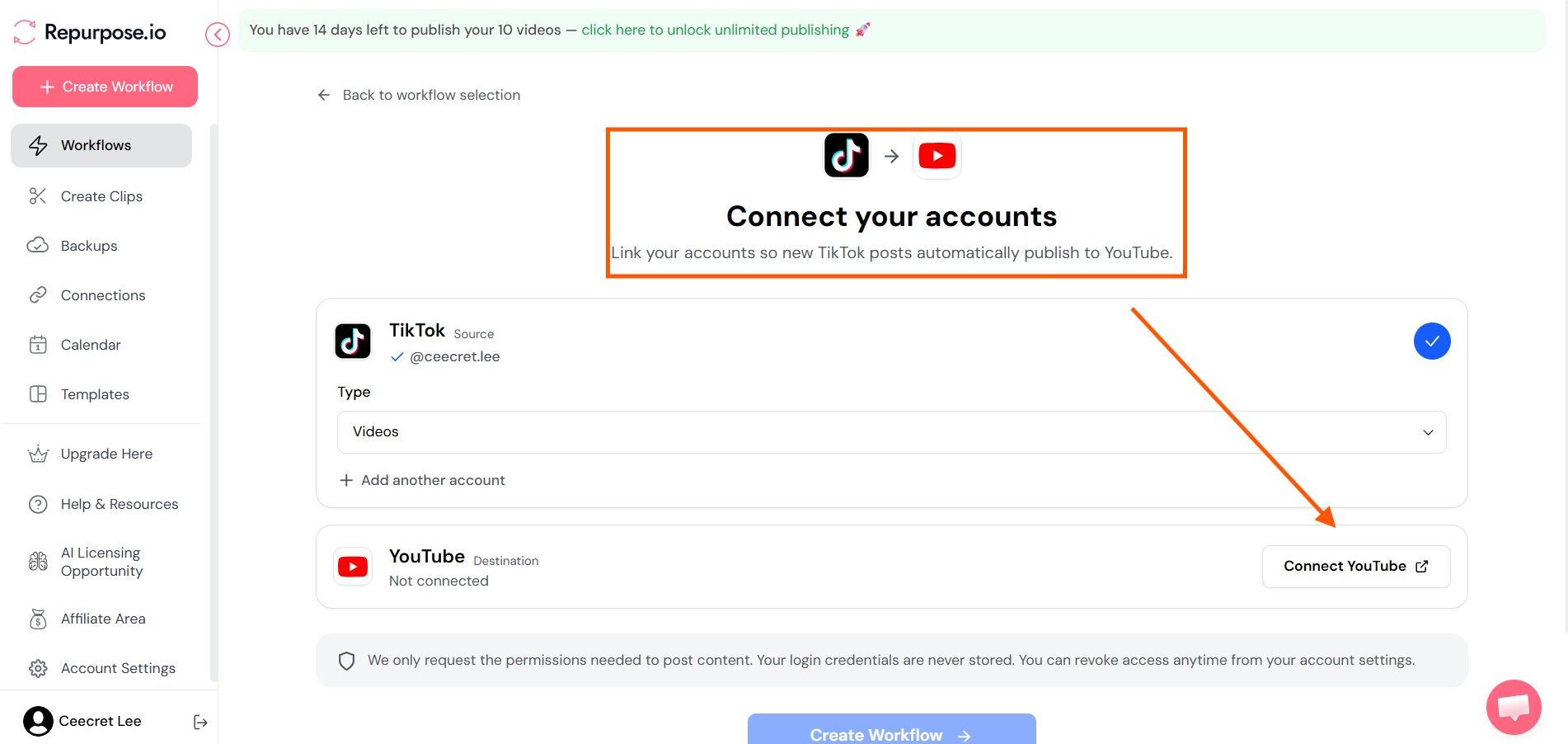
- Build a Workflow: Define a source and a destination. For example: Source: TikTok $\rightarrow$ Destination: YouTube Shorts.
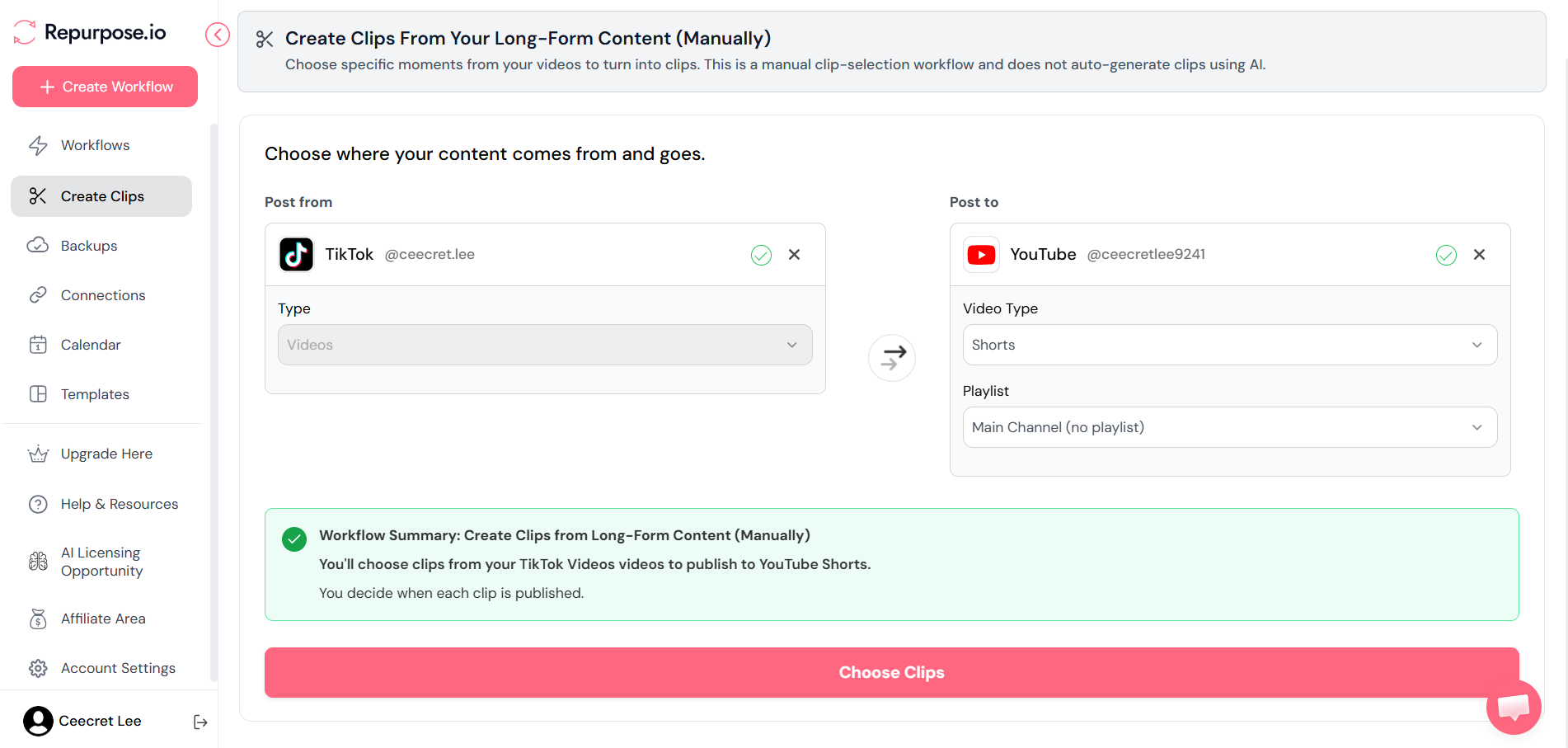
- Configure Action Rules: Choose whether you want the workflow to strip watermarks, add platform-specific hashtags, resize videos (e.g., 16:9 landscape to 9:16 vertical), or prepend custom intro/outro clips.
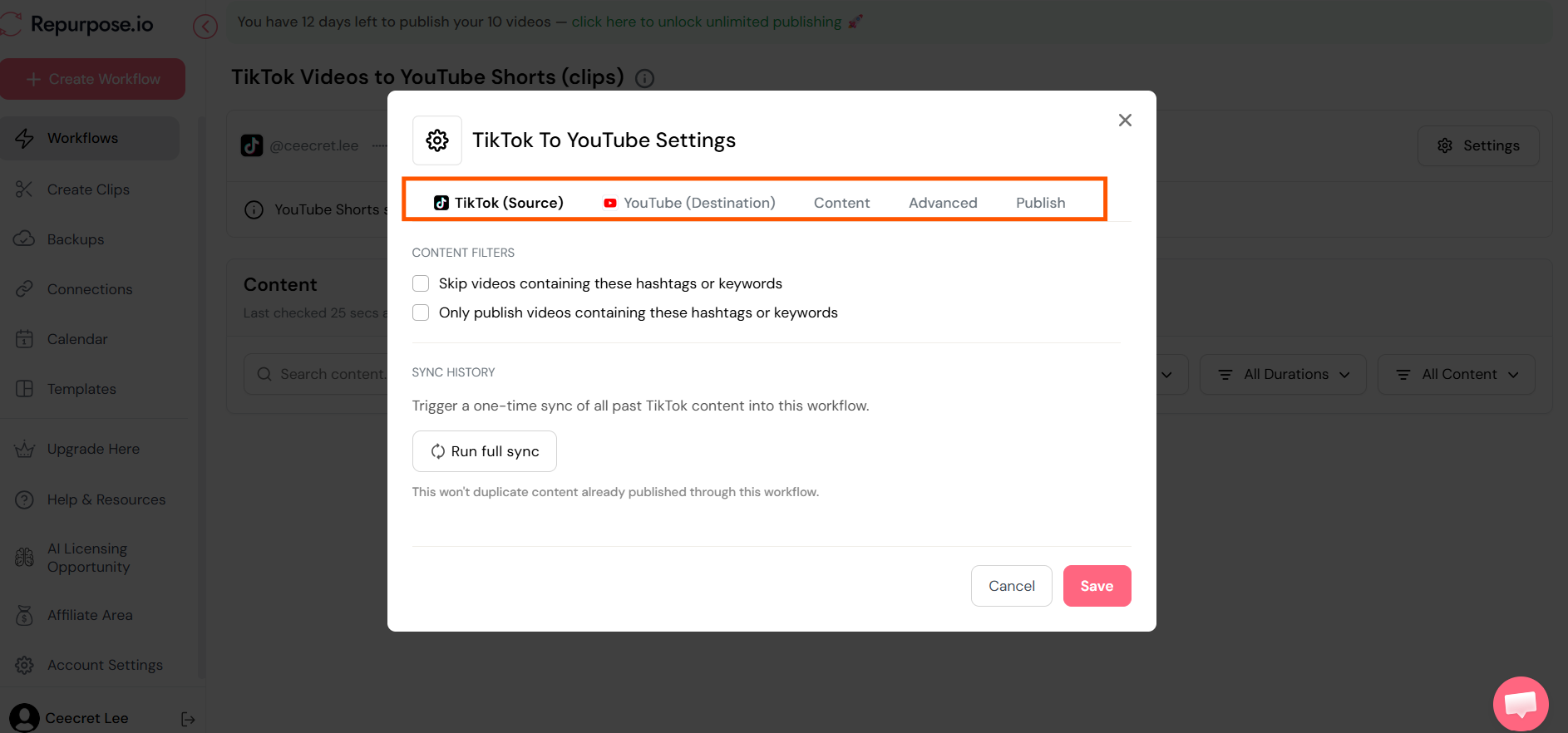
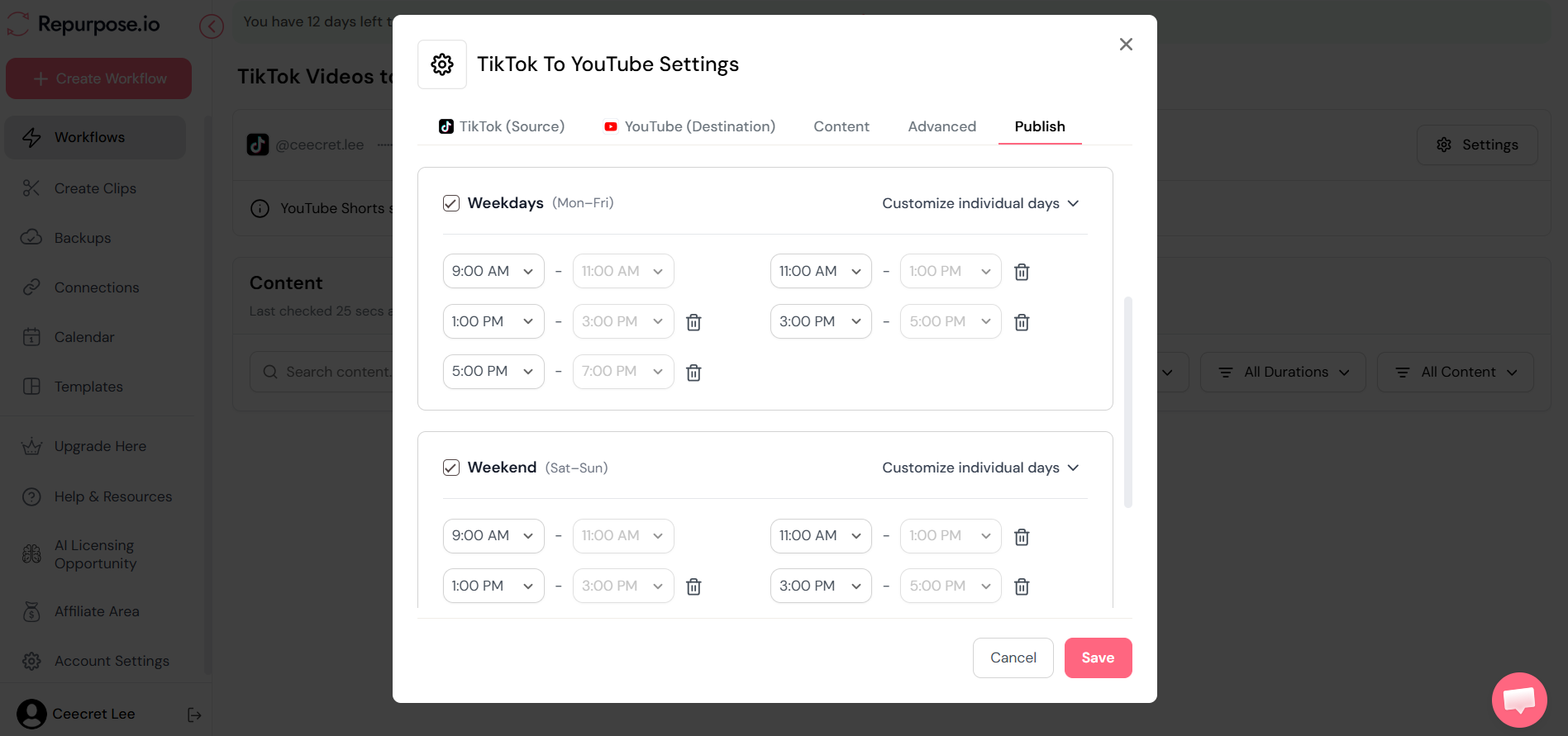
- Set to Auto-Publish or Manual Approval: Choose "Auto" to let the tool publish content instantly whenever new source video drops, or choose "Manual" if you prefer to review posts, tweak captions, or set specific publish dates on a calendar preview.
What are the Key Features and Benefits of Repurpose.io?
1. Zero-Watermark Auto-Republishing
Repurpose.io fetches raw, high-resolution source video files directly from platforms like TikTok or Zoom, removing all branding watermarks automatically before publishing to secondary channels.
2. AI Tool Stack & Captions Integration
For modern businesses heavily integrating AI into their tech stack, Repurpose.io seamlessly pairs with tools like HeyGen or Descript. You can auto-generate AI headlines, burned-in captions with dynamic highlight colors, and platform-tailored description text to keep audience engagement high.
3. Smart Scheduling & Content Spacing
To avoid spamming your followers on platforms where you might be publishing multiple clips a day, Repurpose.io allows you to set automated posting intervals (e.g., publish a maximum of 3 videos a day spaced at least 2 hours apart).
4. Customizable Video Templates & Resizing
Easily pad horizontal videos into vertical formats, insert dynamic audio waveforms for audio podcasts, and add persistent brand headers or footers without opening video editing software.
What Makes Repurpose.io Different?
When exploring content repurposing tools, it is easy to get confused by the options available. Here is how Repurpose.io stacks up against common alternatives:
Repurpose.io vs Opus Clip
- Opus Clip is an AI clipping tool. It takes one long video (like a 60-minute podcast) and uses AI to find viral moments, cut them into short clips, and add captions. However, its primary focus is on clip creation, not multi-channel distribution.
- Repurpose.io is a distribution engine. While it offers basic clipping features, its main power lies in automatically moving content seamlessly between 15+ connected channels without manual intervention.
- Verdict: Many creators use both together—using an AI clipper to make the shorts, and Repurpose.io to distribute them everywhere automatically.
Repurpose.io vs Publer
- Publer is a traditional social media management and scheduling tool where you upload finished posts, write captions manually, and pick times on a calendar.
- Repurpose.io is an automated pipeline. You don't log in daily to create posts; you create workflows that trigger automatically whenever content is created elsewhere.
- Verdict: If you want a traditional content planner, Publer works well. If you want a hands-off system that distributes content while you sleep, Repurpose.io is designed for that precise job.
Repurpose.io Pros and Cons
Pros:
- True "set-and-forget" automation saves 5–10+ hours of manual admin work weekly.
- Automatic watermark removal ensures full algorithmic reach on Instagram Reels and YouTube Shorts.
- Integrates smoothly with AI video generators and podcast RSS feeds.
- Unlimited video publishing across connected channels on all plans.
Cons:
- Built specifically for video/audio; not designed for text-only posts (like long-form text on X or LinkedIn).
- The UI is functional and clean, but prioritized for utility rather than fancy graphics.
Repurpose.io Pricing: Is Repurpose.io Worth It?
Repurpose.io keeps its pricing structure straightforward with plans based on the number of connected accounts rather than restricting video volume:
- 14-Day Free Trial: Lets you publish up to 10 videos free without requiring a credit card up front.
- Starter Plan (~$35/month or ~$29/mo billed annually): Supports up to 3 accounts per social network. Perfect for single creators or individual small business owners.
- Pro Plan (~$79/month or ~$66/mo billed annually): Supports up to 10 accounts per network. Ideal for businesses with multiple brands or sub-accounts.
- Agency Plan (~$179/month or ~$149/mo billed annually): Designed for marketing agencies managing up to 25 accounts per network.
Is Repurpose.io worth it?
If your time as a business owner or creator is worth more than $10/hour, yes, absolutely. If you post just 3 to 5 short-form videos a week, manually downloading, editing watermarks, and re-posting across 4 platforms will easily consume 15 to 20 hours a month. Repurpose.io automates that entire process for less than the cost of a single hour of virtual assistant labor.
Final Thoughts on Repurpose.io
At the end of the day, organic reach in 2026 comes down to consistency and platform coverage. Creating great content is hard enough; letting administrative tasks hold your content back from reaching audiences on secondary platforms is an avoidable mistake.
By pairing modern AI tools with Repurpose.io’s automated workflows, you can build a full-scale content engine that turns one short video into nationwide exposure across every major video platform.
Frequently Asked Questions
What are some tools for repurposing content?
Some top tools for content repurposing include Repurpose.io (automated multi-platform distribution), Opus Clip (AI short-form clipping), Descript (text-based video/audio editing), Headliner (audio-to-video audiograms), and ChatGPT/Claude (reformatting long text into social threads).
Does Repurpose.io automatically remove TikTok watermarks?
Yes. When you set up a workflow from TikTok to platforms like Instagram Reels or YouTube Shorts, Repurpose.io fetches the raw source file and automatically strips out the watermark before publishing.
Can I connect AI video generators like HeyGen or Descript?
Yes. You can route videos generated by AI tools straight from Google Drive, Dropbox, or connected feeds into Repurpose.io, which then formats, schedules, and auto-posts them across your social accounts.
Do I need to keep my browser open or computer running for workflows to work?
No. Repurpose.io runs completely in the cloud. Once you build and activate your workflow, it works automatically in the background 24/7 without requiring your computer to be on.
Will Repurpose.io ruin or compress my video quality?
No. It preserves the original resolution and audio clarity of your video file during distribution, ensuring your content looks sharp on every destination platform.
