

MakeUGC is an AI-powered platform designed to help businesses create user-generated content (UGC) style ads without relying on traditional creators, filming equipment, or expensive production workflows. Instead of hiring influencers and coordinating video shoots, you can generate AI-driven promotional videos in minutes.
When we look at it closely, MakeUGC focuses on automating social media ad production using AI avatars, synthetic spokespersons, customizable scripts, and short-form video generation. The platform is built specifically for brands that need constant ad creatives for paid campaigns, especially across TikTok, Instagram, Facebook, and YouTube Shorts.
Let’s take a look at MakeUGC and how this AI tool can help you create ads.
What Problems Does MakeUGC Solve?
MakeUGC solves several big problems you deal with when creating modern social media ads:
- Hiring influencers can be expensive and time-consuming.
- Filming UGC content often requires product shipping and creator coordination.
- Editing multiple ad variations manually slows campaign testing.
- Brands constantly need fresh creatives to avoid ad fatigue.
- Scaling multilingual campaigns traditionally requires additional creators and editors.
Instead of spending days organizing production, you can generate AI-powered UGC videos in a few minutes. This dramatically reduces turnaround time while allowing you to test more ad angles at a lower cost.
Who Should Use MakeUGC?
Because the platform automates AI spokespersons, script generation, short-form editing, and ad-style video production, it appeals most to users running a fast-paced digital campaign.
Here are those who may get the most value from it:
- Ecommerce brands: Great for businesses running paid social ads regularly.
- Digital marketing agencies: Useful for handling multiple client campaigns efficiently.
- Dropshippers: Helpful for quickly testing product angles and creatives.
- Social media marketers: Good for producing UGC-style videos without hiring creators.
- SaaS companies: Useful for app demos and promotional explainer content.
- Small businesses: Ideal for professional-looking ads without large production budgets.
- Performance marketers: Valuable for rapid split testing and scaling winning ads.
- Global brands: Helpful for creating localized ad variations across markets.
What Can MakeUGC Be Used For?
You can use MakeUGC for much more than simple AI video creation. The platform supports several stages of the ad production process, making it flexible for both small campaigns and large-scale paid advertising operations.
Creating UGC-Style Product Ads
MakeUGC is especially designed to create short-form videos that look native to social media feeds. These videos resemble authentic influencer style or customer-generated content rather than polished corporate advertisements.
To start creating an ad, users typically upload product information, write a prompt, or customize a script. The AI then generates a ready-made promotional video with voiceover, visuals, captions, and an AI spokesperson.
After generating a video, users can further customize hooks, captions, scripts, pacing, music, and visuals to produce additional ad variations.
Generating AI Spokesperson Videos
One of MakeUGC’s biggest features is its AI spokesperson system. Instead of hiring creators or filming actors, users can generate realistic AI presenters that speak naturally on camera.
These AI actors are designed to mimic real UGC creators commonly seen on TikTok and Instagram advertisements.
Businesses that could benefit from AI spokesperson videos include:
- Ecommerce brands
- Startups
- SaaS companies
- Agencies
- Coaches and consultants
- Subscription businesses
Creating Short-Form Social Media Content
MakeUGC is heavily optimized for vertical short-form video formats. This lets you create content for:
- TikTok Ads
- Instagram Reels
- Facebook Ads
- YouTube Shorts
- Organic Social Media Campaigns
Because the videos are designed to look platform-native, they blend more naturally into social feeds and often perform better than overly polished advertisements.
Producing Multiple Ad Variations
One big advantage of MakeUGC is rapid creative testing. Instead of producing one advertisement at a time, users can generate multiple versions quickly.
Common variations include:
- Different hooks
- Different calls to action
- New AI presenters
- Different scripts
- Alternate product angles
- Modified captions and subtitles
This allows performance marketers to test multiple creatives simultaneously to identify winning ads faster.
What are the Key Features and Benefits of MakeUGC?
MakeUGC is designed to simplify and speed up social media ad creation using AI. Instead of relying on influencers, filming, or manual editing, the platform helps users generate UGC-style videos, AI spokesperson ads, and multiple creative variations quickly. Here’s what it could do for people.
AI UGC Video Generation
MakeUGC can generate complete promotional videos using AI-generated presenters, scripts, captions, and visuals.
How to Generate an AI UGC Video
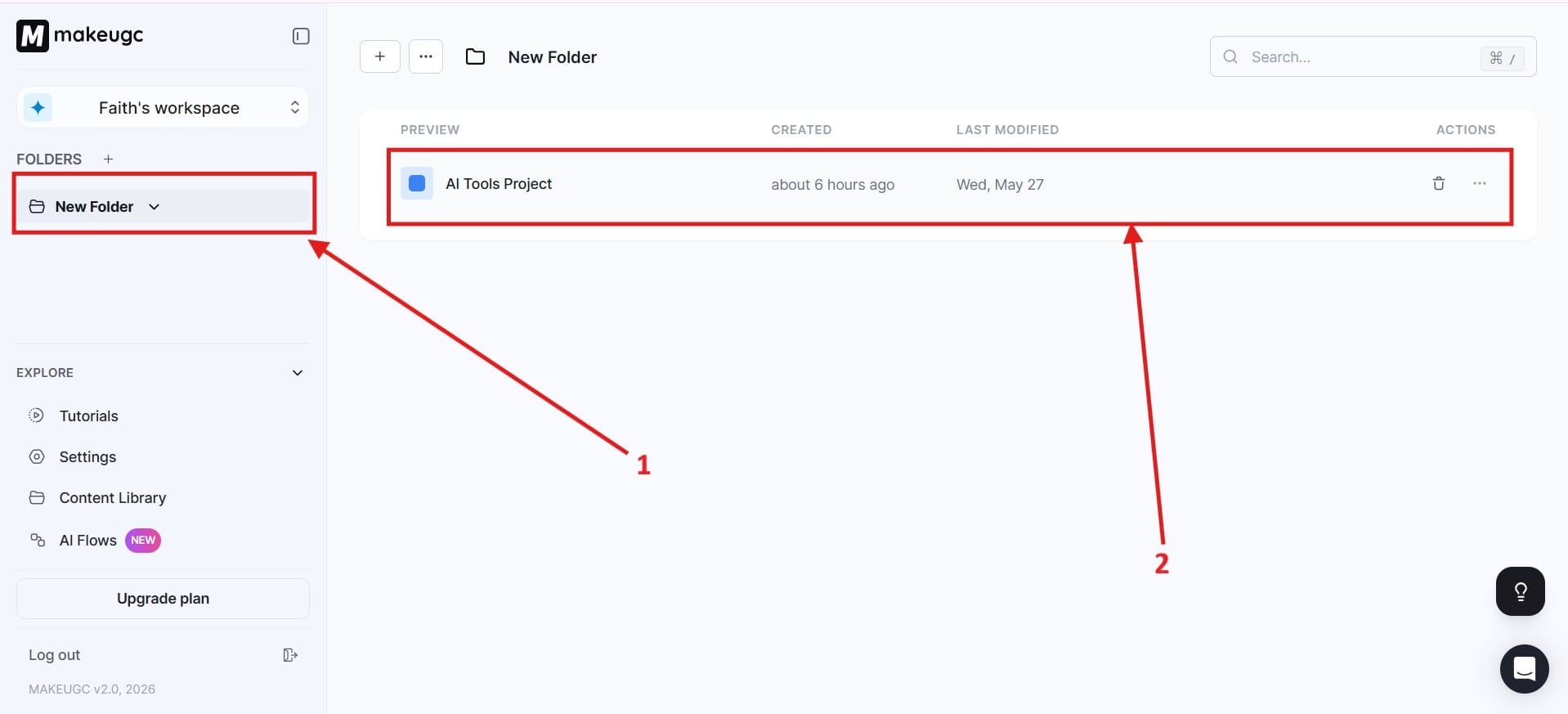
- First, you need to go to the folder. I highlighted this as Red Box 1. After you go to the folder, it will pull down your projects. Choose the project that you want. I highlighted what you would click next in Red Box 2, except it might say New Project.
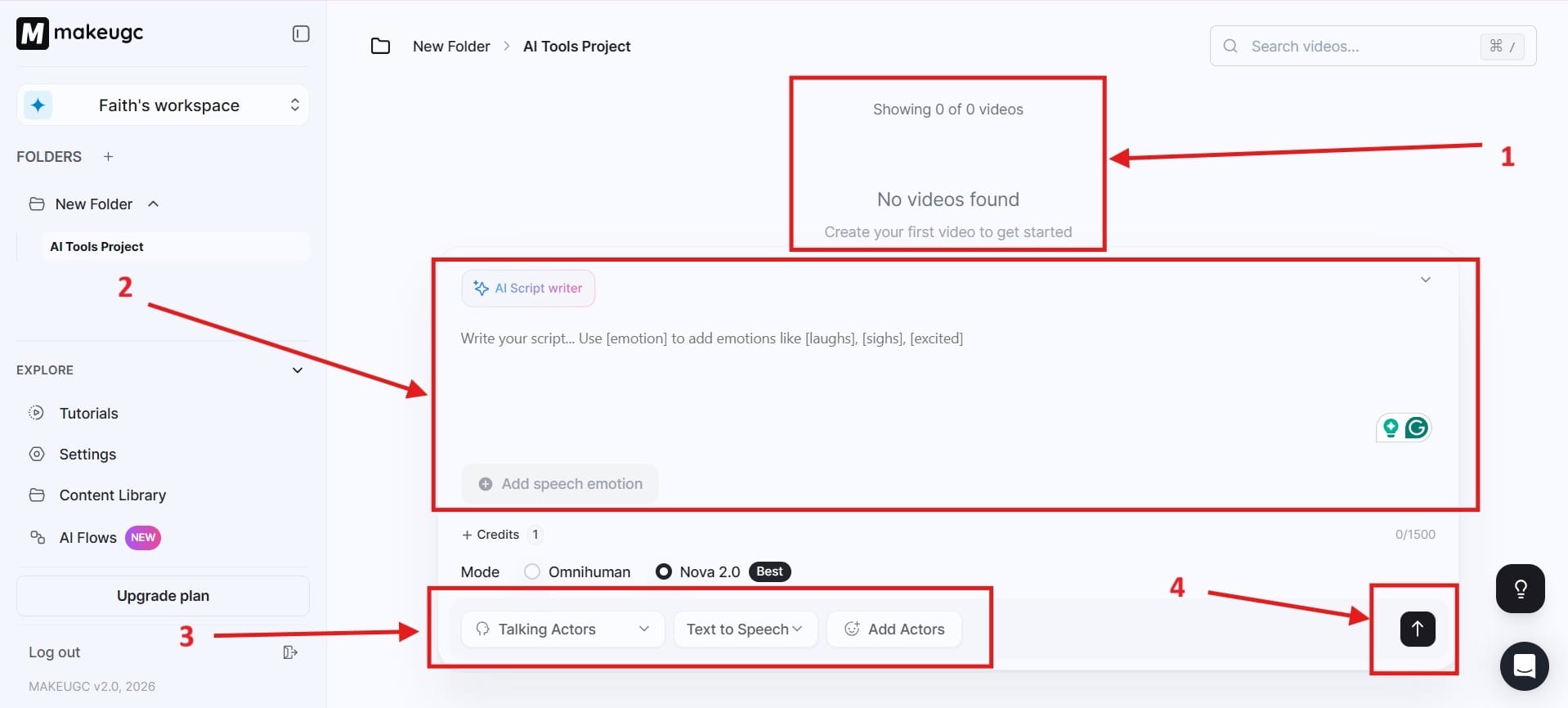
- Once you click on this, it will take you to a new page. The first section highlighted as Red Box 1 is where you will have your collection of videos. In Red Box 2, you will generate your video with a prompt by telling it what you would like for it to create. Red Box 3 covers all the actors you would like to add, the text-to-speech function, and add actors. In Red Box 4, this is where you will generate the video.
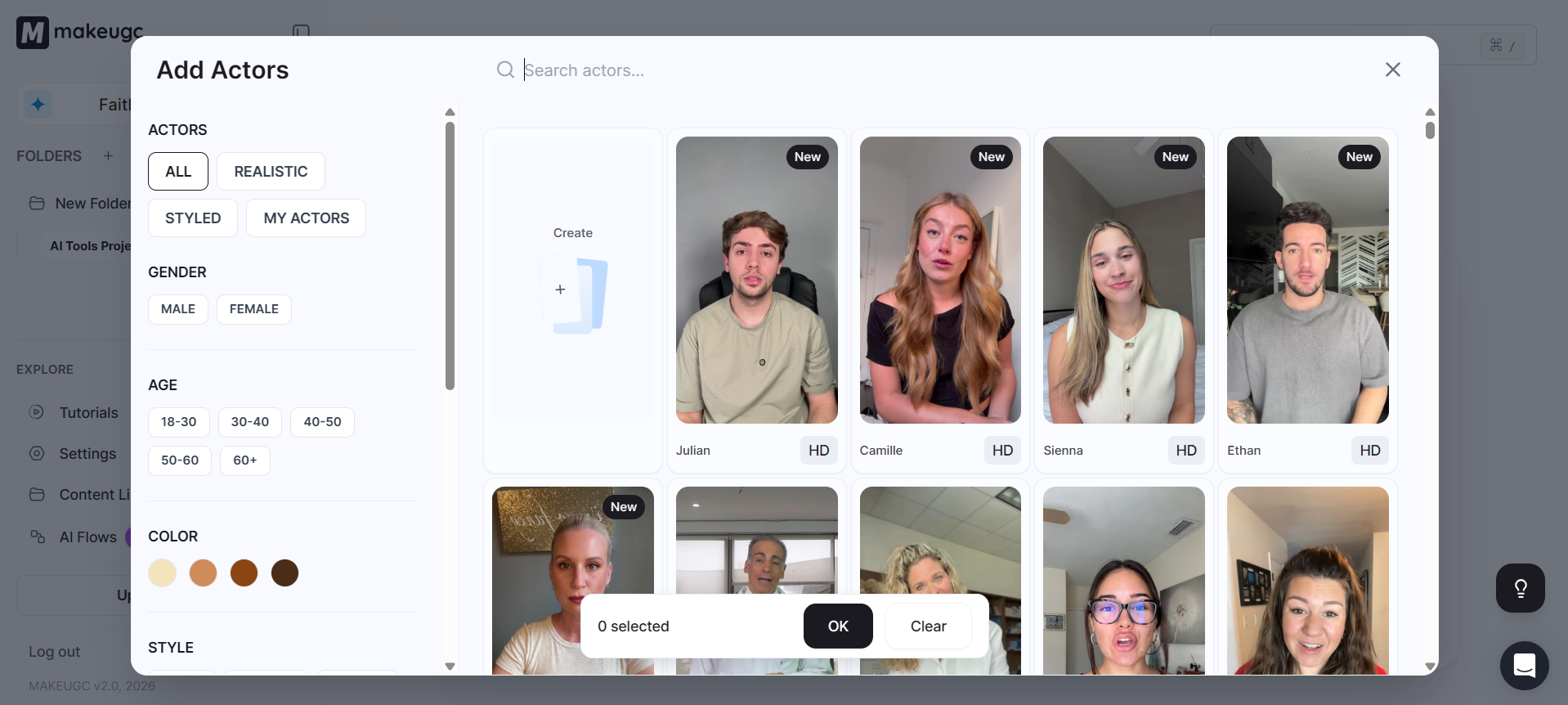
- When you click on the area that says Add Actors, it will give you many different actors, and you can choose their gender and age. If you choose one actor, that is 1 credit. Choose 2 actors, and that is 2 credits and so on.
- After you have done that, it will begin to process the video and this is how you generate your video with MakeUGC.
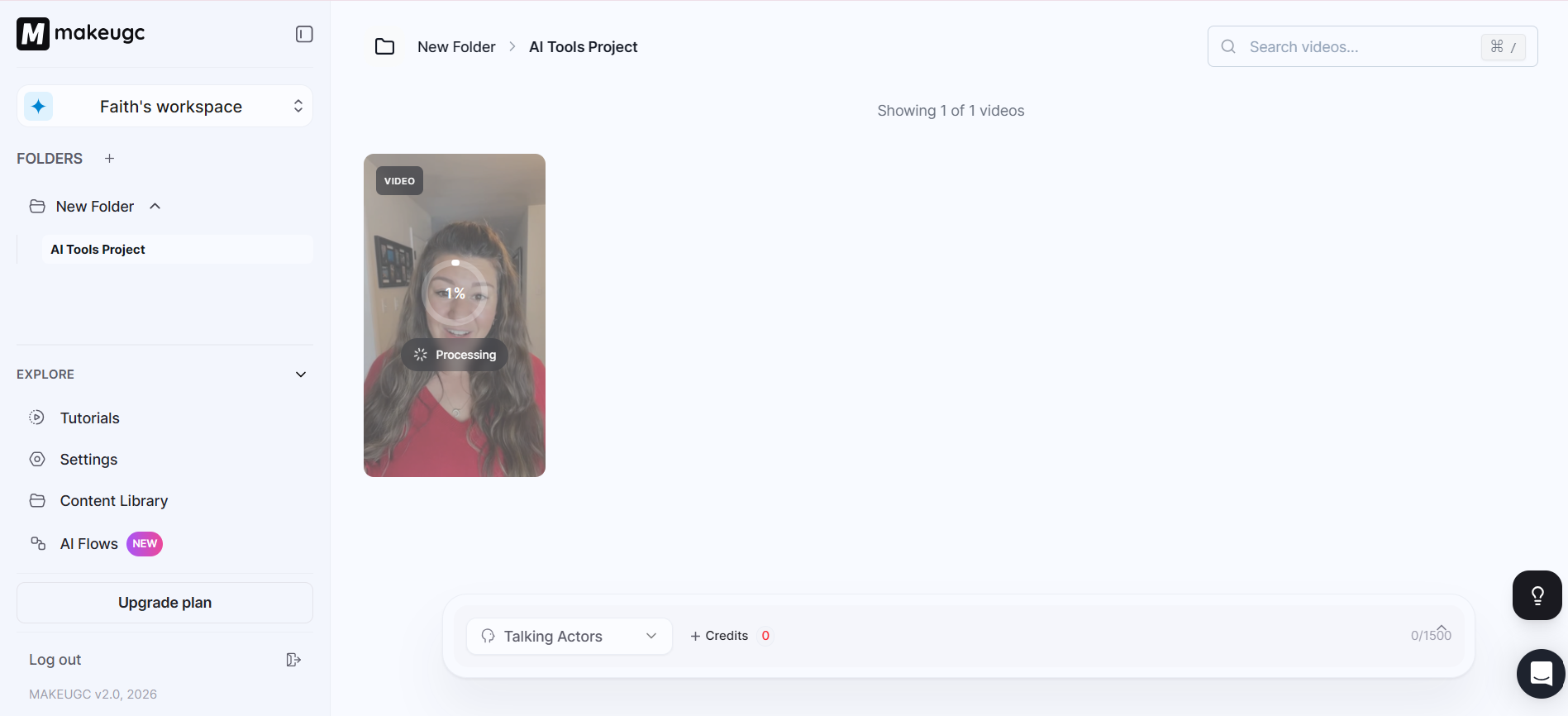
- After you’ve done that, your video will be ready for sharing to social media platforms.
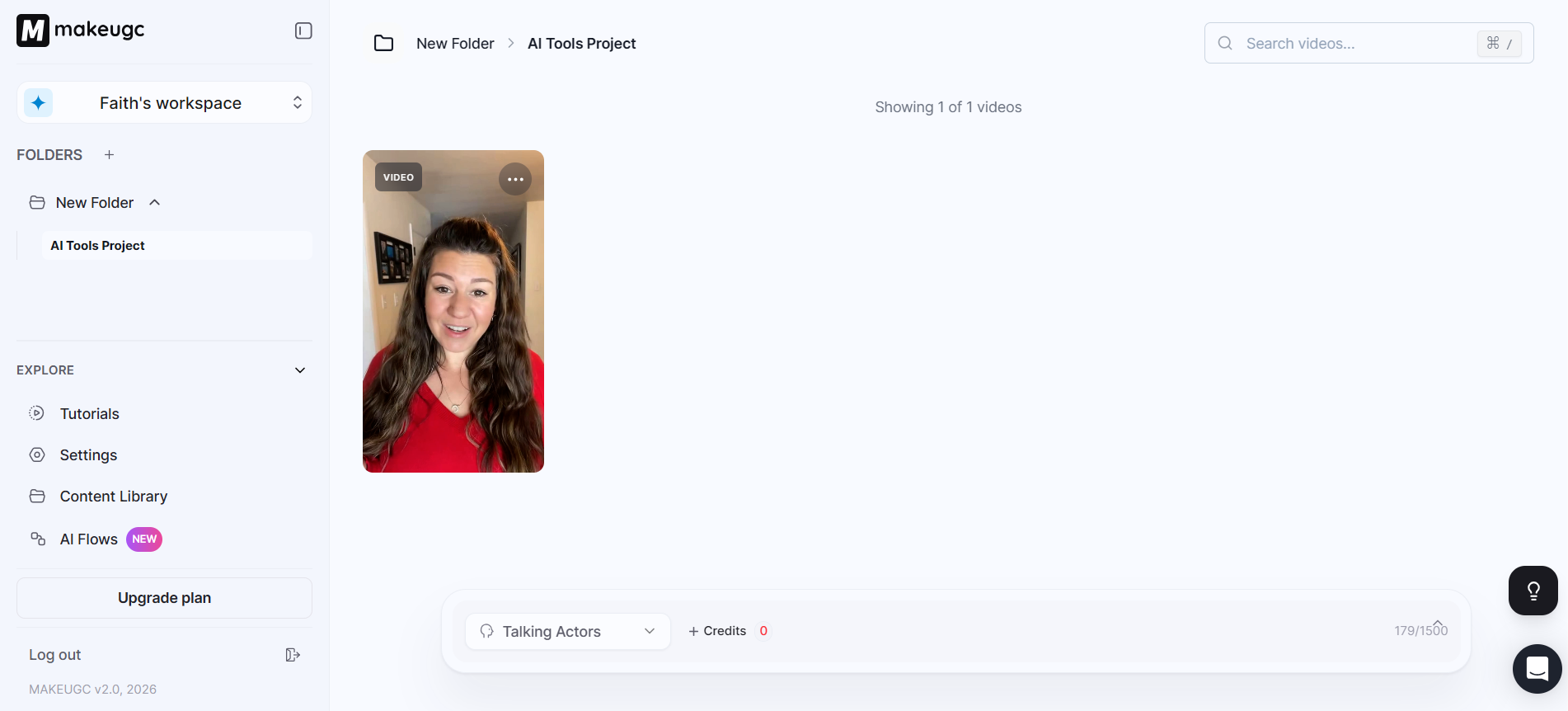
AI Content Library
Users gain access to AI presenters that simulate real creators, allowing businesses to create face-driven content without filming anyone manually.
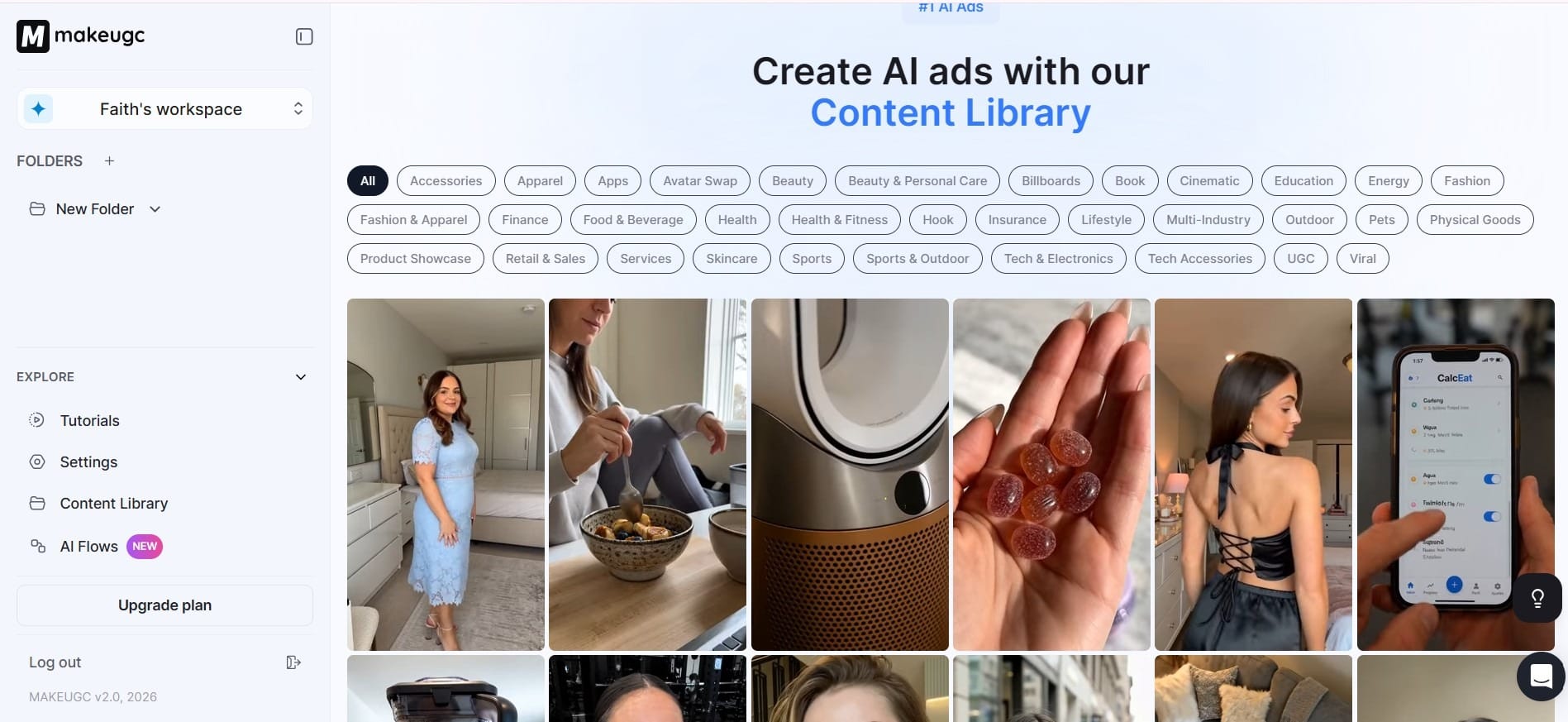
This is particularly useful for brands that need frequent promotional videos but do not want ongoing creator expenses. You can see the different spokespeople you can use in the image I use below, and there’s a good selection of choices when it comes to this. You can choose their age, multiple actors, skin color, and much more.
MakeUGC has a massive content library.
How to Use the MakeUGC Library
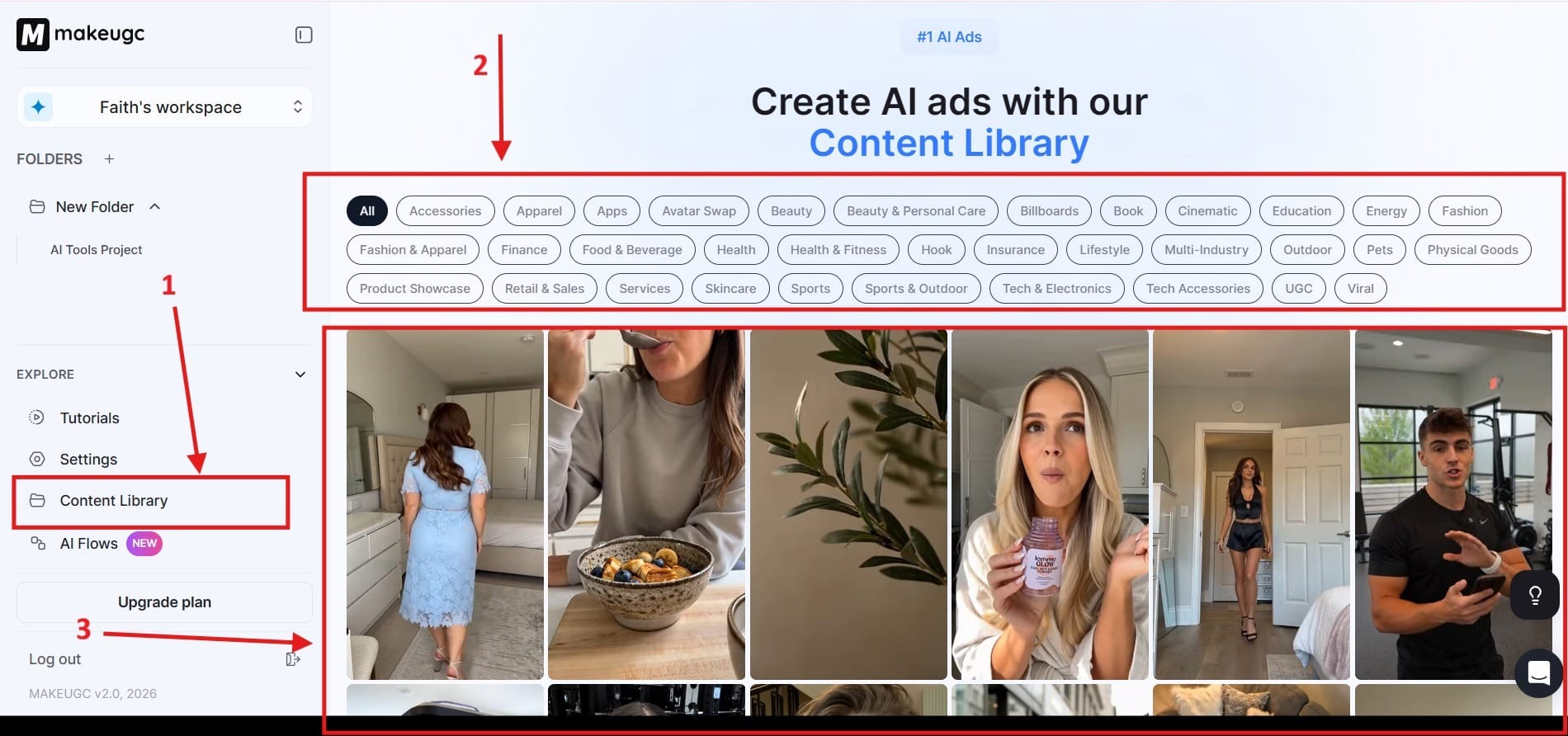
- To begin, first you need to go to the content library. Go over to the lefthand side of your navigation screen and click on the part that says Content Library. I highlighted this as Red Box 1. After you do that, you can choose from different categories based on what you need. I highlighted that in Red Box 2. Finally, you have Red Box 3 where you can choose different AI actors for what you would like.
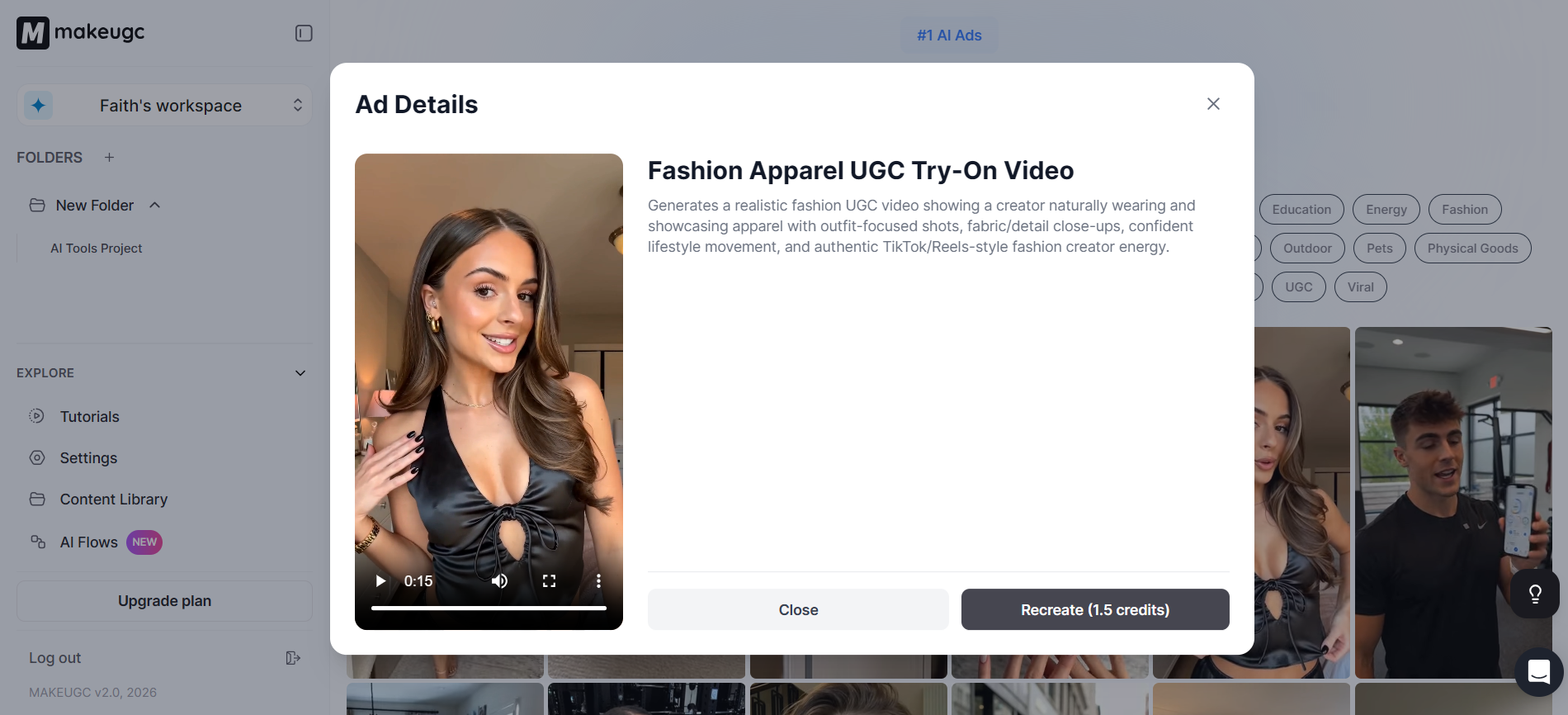
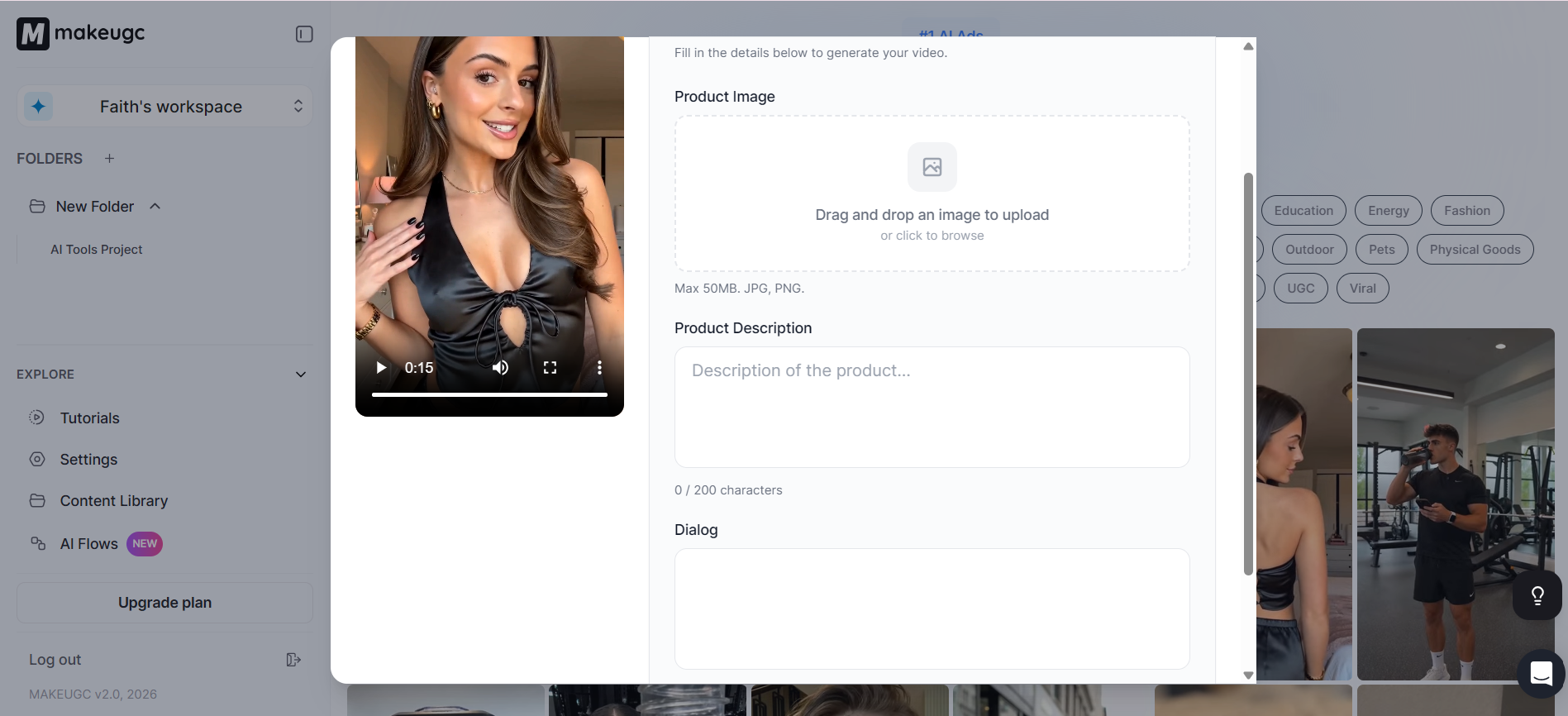
- After you click on one of the video actors, you will see them talking in the video. You can then choose to recreate what they did with your own product. One thing to keep in mind is that this method does cost 1.5 credits, which is a little more, but you get 0:15 seconds of ad time. The other way gives you 9 seconds.
- When you click on the button that says Recreate, it will take you to this section. Here, you will want to drag and drop images onto the screen to upload them. You will also need to write your product description and then the dialog that you would like for them to use.
Fast Ad Variation Production
Instead of spending days editing multiple creatives, you can rapidly create variations for split testing campaigns.
This fast production allows brands to:
- Increase testing speed
- Identify winning creatives faster
- Reduce production costs
- Scale campaigns more efficiently
Short-Form Optimization
MakeUGC is designed specifically for vertical social media content. The platform prioritizes TikTok-style pacing, captions, hooks, and UGC presentation formats that work well in paid advertising environments.
Cost Reduction
Traditional UGC production often requires:
- Hiring creators
- Shipping products
- Coordinating shoots
- Manual editing
- Multiple revisions
MakeUGC reduces much of your overhead by automating the process with AI-generated assets. You don’t need to hire hardly anyone to produce ads.
What Makes MakeUGC Different?
What makes MakeUGC different is its heavy focus on performance marketing and scalable UGC production rather than traditional cinematic video editing.
The platform is built specifically for marketers who need:
- Fast ad creation
- Continuous testing
- High creative volume
- Platform-native social ads
- AI spokesperson automation
Unlike ordinary AI video editors that focus mainly on visual storytelling, MakeUGC centers its workflow around direct-response advertising and paid social campaigns.
It also stands out because its videos are intentionally designed to resemble authentic social media content instead of polished commercials. This makes the ads feel more native to TikTok, Instagram, and Facebook feeds.
Final Thoughts
MakeUGC positions itself as a practical AI advertising platform for businesses that need speed, flexibility, and scalable video production. By combining AI spokespersons, UGC-style formatting, short-form optimization, and rapid ad variation generation, the platform helps you create large volumes of content without relying on traditional creator workflows.
For ecommerce brands, agencies, and performance marketers constantly battling ad fatigue, MakeUGC offers a major advantage: the ability to generate, test, and improve promotional creatives in minutes rather than days. Its strongest value lies in helping businesses scale content production while reducing the time and cost normally associated with social media advertising.
Frequently Asked Questions
How does MakeUGC work?
MakeUGC uses AI to generate UGC-style videos, avatars, and ads from your product details or scripts.
Who is the founder of MakeUGC?
MakeUGC was founded by George Stock.
What are MakeUGC alternatives?
Popular alternatives include Synthesia, HeyGen, and Arcads.
How much does it cost to make UGC?
Traditional UGC can cost $50–$500+ per video, while AI UGC tools are usually subscription-based.
Can MakeUGC create ads for TikTok and Instagram?
Yes, MakeUGC is designed for short-form ads on TikTok, Instagram Reels, Facebook, and YouTube Shorts.
