

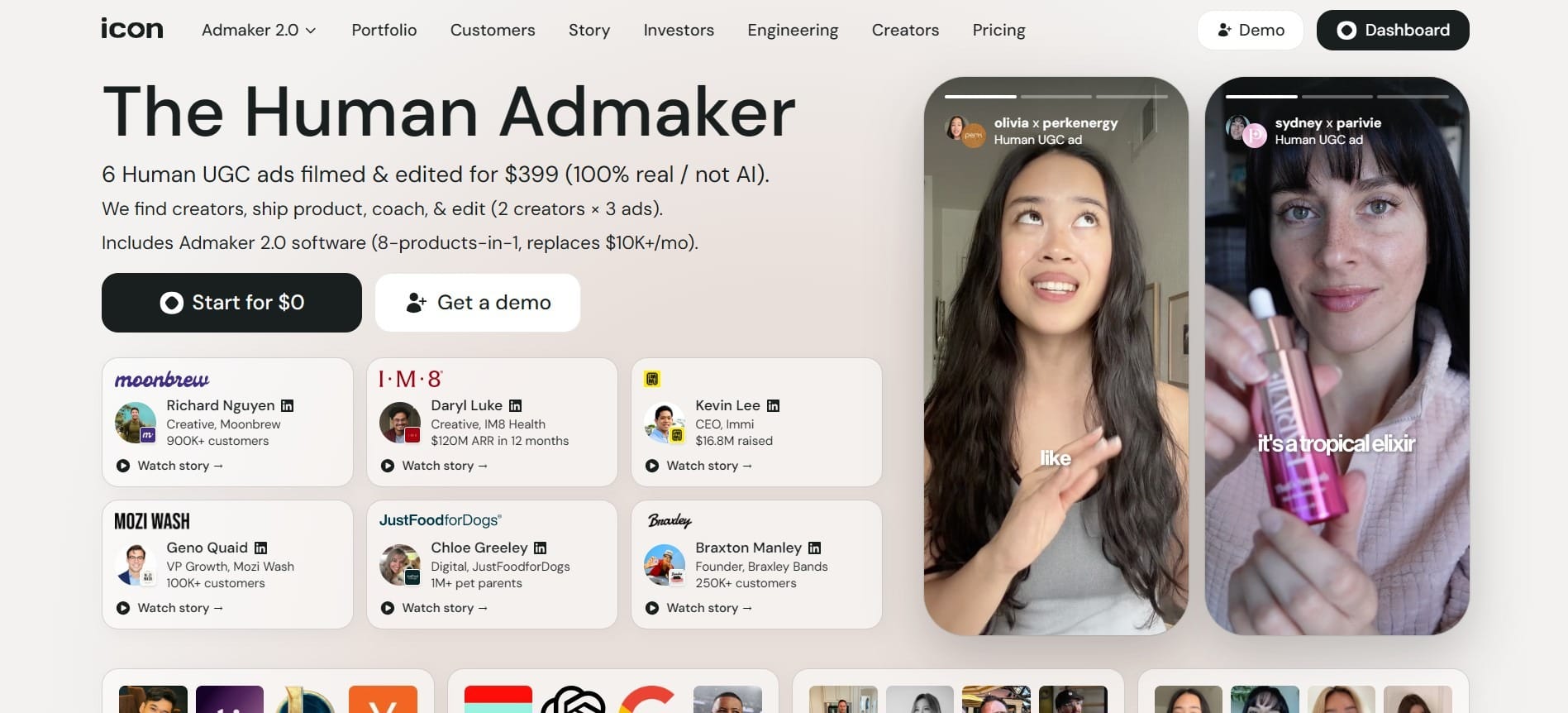
Icon AI is an advertising technology platform focused on helping your brand to create scalable UGC-style advertising campaigns for social media platforms like TikTok, Instagram, Facebook, and YouTube Shorts.
Unlike many AI video generators that focus entirely on synthetic AI avatars, Icon combines human-generated UGC production with AI-powered advertising tools. The platform helps you create “Human UGC” advertisements while also providing access to its advertising software suite called Admaker 2.0.
When we look at the platform closely, Icon positions itself as both a creative production service and an AI-assisted advertising workflow system. The platform includes tools for competitor ad research, creative analytics, AI asset generation, campaign management, creator whitelisting, and ad storage. Let’s take a look at this AI tool and what it can do.
What Problems Does Icon AI Solve?
Traditional UGC advertising often involves finding creators, shipping products, coordinating scripts, reviewing footage, editing videos, and managing revisions. This process can be expensive and time-consuming, especially for brands running aggressive creative testing campaigns.
Icon attempts to streamline much of that workflow by combining creator sourcing with AI-powered creative tools. The company says they help brands find creators, coordinate production, coach talent, edit content, and generate multiple ad assets faster.
The platform also helps marketers fight ad fatigue from this customer base. Since paid social campaigns often decline in performance once an audience repeatedly sees the same creatives, Icon focuses heavily on rapid variation production and continuous testing.
Who Should Use Icon AI?
Icon AI focuses on performance advertising and scalable UGC production. This strong emphasis appeals mostly to businesses that depend on high-volume social advertising campaigns. Here are those who may benefit the most from Icon AI:
- Ecommerce brands: Helpful for stores that constantly need fresh TikTok and Instagram advertisements. Icon was especially designed for large volumes of rapid AI variations, so this is one of the areas where it excels. Most eCommerce brands spend 7% to 12% on their marketing, so Icon allows them to save more money.
- Performance marketers: Useful for marketers running continuous split-testing campaigns. Get everything all in one place to ideate, draft, and test many variations, dropping the need to constantly jump between tools. This saves you time and money.
- Digital agencies: Helpful for agencies managing several clients that require ongoing creative production. Icon accelerates the ad creation process allowing you to get feedback faster and make the adjustments needed.
- Startups: Good for startups that need advertising content without hiring large in-house creative teams. Startups usually work with an infamously tight budget. An estimated 34% of startups that fail cite running out money, which is one of the biggest reasons to control your spending on ads.
- Direct-response advertisers: Excellent for businesses heavily dependent on conversion-focused paid ads. Most direct-response professionals treat Icon AI as a top-of-funnel testing tool. For example, they might use it to quickly test different variations of ads until they find one that works best.
What Can Icon AI Be Used For?
You could work as a creator, entrepreneur, marketer, or someone looking to save time. Icon AI offers a wide range of practical applications. Here are some of the most common and valuable ways Icon AI can be used today.
Creating Human UGC Ads
One of Icon’s key functions is producing Human UGC advertisements using real creators instead of fully AI-generated avatars. Icon helps brands source creators, coordinate filming, edit videos, and produce multiple UGC advertisements optimized for social media campaigns.
The platform focuses heavily on making ads feel native to social feeds rather than overly polished corporate commercials. After producing the content, users can test variations, adjust messaging angles, and create additional creatives for split testing.
Getting Started with Onboarding
To get started with Icon, you first need to go through their onboarding process. Because a lot of that is self-explanatory, we’re going to skip ahead to creating human UGC ads. I highlighted this in the image below. The Red Box 1 shows you the process for getting onboarded. Red Box 2 will take you through the UGC style guide where you can choose your UGC style.
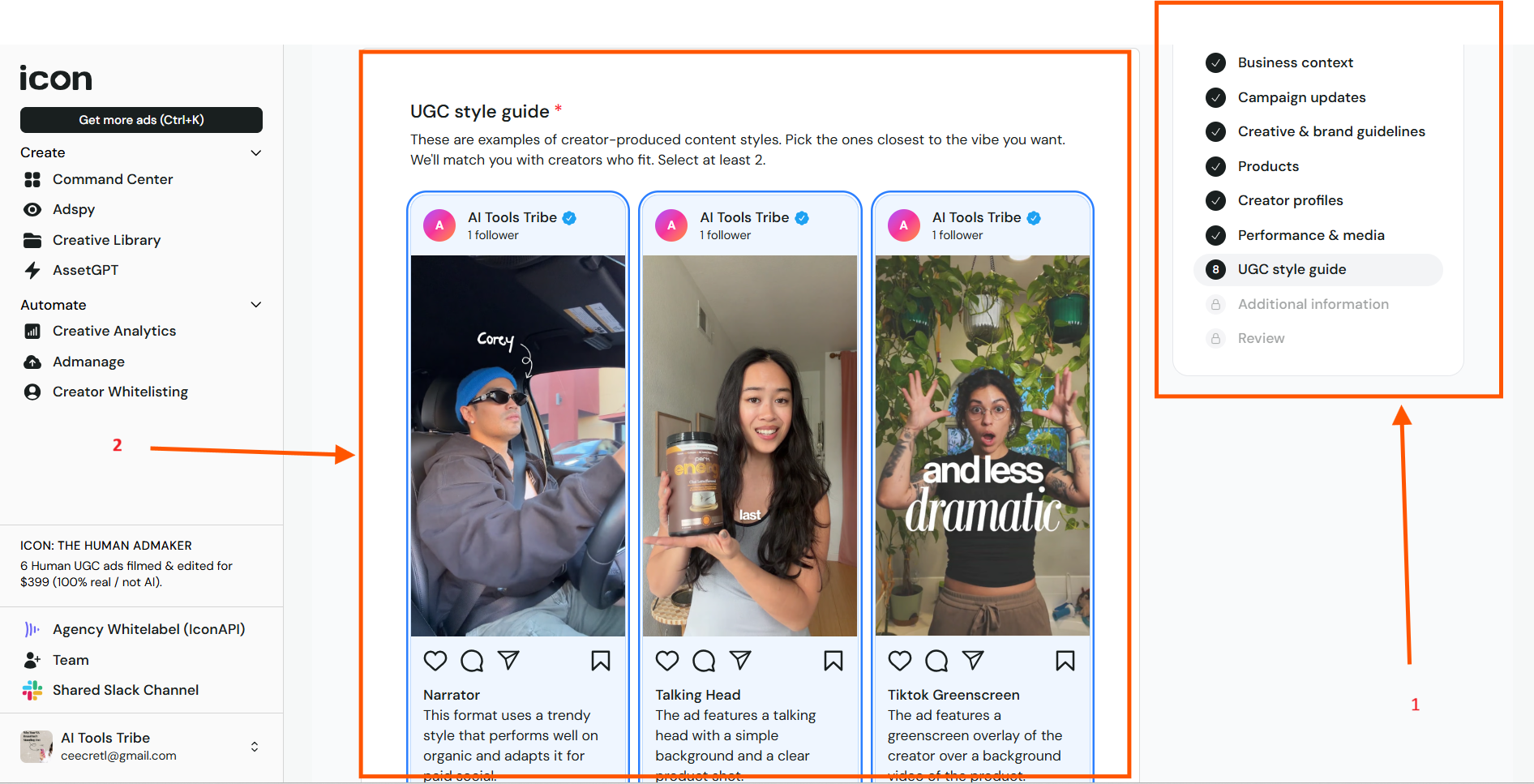
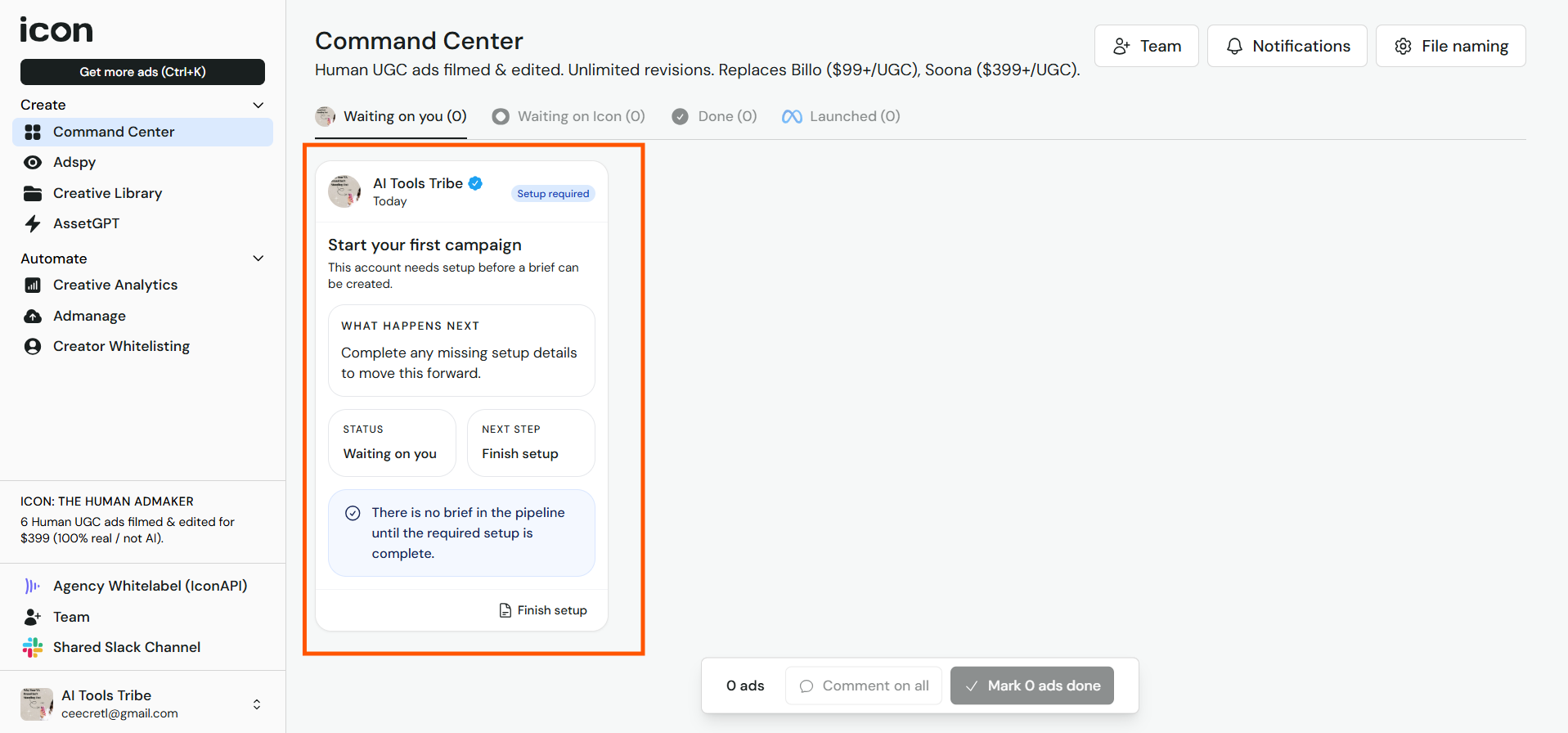
Once through that, you would go in and confirm your responses in the review, and this will set you up. Next, you need to go in and start your ad campaign. I highlighted this in the Red Box, found in the Command Center.
Using Admaker 2.0
A major part of Icon’s ecosystem is Admaker 2.0, which the company describes as an “8-products-in-1” advertising system.
The platform includes features for:
- Competitor ad tracking
- Creative Library
- AssetGPT
- Creative Analytics
- Admanage
- CreatorWhitelisting
Admaker 2.0 was designed to replace multiple separate advertising and creative management tools. Let’s take a look at some of these tools.
Competitor Ad Tracking
One of the most powerful features of Icon AI is its ability to help businesses monitor and analyze competitor advertising strategies. Instead of guessing what’s working in your industry, you gain insights into trending ad creatives, messaging styles, audience targeting approaches, and campaign patterns.
You’ll find this section on the lefthand side of the screen located as Adspy. When you click on that, it will take you to an area that looks like this:
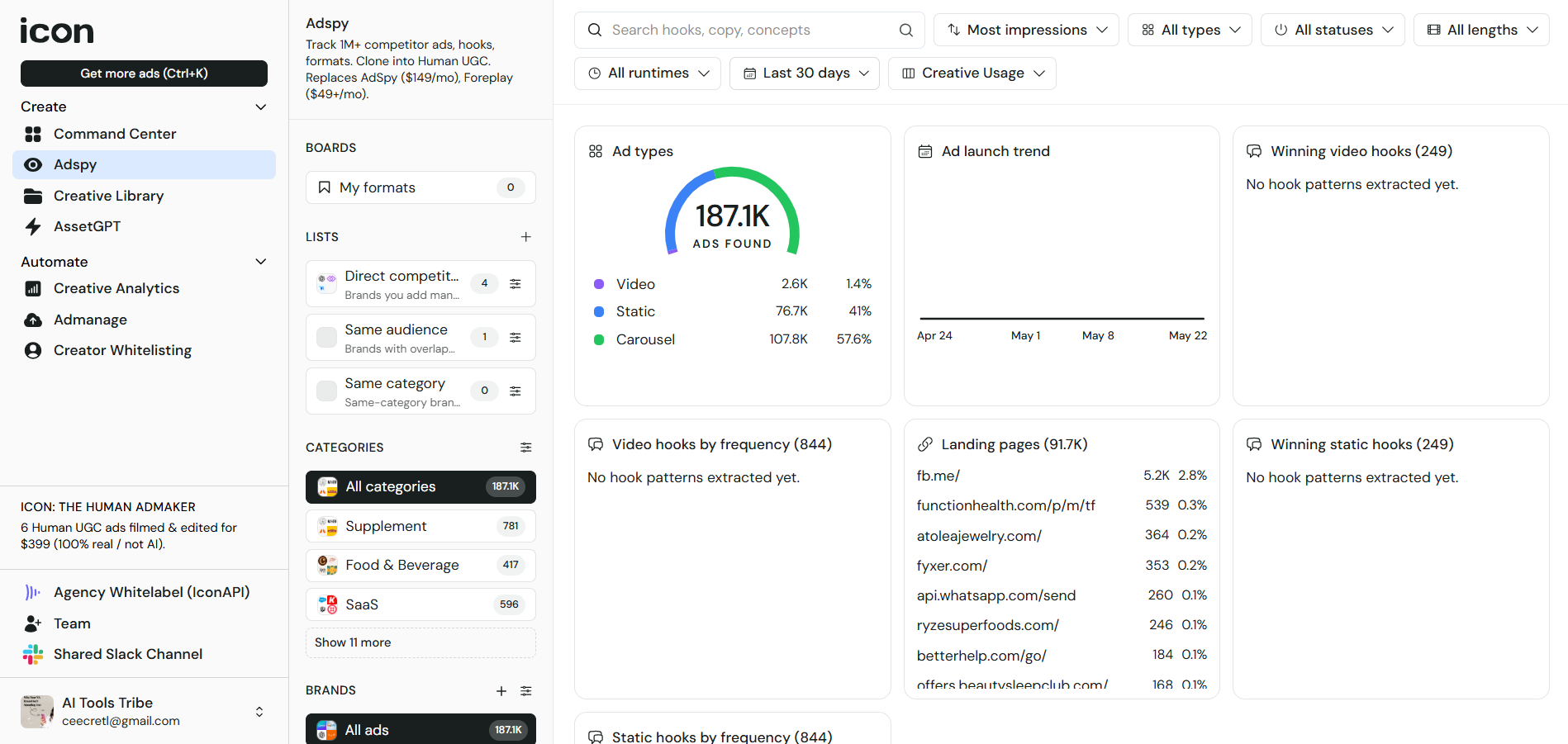
You can use this section to spy on competitors to figure out how to best approach your own ads based on what’s already working with your competitors.
Creative Library
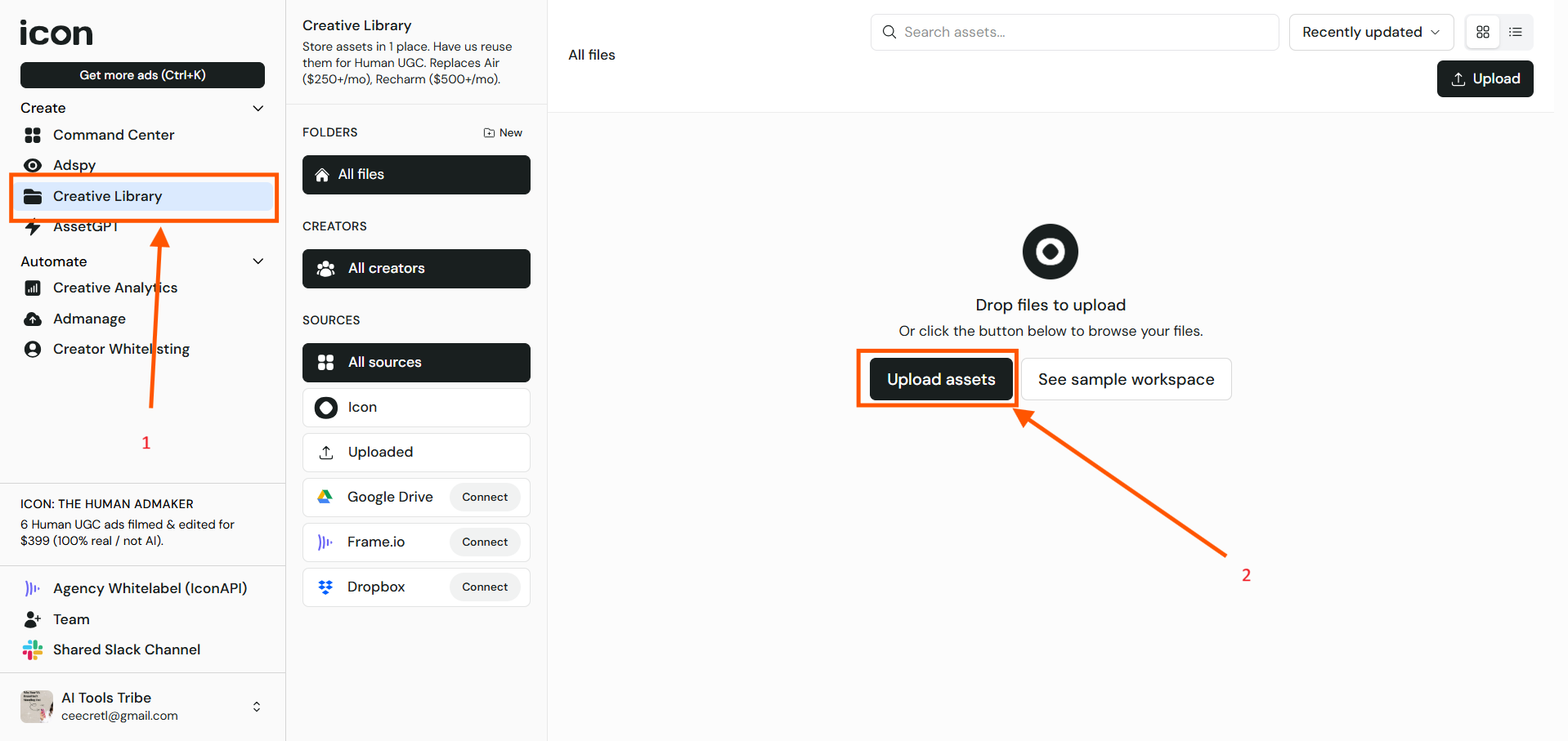
Next, we will take you through the creative library. This is the section where you can upload assets. First, go to the Creative Library highlighted on the left as Red Box 1. Next, you would go to upload the assets you want to put in your creative library, highlighted as Red Box 2.
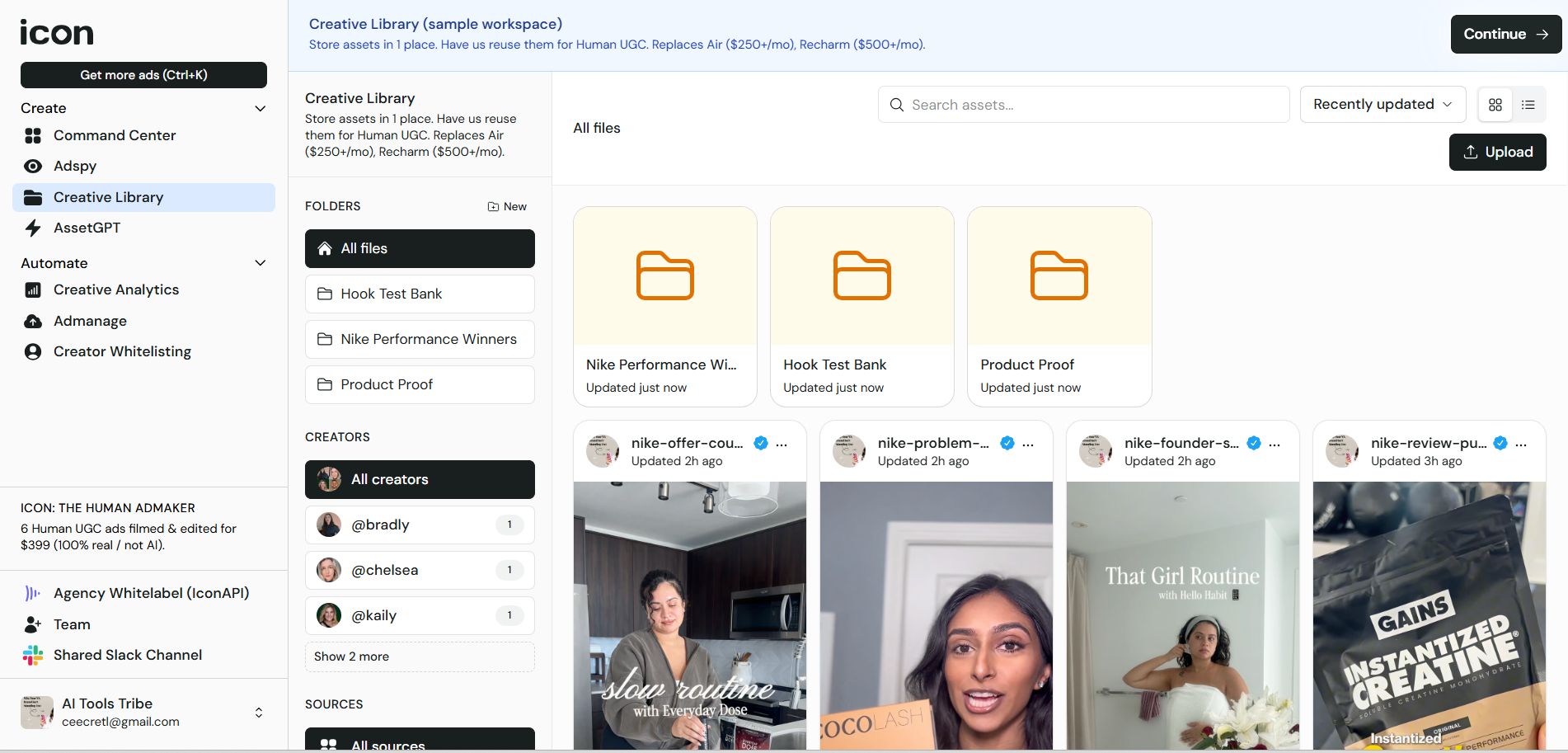
After uploading assets, you’ll see that your workspace will look something like the image below:
AssetGPT
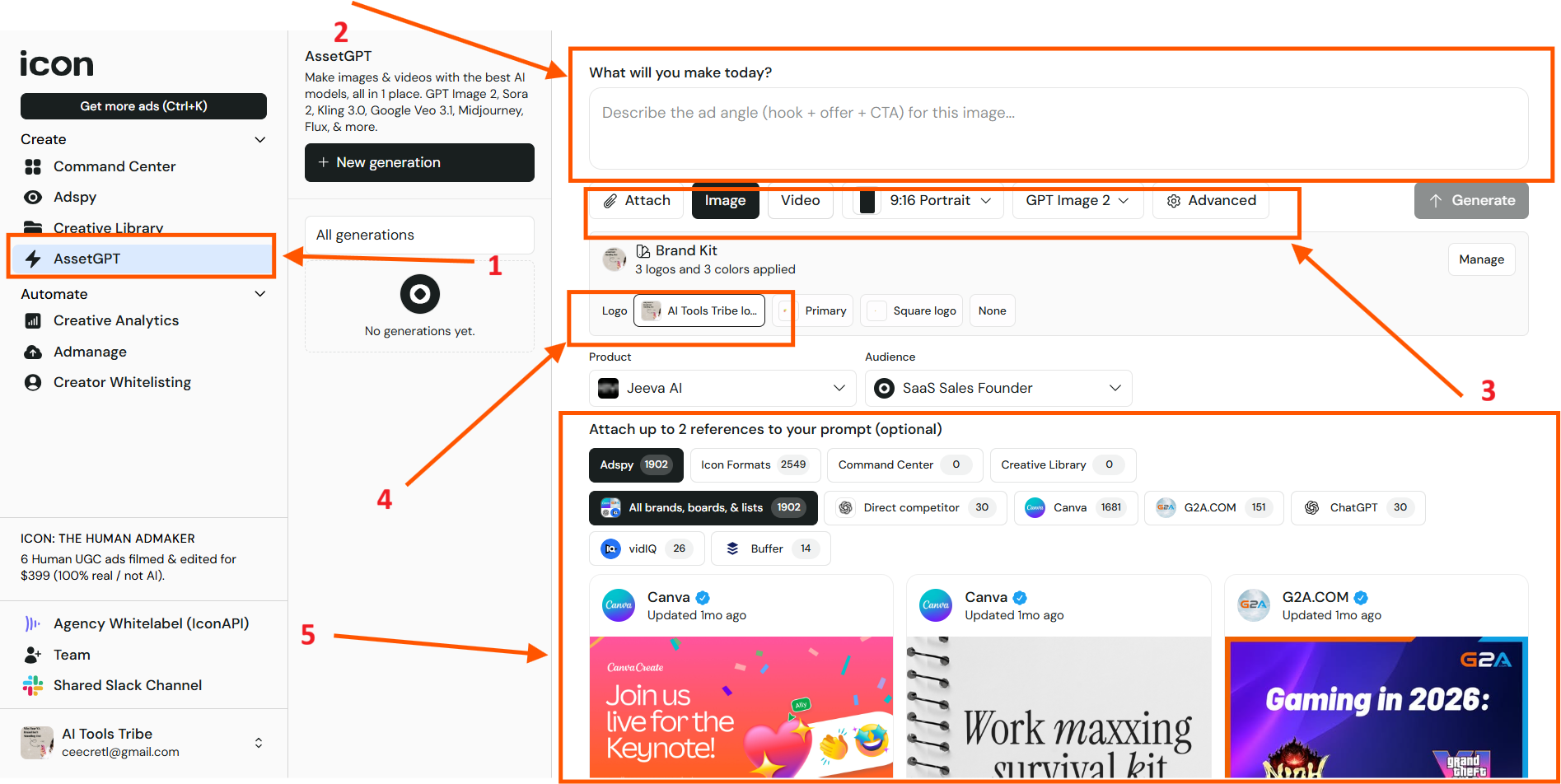
AssetGPT gives you a variety of options when it comes to the creation of your content for ads. You can, for example, generate images or videos. To get to this section, first go to the lefthand side and click on Red Box 1. Next, go to the generate and prompt it with how you would like for it to generate. This is found in Red Box 2.
Below that, you have the options to attach a file, generate an image, a video, or whatever you would like. You need to pay attention to this to set up what you generate before generating it. This is found in Red Box 3. In Red Box 4, you can upload your logo. Red Box 5 lets you attach up to 2 references for how you would like your prompt to generate. Once you’re happy with the options you selected, you can hit the button to generate it.
Creative Analytics
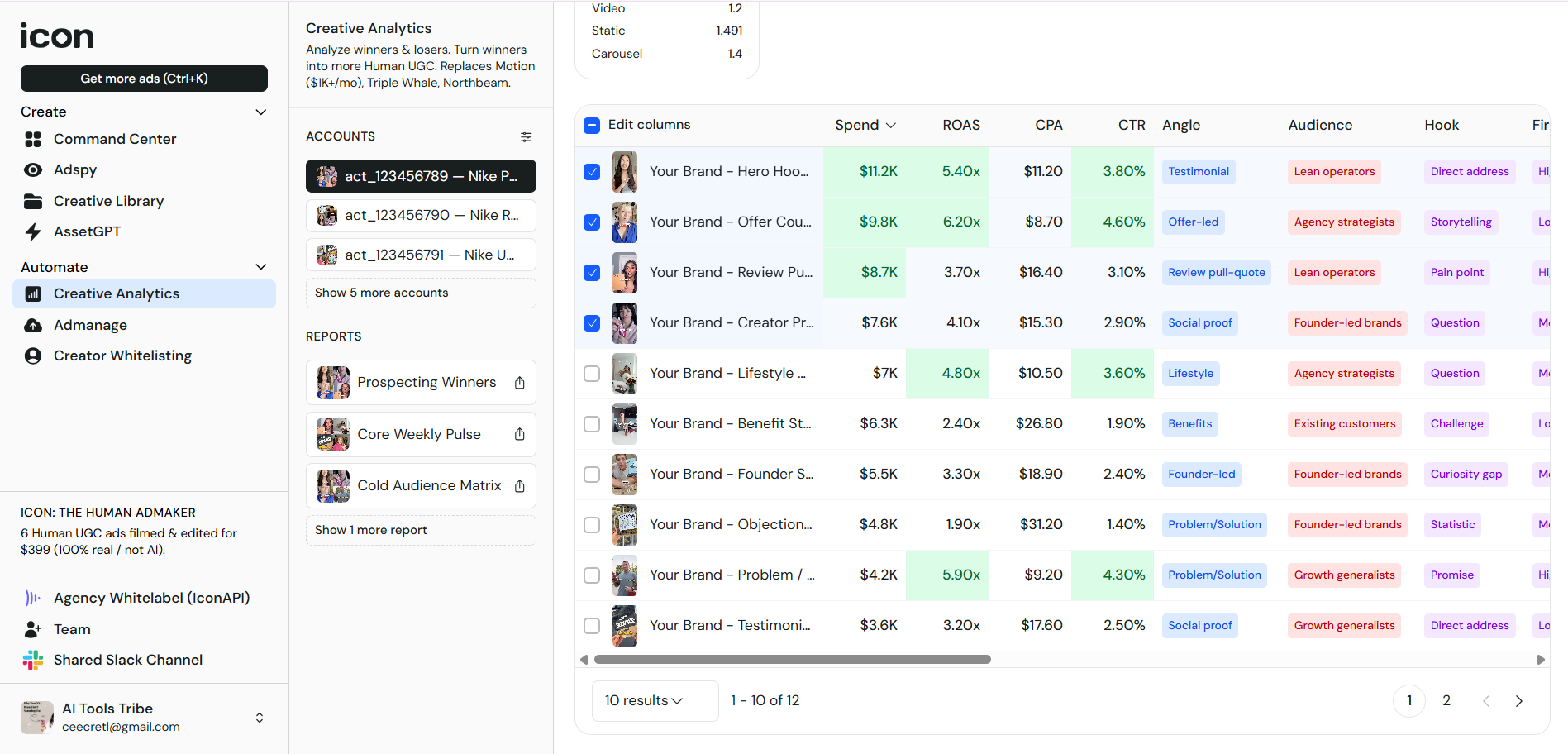
Next, we have the section where you can analyze your best performing ads. This will show you your top performers and give you statistics, such as CTR, CPM, CPA, SPEND, FREQUENCY, and ROAS. You’ll also see your accounts and reports on the left before the navigation bar. The screen should look something like the image below:
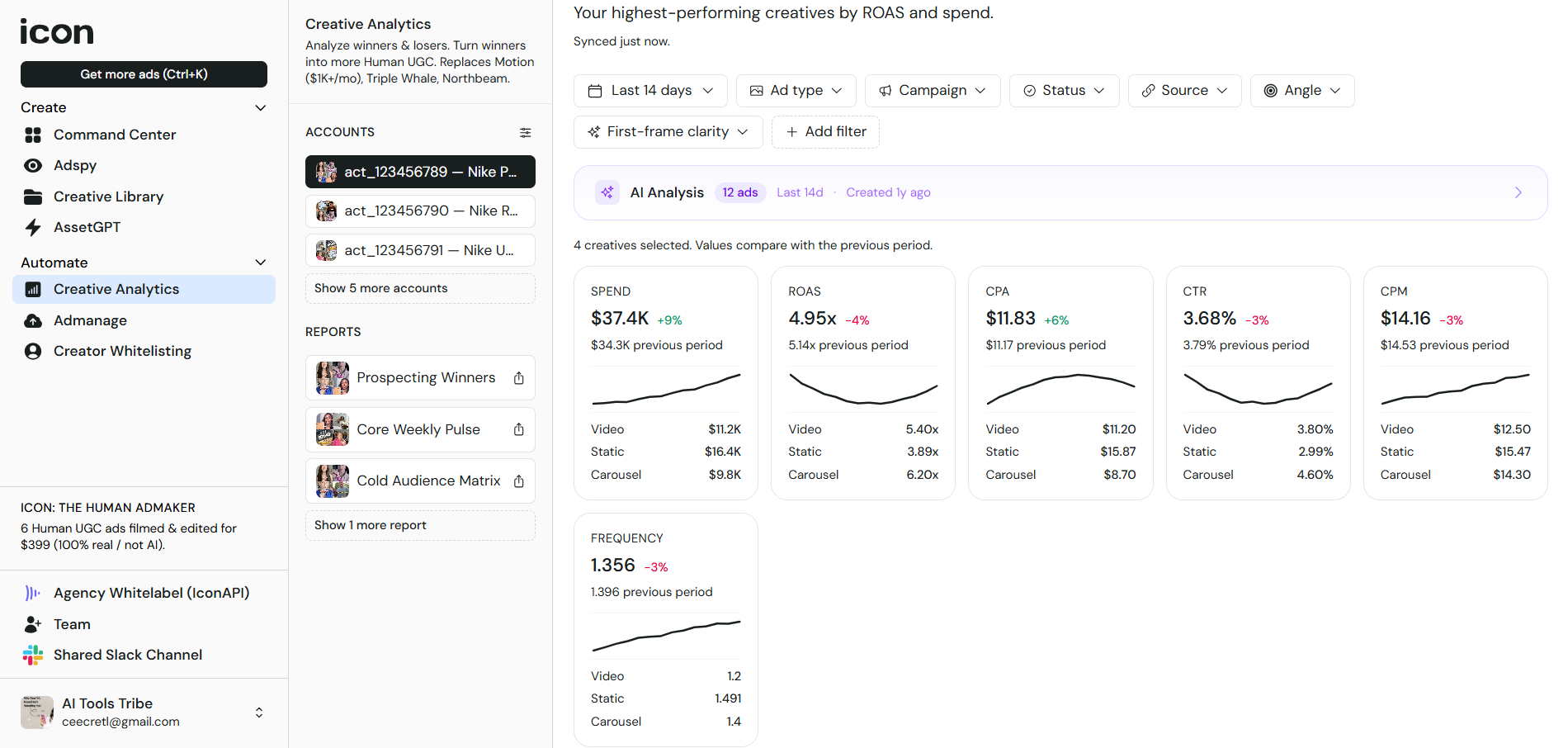
When you scroll further down the page for Creative Analytics, you will see how each add performs with the different metrics showing up, the audience type, and what hook you used.
Admanage
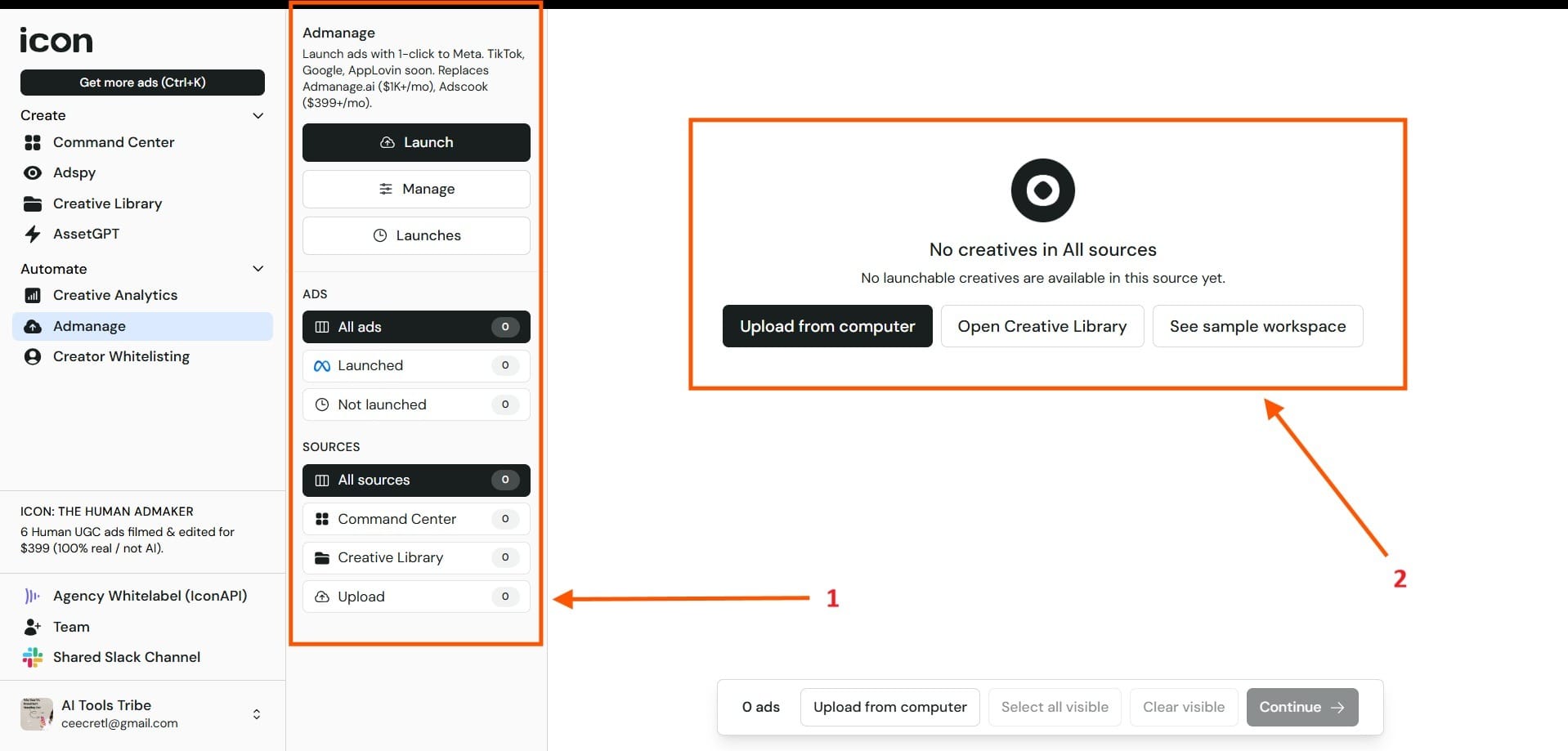
Highlighted in Red Box 1 you see where you can manage your ads. This includes things like launch of an ad, management of an ad, or the previous launches that you’ve already done. Below that is ADS where you will see the ads you launched and the ads that you haven’t launched yet. Below that is the sources, the Command Center, the Creative Library, and the Upload section. In Red Box 2, this is where you can make Uploads to your computer and open your Creative Library.
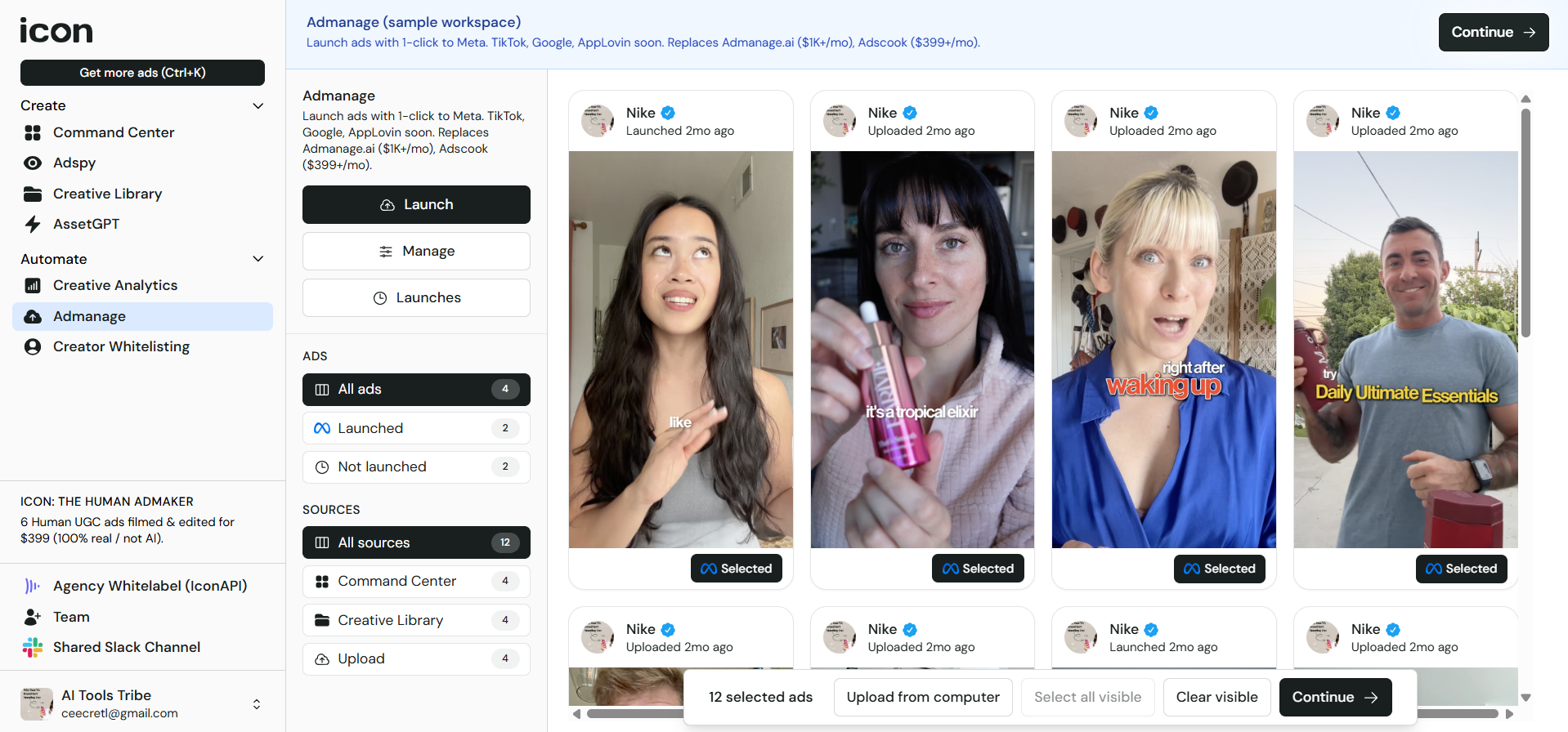
Below, you’ll also see what the typical workspace would look like:
Creator Whitelisting
In the Whitelisting section, you’ll see the ads that you’ve already created because this is the section where they’ll appear. The image below shows you what this section will look like:

Final Thoughts
Hopefully this gives you a clear idea of what Icon AI does. The platform combines UGC-style ad production with AI tools for campaign setup, research, asset creation, analytics, ad management, and optimization.
For ecommerce brands and marketers, it offers a faster way to create and test ad creatives at scale without relying fully on traditional production workflows.
Frequently Asked Questions
Is Icon AI safe to use?
Icon AI appears to be a legitimate advertising platform used by ecommerce brands and marketers. The company publicly lists its services, pricing, and team information online. However, like any AI marketing tool, users should still review privacy policies, billing terms, uploaded assets, and generated content before publishing campaigns.
Who is the founder of Icon Ad Maker?
Icon AI was founded by Kennan Frost, who publicly describes the company as “the first AI ad maker.”
What is an ad maker?
An ad maker is a tool or platform used to create advertisements. Modern AI ad makers help automate tasks like scriptwriting, video editing, asset generation, analytics, and ad testing for platforms like Meta, TikTok, and Google Ads.
What should you be careful of when using AI?
When using AI tools, you should be careful about sharing sensitive business data, publishing inaccurate or misleading AI-generated content, and potential copyright or ownership issues with generated assets. It is also important not to rely entirely on automation without human review and to watch for hidden subscription costs or billing terms. AI tools generally work best when combined with human oversight and editing.
Can Icon AI create fully AI-generated ads?
Yes. Icon AI includes AI tools for generating images, videos, scripts, and ad assets, but the platform also emphasizes human-created UGC content and editing workflows.
